EasyManua.ls Logo

Sony Trinitron KV-13VM30 - Page 13

Sony Trinitron KV-13VM30
116 pages
Print Icon
To Next Page IconTo Next Page
To Previous Page IconTo Previous Page
Loading...
Presetting
TV
Channels
>
Once
you
have
preset
the
channels
on
your
VIDEO
TV,
you
will
be
able
to
use
the
channel
+/-
buttons
on
the
VIDEO
TV
or
the
Remote
commander
to
scan
the
channel
you
selected.
Presetting
TV
Channels
Automatically
Perform
auto
programming
during
the
day
rather
than
late
at
night,
when
some
channels
may
not
be
broadcasting.
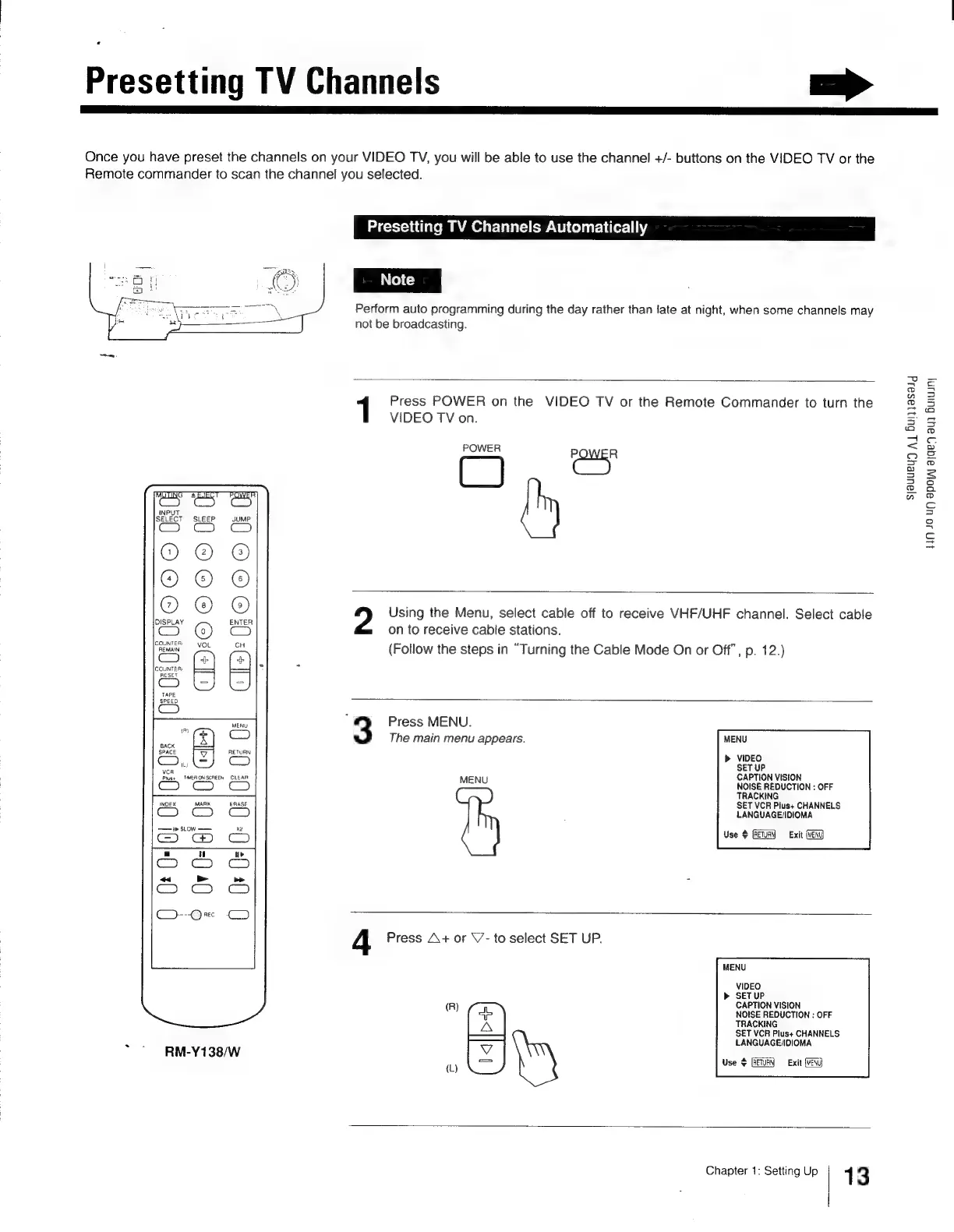
Press
POWER
on
the
VIDEO
TV
or
the
Remote
Commander
to
turn
the
VIDEO
TV
on.
POWER
(quer
me
3
Ic
ae
m.
m,
OOO]
CRCRO
Rn
CT7}3©
©G@®
NO
Using
the
Menu,
select
cable
off
to
receive
VHF/UHF
channel.
Select
cable
Cc)
Cc)
on
to
receive
cable
stations.
Rew
ou
Follow
the
steps
in
“Turning
th
le
Mo
n
or
Off”,
p.
12.
os
(
p
g
the
Cab
de
On
or
Off’,
p
)
eeset
F>
co)
Po
ae
3
Press
MENU.
‘7
CO
The
main
menu
appears.
MENU
GACK
SPACE
RETURN
(eps)
>
VIDEO
mei
SET
UP
Pee
WERONSCREEN
CLEAR
MENU
CAPTION
VISION
aS
NOISE
REDUCTION
:
OFF
TRACKING
SET
VCR
Plus+
CHANNELS
LANGUAGE/IDIOMA
Use
$
Exit
(MENU
INDEX
MARK
ERASE
—1'>
SLow
——
x2
CO
7
w
ty
Cc)
cS
“«
>_-
C2).
1S)
3D
-@x
4
Press
A+
or
\7-
to
select
SET
UP.
MENU
VIDEO
b>
SETUP
(R)
CAPTION
VISION
ob
NOISE
REDUCTION
:
OFF
A
TRACKING
SET
VCR
Plus+
CHANNELS
<3
7
LANGUAGE/IDIOMA
Bhey
teow
()
Ea
Use
$
[RETURN
Exit
(REND
Chapter
1:
Setting
Up
1
3
sjauueu)
A
Buiasaig
110
40
UD
apo
aygey
aud
Buruuny

Other manuals for Sony Trinitron KV-13VM30

Related product manuals