EasyManua.ls Logo

Sony Trinitron KV-13VM30 - Page 21

Sony Trinitron KV-13VM30
116 pages
Print Icon
To Next Page IconTo Next Page
To Previous Page IconTo Previous Page
Loading...
Adjusting
Picture
Quality
ec
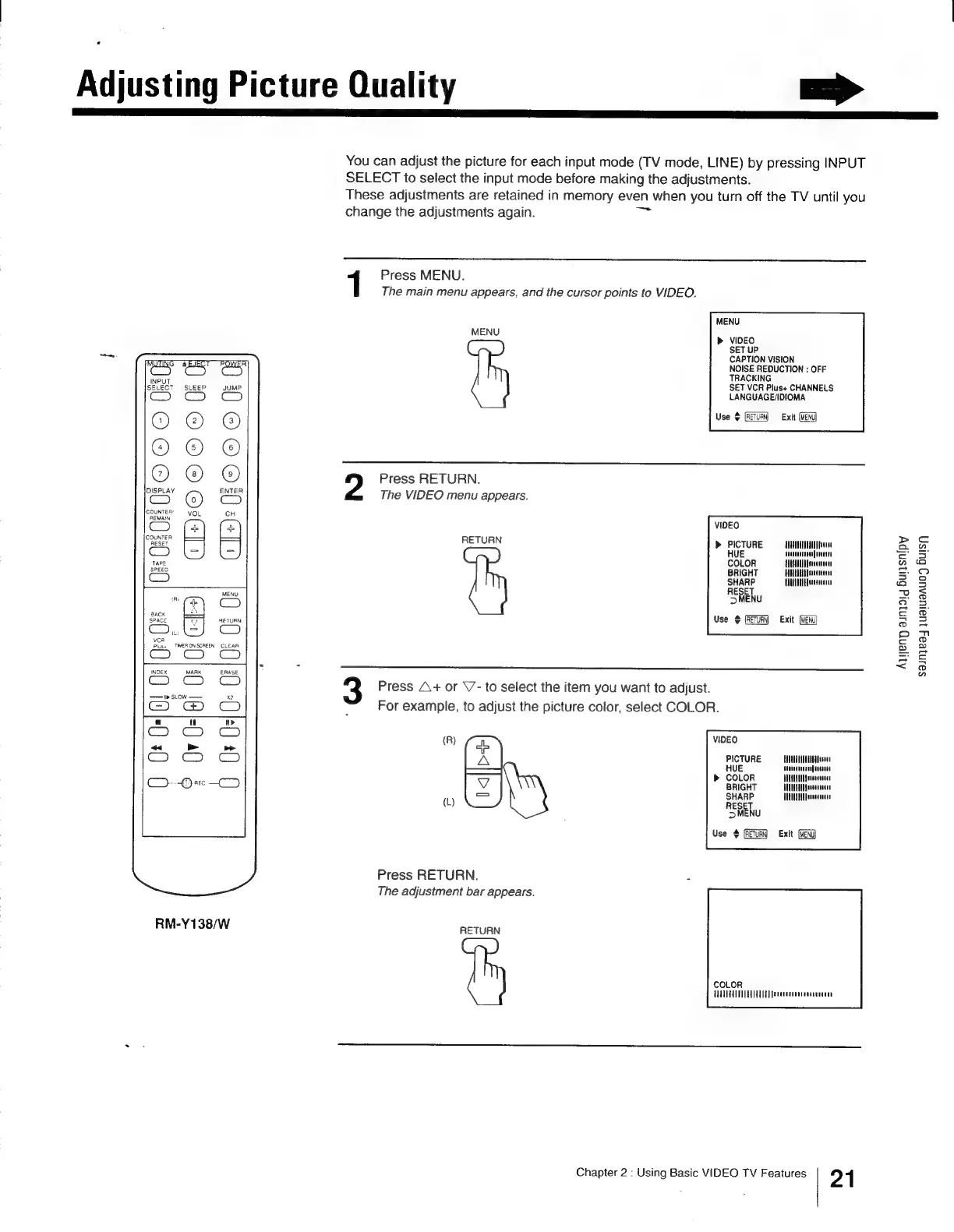
You
can
adjust
the
picture
for
each
input
mode
(TV
mode,
LINE)
by
pressing
INPUT
SELECT
to
select
the
input
mode
before
making
the
adjustments.
These
adjustments
are
retained
in
memory
even
when
you
turn
off
the
TV
until
you
change
the
adjustments
again.
=
1
Press
MENU.
The
main
menu
appears,
and
the
cursor
points
to
VIDEO.
MENU
MENU
»
VIDEO
SET
UP
CAPTION
VISION
NOISE
REDUCTION
:
OFF
TRACKING
SET
VCR
Plus+
CHANNELS
LANGUAGE/IDIOMA
Use
%
Exit
(MENU)
OOO
OOO)
Press
RETURN.
The
VIDEO
menu
appears.
9
a
a)
<
m
Zz
S m
2
VIDEO
pay
>
PICTURE
——ANINIIIW
HUE
Heavesaruennfieten
COLOR
ATARNUAMenceatnaes
BRIGHT
TALL
Ef
ereennenes
Piel
AUUO
Isttten
>MENU
Use
+
Exit
CT}5©O
©OCO
OU
GI):
0
oe
Ss
fae
(ae
me]
igs]
|z¢
mal
|€2|
|E2 3
ta
UJza
2
2
=
a
2
é
vcA
4
TMERONSCREEN
CLEAR
INDEX
MARK
ERASE
Press
A+
or
\7-
to
select
the
item
you
want
to
adjust.
S'S
©
;
For
example,
to
adjust
the
picture
color,
select
COLOR.
ul
(R)
VIDEO
«
»>
ob
Soe
ee
PICTURE
HULATUTTTUENA
Dae
eae
Megan
nuereagucsneny
BUCA
REEeeaeestens
J
Tee
i
Use
¢
Exit
(MENG)
1
Press
RETURN.
zi
The
adjustment
bar
appears.
RM-Y138/W
RETURN
COLOR
TTT
TEE
fetecerienseaecenaiee
Chapter
2
:
Using
Basic
VIDEO
TV
Features
21
Aqyeng
ainjaig
Bursnipy
sainjeaj
juaiuanuo’y
Buisj