EasyManua.ls Logo

Sony Trinitron KV-13VM30 - Page 23

Sony Trinitron KV-13VM30
116 pages
Print Icon
To Next Page IconTo Next Page
To Previous Page IconTo Previous Page
Loading...
Using
Closed
Caption
=
U
ic
»
OOO
©oOe
9
G
a]
2
m
Zz
Ss
nm
z
OOO]
C
[)2
0
28
2
3
(2
Re
U8
0208
0
23
<
fo)
Ey
RM-Y138/W
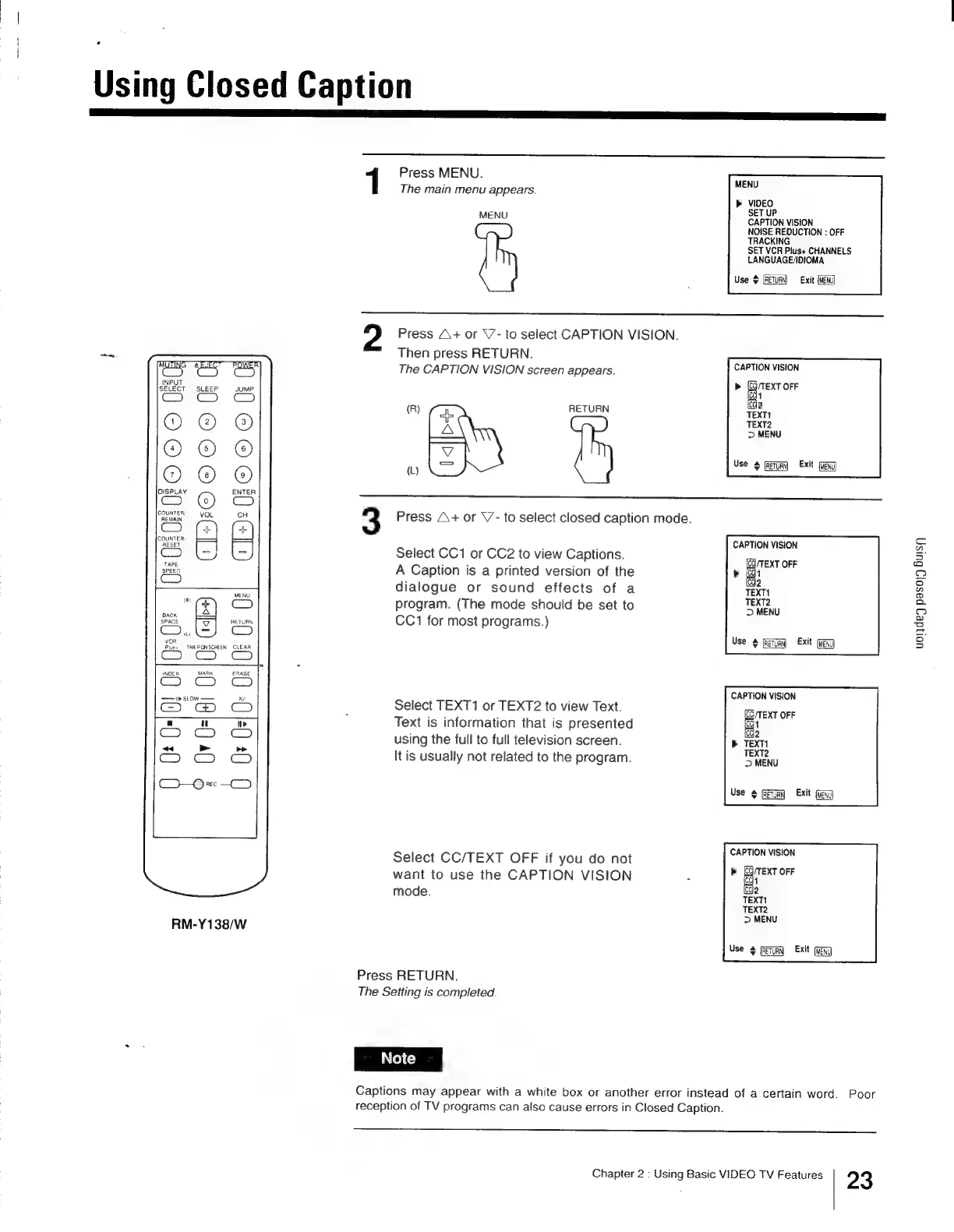
Press
MENU.
:
MENU
The
main
menu
appears.
>
VIDEO
MENU
SET
UP
CAPTION
VISION
NOISE
REDUCTION
:
OFF
TRACKING
SET
VCR
Plus+
CHANNELS
LANGUAGE/IDIOMA
Use
$
Exit
Press
A+
or
\7-
to
select
CAPTION
VISION.
Then
press
RETURN.
The
CAPTION
VISION
screen
appears.
CAPTION
VISION
>
anor
icq
icc
1
2
(R)
RETURN
TEXT1
TEXT2
>
MENU
wu
eg
ve
9
Geum
Ext
3
Press
A+
or
V-
to
select
closed
caption
mode.
.
;
CAPTION
VISION
Select
CC1
or
CC2
to
view
Captions.
Z :
:
[CQ
/TEXT
OFF
A
Caption
is
a
printed
version
of
the
>
(1
[cde
dialogue
or
sound
effects
of
a
TEXT1
program.
(The
mode
should
be
set
to
ii
CC1
for
most
programs.)
uoljdey
pasoyg
Busy
Use
[ReTuay
Exit
CAPTION
VISION
Select
TEXT1
or
TEXT2
to
view
Text.
STC
OFE
Text
is
information
that
is
presented
EI
using
the
full
to
full
television
screen.
>
TEXT!
It
is
usually
not
related
to
the
program.
ei
Use
eS
Exit
Select
CC/TEXT
OFF
if
you
do
not
SEEN
want
to
use
the
CAPTION
VISION
:
»
anon
mode.
fede
TEXT1
TEXT2
>
MENU
Use
#
feu
Exit
Gag
Press
RETURN.
The
Setting
is
completed.
Captions
may
appear
with
a
white
box
or
another
error
instead
of a
certain
word.
Poor
reception
of
TV
programs
can
also
cause
errors
in
Closed
Caption.
Chapter
2
:
Using
Basic
VIDEO
TV
Features
23

Other manuals for Sony Trinitron KV-13VM30

Related product manuals