EasyManua.ls Logo

Sony Trinitron KV-13VM30 - Page 44

Sony Trinitron KV-13VM30
116 pages
Print Icon
To Next Page IconTo Next Page
To Previous Page IconTo Previous Page
Loading...
Recording
TV
Programs
using
VCR
Plus
+
44
I=)
28
a
OF
0
En
23
D
i
Ba
ba
CI»)
INDEX
jc)
an!
OOO
<
fe}
&
MARK
orogodt
m
Zz
car
m
D
CS)
cH
(+)
MENU
3]
ERASE
RM-Y138/W
VCR
Plus+
is
a
feature
in
SONY
VCRs
that
simplifies
the
task
of
programming
the
VIDEO
TV
to
make
timer
recordings.
How
VCR
Plus+
works
Whenever
you
want
to
record
a
TV
program,
all
you
need
to
do
is
to
look
up
the
program's
"PlusCode,"
a
number
assigned
to
each
program
that's
published
in
the
TV
section
of
most
newspapers,
cable
TV
listings,
and
even
TV
GUIDE
magazine.
Then,
just
enter
the
PlusCode
of
the
program
you
want
and
the
VIDEO
TV
is
automatically
programmed
to
record
that
show.
It's
that
simple.
With
VCR
Plus+
,
you
no
longer
have
to
go
through
a
lengthy
and
often
repetitive
procedure
when
you
set
start
and
stop
times,
channel
numbers,
and
dates.
All
this
information
is
automatically
sent
to
your
VIDEO
TV
when
you
enter
the
program's
PlusCode.
Setting
Up
VCR
Plus
+
Setting
up
your
VIDEO
TV
involves
coordinating
the
TV
channel
number(the
number
you
turn
on
your
set
to
watch
a
program)
with
the
guide
channel
number
(the
number
that's
assigned
to
that
channel
in
your
program
guide).
To
get
the
guide
channel
numbers,
find
the
"Channel
Line-up
Chart"
in
the
program
guide
for
your
area
that
features
VCR
PlusCodes.
It
usually
looks
like
the
example
on
page
45.
For
each
channel
your
VIDEO
TV
receives,
use
the
Channel
Line-up
Chart
to
check
that
the
channel
numbers
match.
For
example,
if
HBO
is
listed
in
the
Channel
Line-
up
Chart
on
channel
33,
and
your
VIDEO
TV
receives
HBO
on
channel
15,
you
need
to
coordinate
these
numbers
using
the
following
procedure.
For
channels
in
which
the
numbers
are
the
same
(for
example,
if
your
VIDEO
TV
recevies
HBO
on
channel
33,
and
the
guide
channel
number
is
33),
you
can
skip
this
procedure.
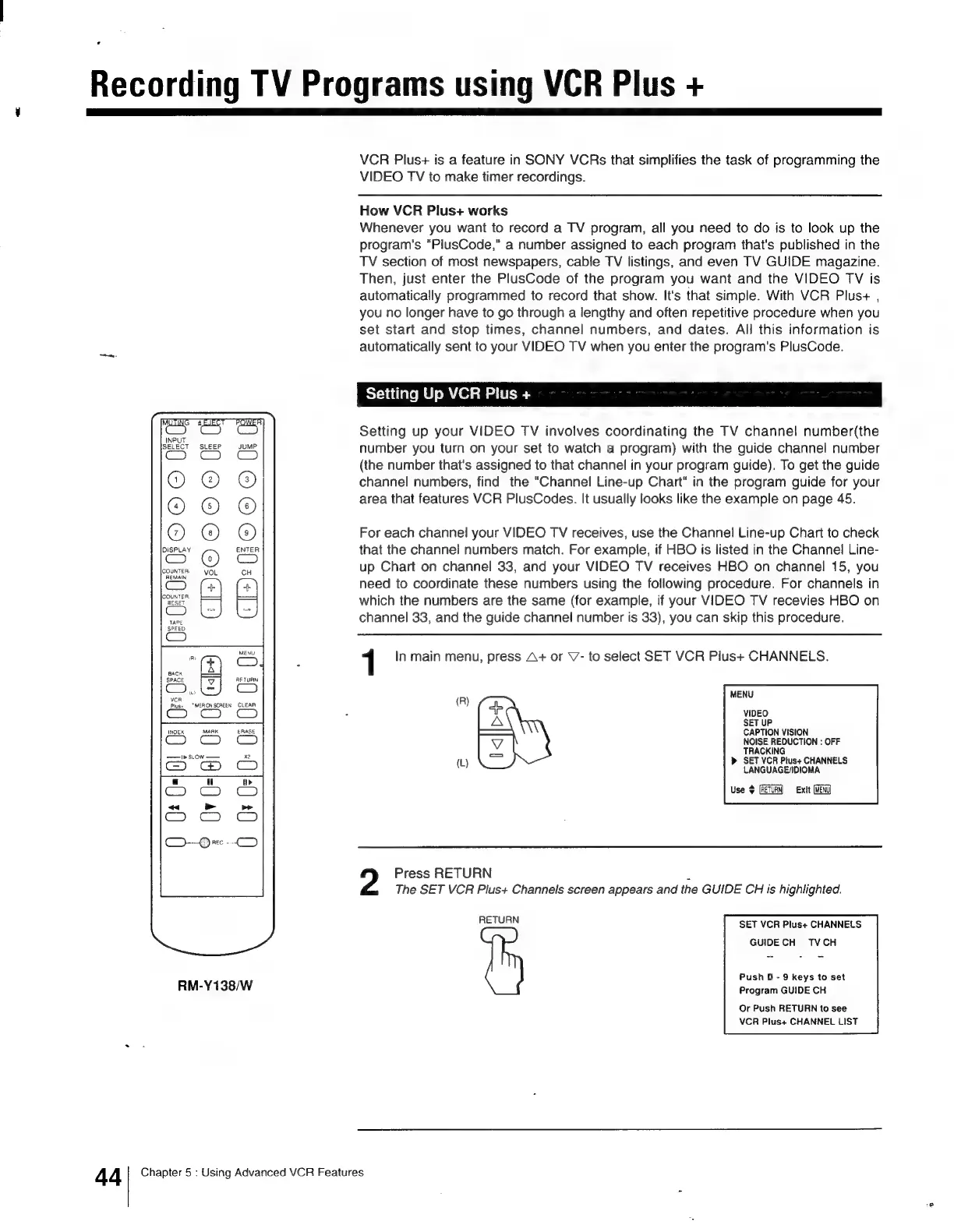
1
In
main
menu,
press
A+
or
V7-
to
select
SET
VCR
Plus+
CHANNELS.
MENU
(R)
VIDEO
SET
UP
———}
CAPTION
VISION
NOISE
REDUCTION
:
OFF
TRACKING
(Ll)
»
SET
VCR
Plus+
CHANNELS
LANGUAGE/IDIOMA
Use
$
(RETURN)
Exit
(MENU)
2
Press
RETURN
;
The
SET VCR
Plus+
Channels
screen
appears
and
the
GUIDE
CH
is
highlighted.
RETURN
SET
VCR
Plus+
CHANNELS
GUIDECH
VCH
Push
0
-
9
keys
to
set
Program
GUIDE
CH
Or
Push
RETURN
to
see
VCR
Plus+
CHANNEL
LIST
Chapter
5
:
Using
Advanced
VCR
Features

Other manuals for Sony Trinitron KV-13VM30

Related product manuals