EasyManua.ls Logo

Sony Trinitron KV-13VM30 - Page 46

Sony Trinitron KV-13VM30
116 pages
Print Icon
To Next Page IconTo Next Page
To Previous Page IconTo Previous Page
Loading...
Recording
TV
Programs
Using
VCR
Plus+
m2
a]
rod
3
a
m
m,
oO
4
1
OOO.U
©
©
0
m
Zz
Si
m
D
fe)
GIBE
0
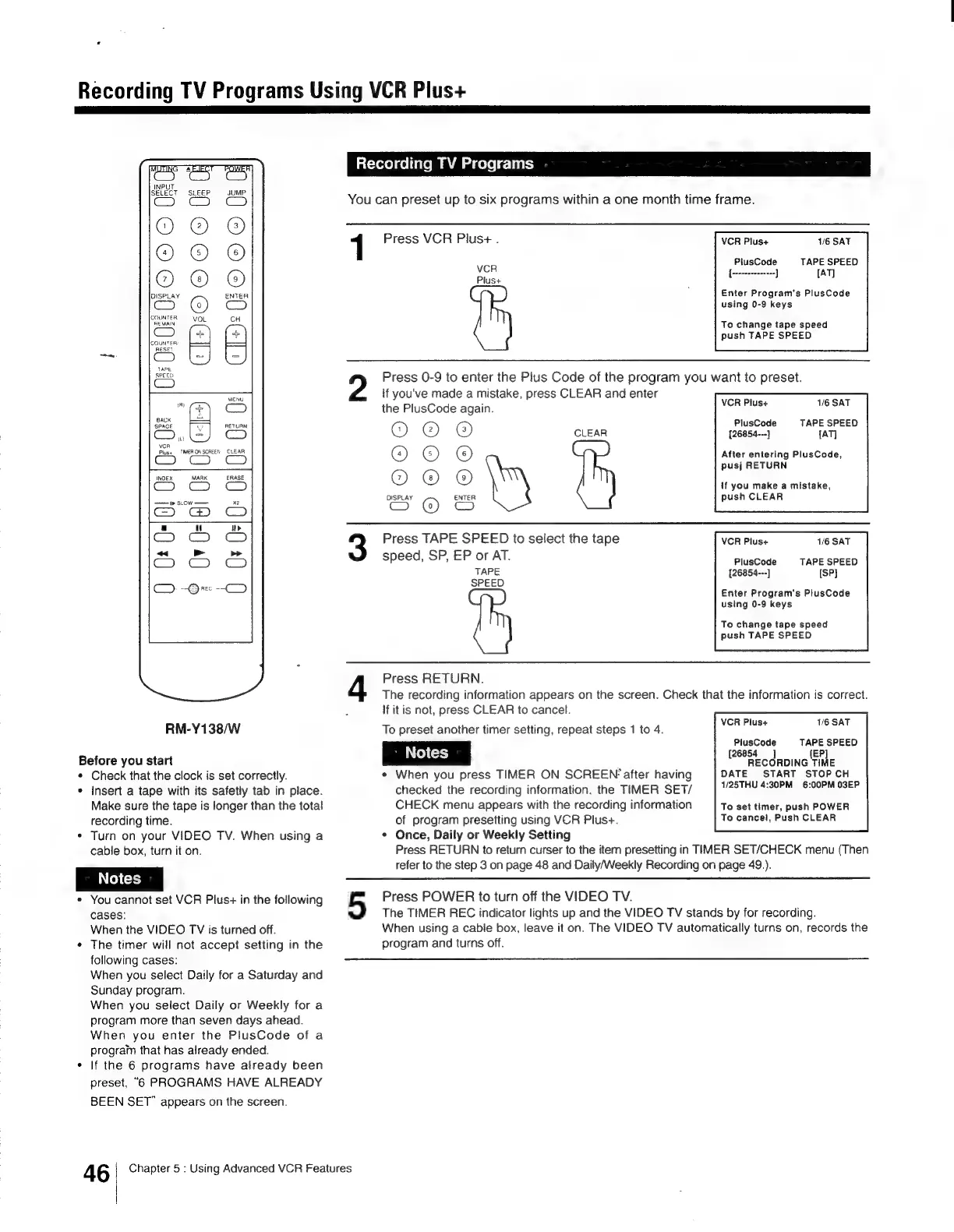
RM-Y138/W
Before
you
start
¢
Check
that
the
clock
is
set
correctly.
¢
Insert
a
tape
with
its
safetly
tab
in
place.
Make
sure
the
tape
is
longer
than
the
total
recording
time.
¢
Turn
on
your
VIDEO
TV.
When
using
a
cable
box,
turn
it
on.
*
You
cannot
set
VCR
Plus+
in
the
following
cases:
9)
When
the
VIDEO
TV
is
turned
off.
¢
The
timer
will
not
accept
setting
in
the
following
cases:
When
you
select
Daily
for
a
Saturday
and
Sunday
program.
When
you
select
Daily
or
Weekly
for
a
program
more
than
seven
days
ahead.
When
you
enter
the
PlusCode
of
a
prograin
that
has
already
ended.
¢
If
the
6
programs
have
already
been
preset,
“6
PROGRAMS
HAVE
ALREADY
BEEN
SET”
appears
on
the
screen.
46
Chapter
5
:
Using
Advanced
VCR
Features
Recording
TV
Programs
You
can
preset
up
to
six
programs
within
a
one
month
time
frame.
Press
VCR
Plus+
.
VCR
Plus+
1/6
SAT
P
PI
VCR
lusCode
TA
aa
Pius+
Enter
Program's
PlusCode
using
0-9
keys
To
change
tape
speed
push
TAPE
SPEED
Press
0-9
to
enter
the
Pius
Code
of
the
program
you
want
to
preset.
if
you've
made
a
mistake,
press
CLEAR
and
enter
the
PlusCode
again.
O-GP@
© ©
©
Se
C5)
VCR
Plus+
1/6
SAT
PlusCode
TAPE
SPEED
CLEAR
[26854---}
[AT]
After
entering
PlusCode,
pusj
RETURN
If
you
make
a
mistake,
push
CLEAR
DISPLAY
Press
TAPE
SPEED
to
select
the
tape
VCR
Plus+
1/6
SAT
speed,
SP,
EP
or
AT.
PlusCode
TAPE
SPEED
TAPE
[26854---]
[SP}
SPEED
Enter
Program's
PlusCode
using
0-9
keys
To
change
tape
speed
push
TAPE
SPEED
Press
RETURN.
The
recording
information
appears
on
the
screen.
Check
that
the
information
is
correct.
If
it
is
not,
press
CLEAR
to
cancel.
To
preset
another
timer
setting,
repeat
steps
1
to
4.
*
When
you
press
TIMER
ON
SCREEN
after
having
checked
the
recording
information.
the
TIMER
SET/
CHECK
menu
appears
with
the
recording
information
of
program
presetting
using
VCR
Plus+.
*
Once,
Daily
or
Weekly
Setting
Press
RETURN
to
return
curser
to
the
item
presetting
in
TIMER
SET/CHECK
menu
(Then
refer
to
the
step
3
on
page
48
and
Daily/Weekly
Recording
on
page
49.).
VCR
Plus+
1/6
SAT
PlusCode
(26854
j
{EP]
RECORDING
TIME
DATE
START
STOP
CH
1/25THU
4:30PM
6:00PM
O3EP
TAPE
SPEED
To
set
timer,
push
POWER
To
cancel,
Push
CLEAR
Press
POWER
to
turn
off
the
VIDEO
TV.
The
TIMER
REC
indicator
lights
up
and
the
VIDEO
TV
stands
by
for
recording.
When
using
a
cable
box,
leave
it
on.
The
VIDEO
TV
automatically
turns
on,
records
the
program
and
turns
off.

Other manuals for Sony Trinitron KV-13VM30

Related product manuals