EasyManua.ls Logo

Sony Trinitron KV-13VM30 - Page 79

Sony Trinitron KV-13VM30
116 pages
Print Icon
To Next Page IconTo Next Page
To Previous Page IconTo Previous Page
Loading...
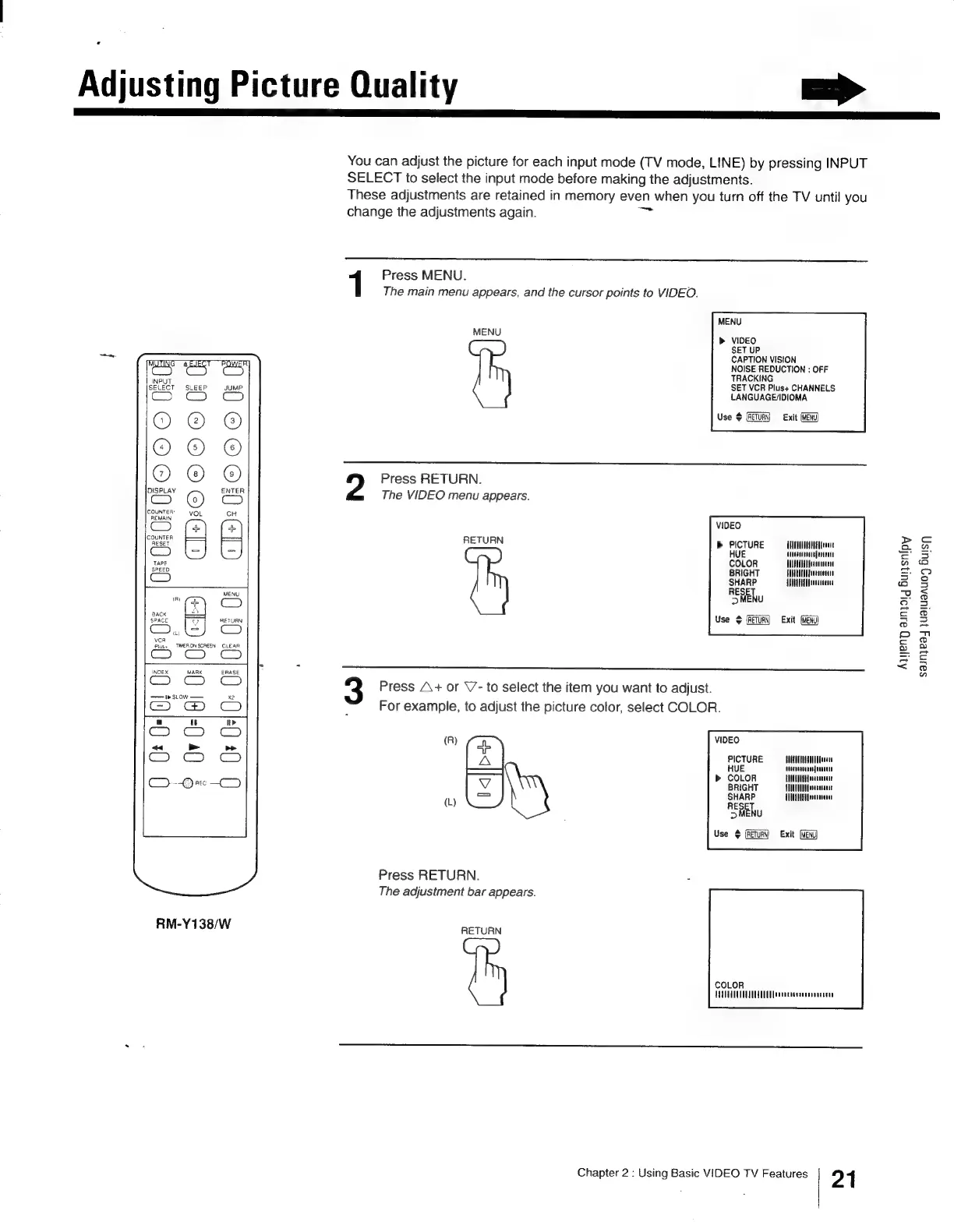
Adjusting
Picture
Quality
a>
You
can
adjust
the
picture
for
each
input
mode
(TV
mode,
LINE)
by
pressing
INPUT
SELECT
to
select
the
input
mode
before
making
the
adjustments.
These
adjustments
are
retained
in
memory
even
when
you
turn
off
the
TV
until
you
change
the
adjustments
again.
1
Press
MENU.
The
main
menu
appears,
and
the
cursor
points
to
VIDEO.
MENU
MENU
»
VIDEO
SET
UP
CAPTION
VISION
NOISE
REDUCTION
:
OFF
TRACKING
SET
VCR
Plus+
CHANNELS
LANGUAGE/IDIOMA
G_
m
=]
z
D
Cc
a
|
LECT
wo
LEE
v
a
tt
=
3
Use
$
[RETURN]
Exit
(MENU)
OrOrea!)
CrO@)(]
Press
RETURN.
The
VIDEO
menu
appears.
9
a
a]
<
S
2
m
Zz
5
m
D
©OOooe0
<
o
pS
REMAIN
VIDEO
RETURN
b>
PICTURE
UTACHUTDAAT
NEHA
eeene
HUE
tuaesnaruuefnieitt
COLOR
MANTUA
Hfeateatatne
BRIGHT
HUNULUAA
seen
SHARP
ANNA
Taneustere
A
OHENU
Use
¢
{RETURN
Exit
E
:0
C
I+)
C
[+2
Q
Press
A+
or
V’-
to
select
the
item
you
want
to
adjust.
eS.
cS
CO
For
example,
to
adjust
the
picture
color,
select
COLOR.
a
ut
ft»
“ed
>
ae
(R)
VIDEO
Bie
ek
a
peTure
Milam
COLOR
HHEAL
CAH
Yeeareecere
BRIGHT
ABUT
dvedeacanie
SHARP
CUE
otien
(L)
RESET
>
MENU
Use
¢
(RETURN)
Exit
(MENG)
Press
RETURN.
The
adjustment
bar
appears.
RM-Y138/W
Bean
COLOR
HUTTE
ences
naten
Chapter
2
:
Using
Basic
VIDEO
TV
Features
21
Aqyeng
aunqoig
Bursnipy
$ainjead
jualuaauo)
Buisn

Other manuals for Sony Trinitron KV-13VM30

Related product manuals