EasyManua.ls Logo

Sony Trinitron KV-13VM30 - Page 87

Sony Trinitron KV-13VM30
116 pages
Print Icon
To Next Page IconTo Next Page
To Previous Page IconTo Previous Page
Loading...
Using
the
Timer-Activated
Functions
Zz
vv
Cc
5
a
nr
m
at)
m,
io}
q
2
m
fut
SC
=
OOo
0
OOO)
[S]
a 3
5
z
TORORORONE
=
a
a
UF
MARK
ERASE
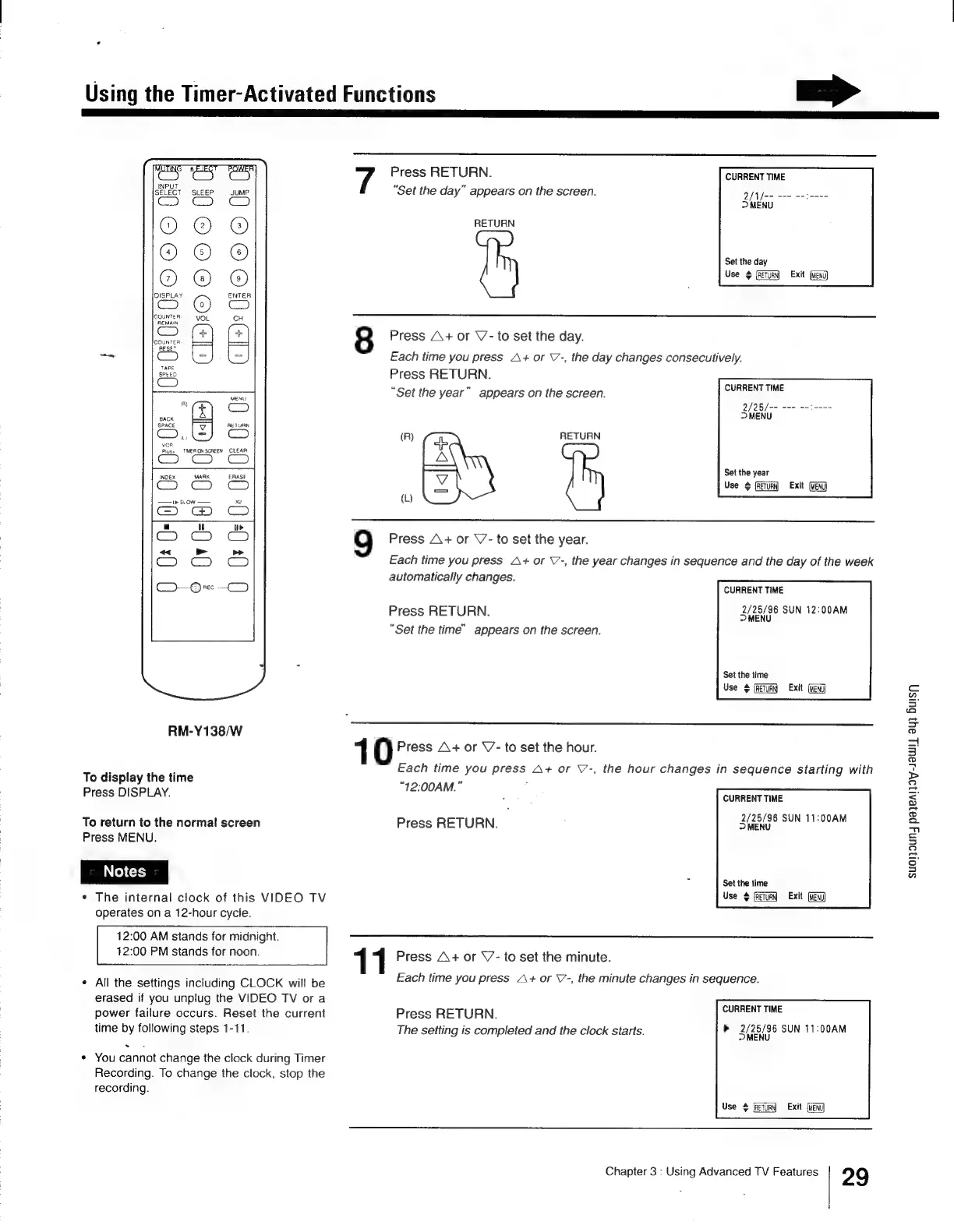
RM-Y138/W
To
display
the
time
Press
DISPLAY.
To
return
to
the
normal
screen
Press
MENU.
The
internal
clock
of
this
VIDEO
TV
operates
on
a
12-hour
cycle.
12:00
AM
stands
for
midnight.
12:00
PM
stands
for
noon.
All
the
settings
including
CLOCK
will
be
erased
if
you
unplug
the
VIDEO
TV
or
a
power
failure
occurs.
Reset
the
current
time
by
following
steps
1-11.
.
You
cannot
change
the
clock
during
Timer
Recording.
To
change
the
clock,
stop
the
recording.
Press
RETURN.
“Set
the
day”
appears
on
the
screen.
CURRENT
TIME
2/1fa=
==
-=2----
>
MENU
RETURN
Set
the
day
Use
#
[RETURN
Exit
[Meni]
8
Press
A\+
or
V-
to
set
the
day.
Each
time
you
press
A+
or
V-,
the
day
changes
consecutively.
Press
RETURN.
“Set
the
year”
appears
on
the
screen.
*
wl
9
Press
A+
or
V7-
to
set
the
year.
Each
time
you
press
A+
or
V’-,
the
year
changes
in
sequence
and
the
day
of
the
week
automatically
changes.
CURRENT
TIME
2/25
for
mon
a=
2-——-
>
MENU
RETURN
Set the
year
Use
#
[RETURN
MENU}
CURRENT
TIME
2/25/96
SUN
12:00AM
Press
RETURN.
Cee
“Set
the
time”
appears
on
the
screen.
Set
the
time
Use
¢@
{RETURN}
Exit
(Meni)
1
0
Press
A+
or
V-
to
set
the
hour.
Each
time
you
press
A+
or
\’-,
the
hour
changes
in
sequence
starting
with
“12:00AM.”
CURRENT
TIME
Press
RETURN.
Sn
eee
Set
the
time
Use
©
fReTuRN
Exit
(MENU
1
Press
A+
or
V-
to
set
the
minute.
Each
time
you
press
A+
or
V-,
the
minute
changes
in
sequence.
CURRENT
TIME
b>
2/25/96
SUN
11:00AM
MENU
Press
RETURN.
The
setting
is
completed
and
the
clock
starts.
Use
#
[RETURN
Exit
Chapter
3
:
Using
Advanced
TV
Features
29
suoljoun4
payeAljoy-1awl,
ay3
Busy

Other manuals for Sony Trinitron KV-13VM30

Related product manuals