User Guide
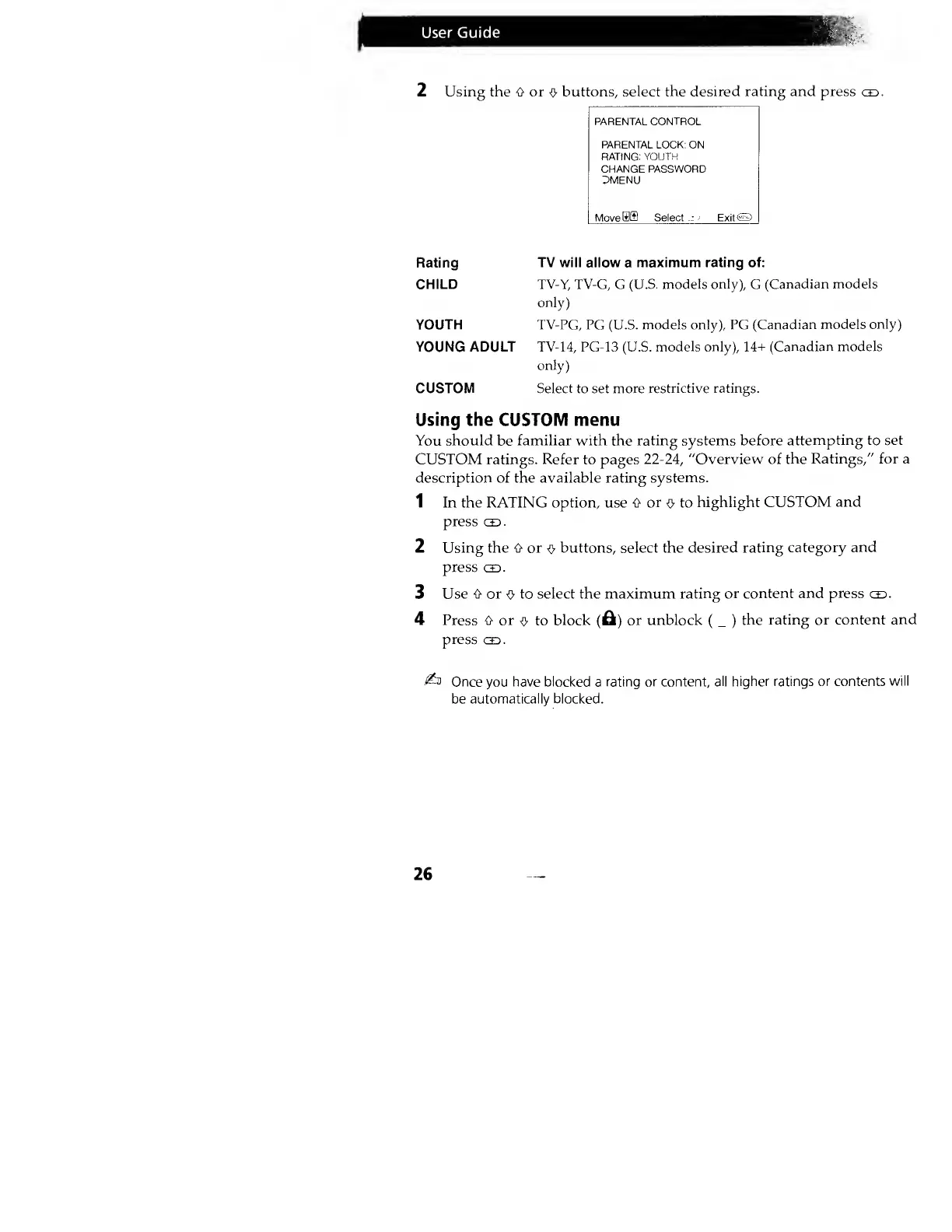
2 Using the O or
O
buttons, select
the desired rating and press
<co.
PARENTAL
CONTROL
PARENTAL
LOCK:
ON
RATING:
YOUTH
CHANGE PASSWORD
DMENU
MoveSffl Select
-J-
-
ExitO
Rating
TV will allow
a
maximum rating of:
CHILD
TV-X
TV-G, G (U.S.
models only),
G
(Canadian
models
only)
YOUTH TV-PG, PG
(U.S.
models only), PG
(Canadian models
only)
YOUNG ADULT TV-
14,
PG-13 (U.S.
models
only),
14+ (Canadian models
only)
CUSTOM Select to set more
restrictive ratings.
Using the CUSTOM menu
You should
be
familiar with the rating systems before
attempting to set
CUSTOM ratings.
Refer
to pages
22-24,
"Overview of
the Ratings," for a
description of the available rating
systems.
1 In the RATING option, use 6
or
<v
to
highlight
CUSTOM and
press
cid.
2 Using the O or
0
buttons, select the desired
rating category
and
press
od.
3
Use 0 or
o
to select the maximum
rating or content and
press
co.
4 Press 0 or
o
to
block
(A)
or unblock
(
_
)
the rating or
content and
press
gd.
£n
Once
you
have blocked
a
rating or content,
all higher ratings or contents
will
be
automatically blocked.
26




 To Next Page