— 13 —
KV-32HS20/36HS20/36HS20H/32XBR450/36XBR450/36XBR450H
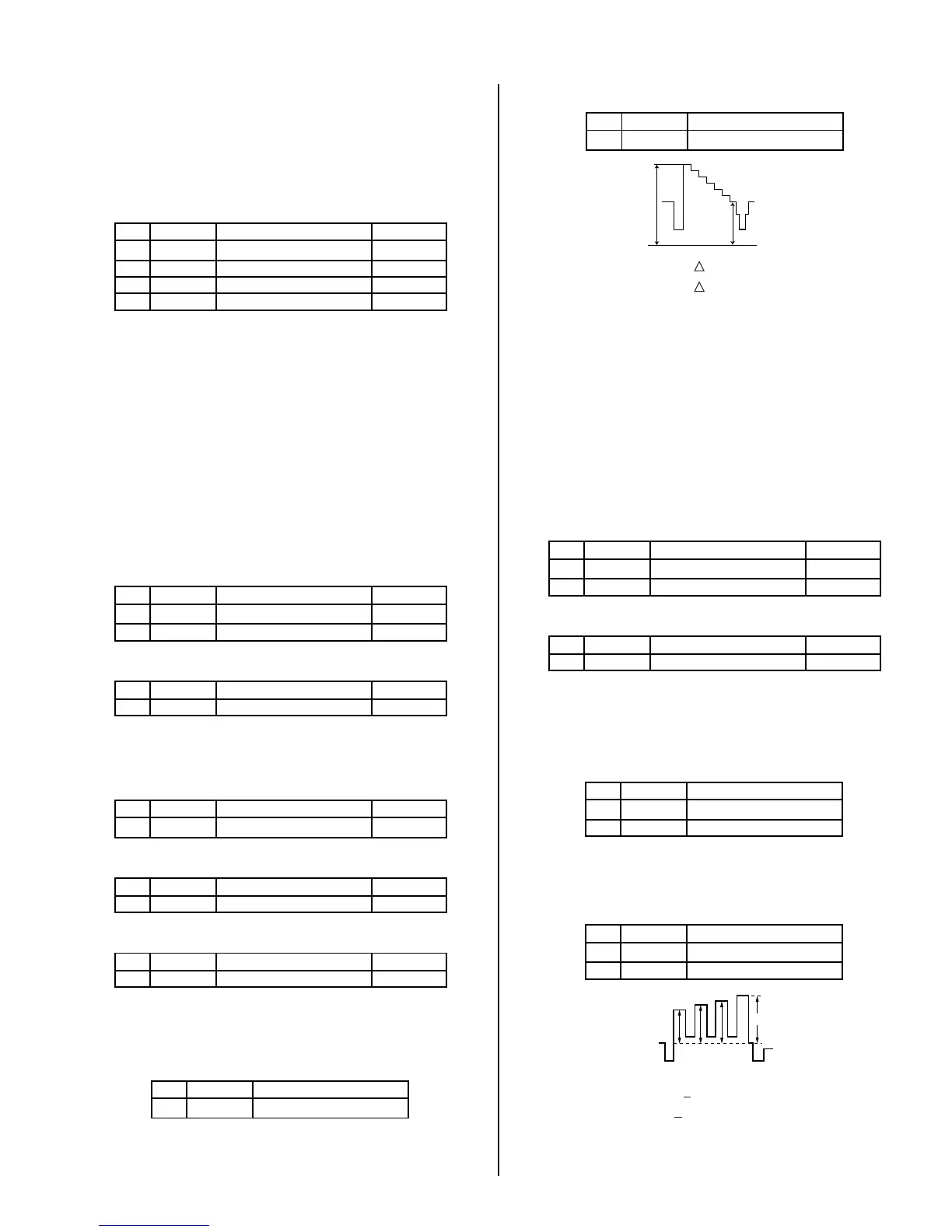
2-6. PICTURE QUALITY ADJUSTMENTS
Preparation:
• Set PRO MODE (Picture: MAX, GAMMA: 0)
• Dynamic-color: Off (=Trinitron: MID).
• Set the service mode to the following:
NO. Name Control Function Avg. Data
06 UDCL Dynamic Color: OFF 0
08 UGRAM GRAMM
0
15 DCT
DC-TRAN 0
16 DPIC DYNAMIC PIC: OFF 0
C2150P-4
1. Input signal (480i):
• Color Bar Video 75IRE (White) 75% modulation 7.5% Set-up
• Color Bar RF 75IRE (White) 75% modulation 7.5% Set-up
2-6.1. VIDEO INPUT - TWO PICTURE SUB
CONTRAST ADJUSTMENT
Preparation:
• Input a Color Bar signal to VIDEO 1 (75 IRE 75%).
• Set picture mode: P&P (PRO MODE).
1. Set to service mode and adjust as follows:
NO. Name Control Function Avg. Data
00 UPIC PICTURE 63
02 UCOL COLOR 0
NO. Name Control Function Avg. Data
01 RGBS R ON 4
2150P-4
2150P-2
INITIAL DATA (IMPORTANT)
NO. Name Control Function Avg. Data
23 SCON SUB-CONT 9
NO. Name Control Function Avg. Data
00 YLEV Y-OU
23
NO. Name Control Function Avg. Data
00 YLEV Y-OU
23
2150P-4
2103-1
2103-2
2. Connect oscilloscope to Pin 1 of CN9001 (R.DRV) on the C Board
3. Adjust MAIN (left) side contrast according to service mode fro SCON.
NO. Name Control Function
02 SCON SUB-CONT
2103-1
4. Adjust SUB (right) side contrast according to service mode for SCON.
NO. Name Control Function
02 SCON SUB-CONT
2103-2
white
black
GND
VR2
VR1
32”: VR1-VR2 = VR = 1.92 ± 0.05 Vp-p
36”: VR1-VR2 =
VR = 2.00 ± 0.05 Vp-p
5. Write data from steps 3 and 4 above, into memory.
2-6.2. VIDEO INPUT - SUB HUE/SUB COLOR
ADJUSTMENT
Preparation:
• Input a Color Bar signal to VIDEO 1 (75 IRE 75%).
• Set picture mode: P&P (PRO MODE).
1. Set to service mode and adjust as follows:
NO. Name Control Function Avg. Data
00 UPIC PICTURE 63
02 UCOL COLOR 31
NO. Name Control Function Avg. Data
01 RGBS R ON 7
2150P-4
2150P-2
2. Connect an oscilloscope to pin 5 of CN9001 (B. DRV) on the C Board.
3. Adjust MAIN (left) side color according to service mode for SCOL.
4. Adjust MAIN (left) side color according to service mode for SHUE.
NO. Name Control Function
03 SCOL SUB-COL
04 SHUE SUB-HUE
2103-1
5. Adjust SUB (right) side color according to service mode for SCOL.
6. Adjust SUB (right) side color according to service mode for SHUE.
NO. Name Control Function
03 SCOL SUB-COL
04 SHUE SUB-HUE
2103-2
VB4
VB3VB2VB1
COLOR: VB1 < VB4 (=VB1 + 0~90 MV)
HUE: VB2 < VB3 (=VB2 + 0~90 MV)
(HUE: Adjust data - 2 STEP)
7. Write data into memory.



 To Next Page