— 16 —
KV-32HS20/36HS20/36HS20H/32XBR450/36XBR450/36XBR450H
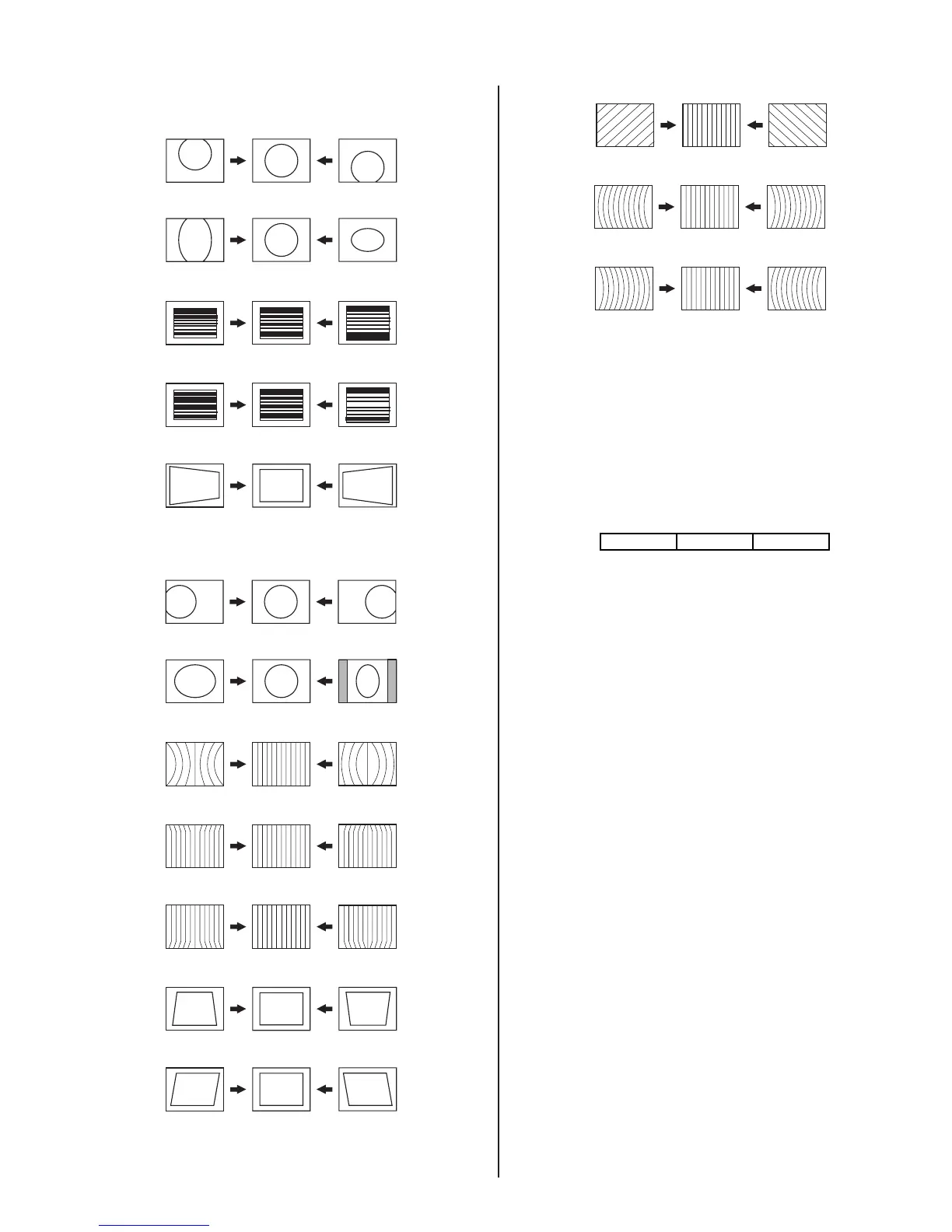
CXA2150D-1
0. VPOS (V-POSITION)
1. VSIZ (V-SIZE)
2. VLIN (V-LINE)
3. VSCO (VS-COR)
7. HTPZ (H-TRAPEZOID)
CXA2150D-2
1. HPOS (H-POSITION)
2. HSIZ (H-SIZE)
5. PIN (PIN AMP)
6. UCP (UP COR PIN COR)
7. LCP (LOW CO PIN COR)
13. PPHA (PIN PHASE)
14. VANG (AFC-ANGLE)
15. LANG (L-ANGLE)
16. VBOW (AFC-BOW)
17. LBOW (L-BOW)
2-9.2. 1080i HD MODE ADJUSTMENT
1. Input a 1080i cross-hatch signaland an HD monoscope signal that
contains overscan markers.
2. Adjust the raster position per section 3-8, only if this procedure was
not performed for full mode.
3. Adjust the geometry similar to Fill DRC mode. Vertical size is 11.8
sq. and horizontal size is 15.8 sq., if monoscope signal is available.
Otherwise, set the vertical size to 91.5% scan and horizontal size
as 90% scan.
4. Use the following register to adjust the horizontal parameter:
2150-D2 01 HPOS
Note: If necessary, touch up the geometry using the data register
listed above for Full mode.
5. Write the data into memory.
2-9.3. VERTICAL COMPRESSES MODE
CHECK AND CONFIRMATION
1. Input a monoscope and crosshatch signal.
2. Check vertical compressed mode.



 To Next Page