– 14 –
KV-AR34M36/AR34M64/AR34M66/AR34M94
RM-993
KV-AR34M60
RM-995
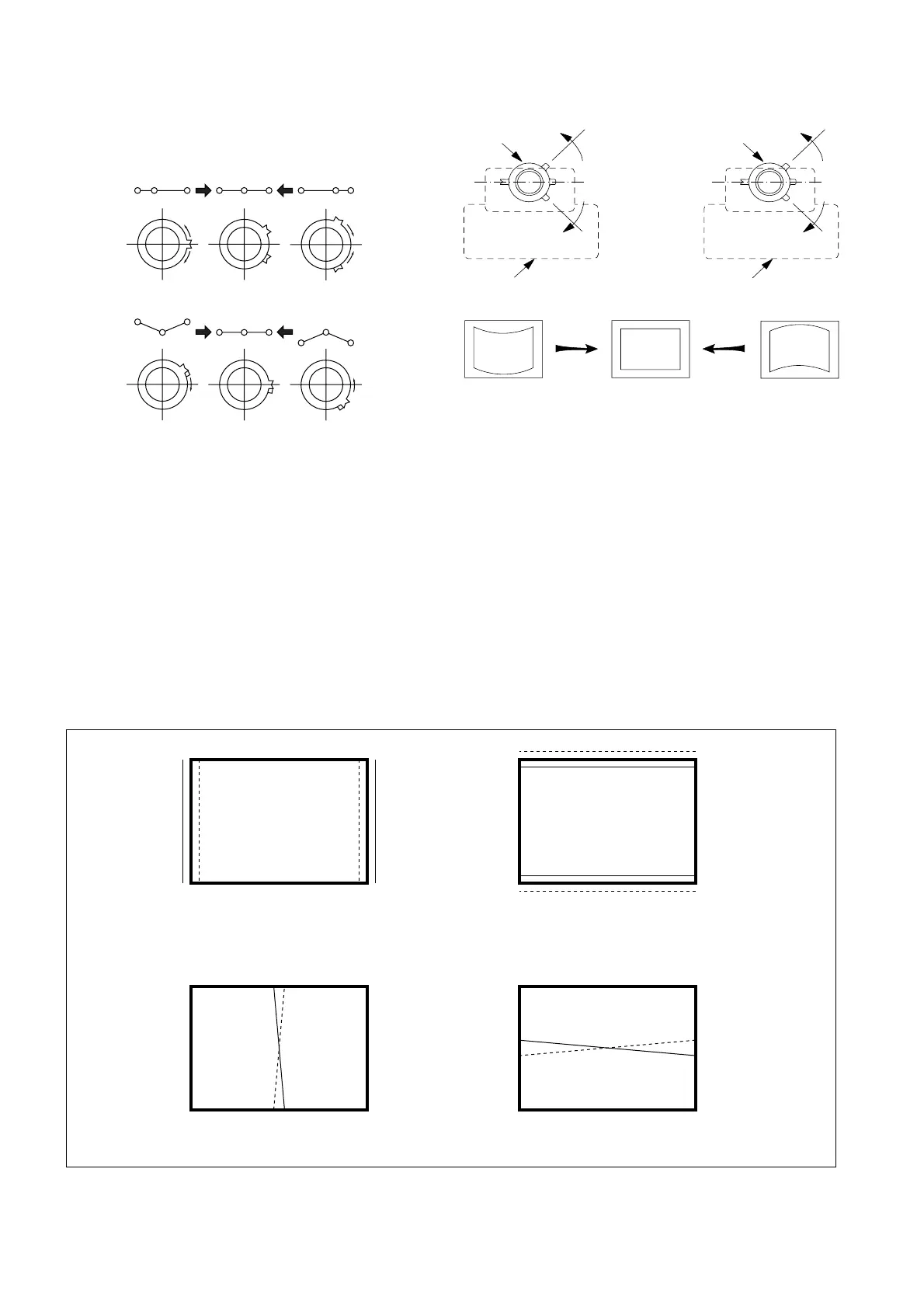
5 Y separation axis correction magnet adjustment.
1. Receive the cross-hatch signal and adjust [PICTURE] to [MIN]
and [BRIGHTNESS] to [STANDARD] .
2. Adjust the Y separation axis correction magnet on the neck
assembly so that the horizontal lines at the top and bottom of
the screen are straight.
Note
1. The Red and Blue magnets should be equally far from the
horizontal center line.
2. Do not separate the Red and Blue magnets too far. (Less than
8 mm)
(2) Dynamic Convergence Adjustment
Preparation:
• Before starting this adjustment, adjust the horizontal static
convergence and the vertical static convergence
4 BMC (Hexapole) Magnet.
If the red, green and blue dots are not balanced or aligned, then
use the BMC magnet to adjust in the manner described below.
R
GB
R
G
B
R
GB
R
G
B
RGB R GB
Neck assy Neck assy
Blue
Red Blue
Red
VM1 board VM1 board
RB
RB
TLH TLV
YCH XCV
B
R
R
B




 To Next Page