– 40 –
KV-AR34M36/AR34M64/AR34M66/AR34M94
RM-993
KV-AR34M60
RM-995
4-3. ADJUSTMENT FOR NON DIGITAL TEXTURE
ENHANCER (DTE) MODEL
(KV-AR34M60 only)
SUB COLOR ADJUSTMENT (KV-AR25/AR29)
1. Select Video.
2. Input PAL Color Bar
3. Set to following condition PICTURE 100%, BRIGHTNESS
50%, Color 50%.
4. Connect an oscilloscope to pin 1 (BOUT) of CN305, A Board.
5. Set the service mode and select SAJ 3 ‘SCL’ with 1 and 4 of
the commander then adjust the VB2=VB3=VB4 3 and 6.
6. Press
[MUTING] → - of the commander to write the data.
7. Input NTSC Color Bar to set and repeat items (3 to 7).
8. Select "WIDE" mode, write the "SAME DATA- 3 STEPS" for
both PAL and NTSC Color Bar input.
SUB COLOR ADJUSTMENT (KV-AR34)
1. Select Video.
2. Input PAL Color Bar
3. Set to following condition PICTURE 100%, BRIGHTNESS
50%, Color 50%.
4. Connect an oscilloscope to pin 1 (BOUT) of CN305, A Board.
5. Set the service mode and select SAJ 3 ‘SCL’ with 1 and 4 of
the commander then adjust the VB2=VB3=VB4 3 and 6.
6. Press
[MUTING] → - of the commander to write the data.
7. Add 6 steps and save the data.
8. Input NTSC Color Bar to TV set and repeat items 3 to 7.
9. Select "WIDE" mode, write the "SAME DATA- 3 STEPS" for
both PAL and NTSC Color Bar input.
SUB HUE ADJUSTMENT
1. Select Video 1.
2. Input a NTSC 3.58 color-bar, video into Video 1.
3. Set the following condition:
PICTURE 100%, BRIGHTNESS 50%, COLOR 50%
4. Connect an oscilloscope to pin 1 (B OUT) of CN305, A board.
5. Select SAJ 1 "SHU" with 1 and 4 of the commander by
setting to Service Mode and adjust to VB1=VB2=VB3=VB4
with 3 and 6.
6. Press [MUTING] → - of the commander to write the data.
7. Adjust SAJ 1 "SHU" as step 3 to 6 when receiving TV mode.
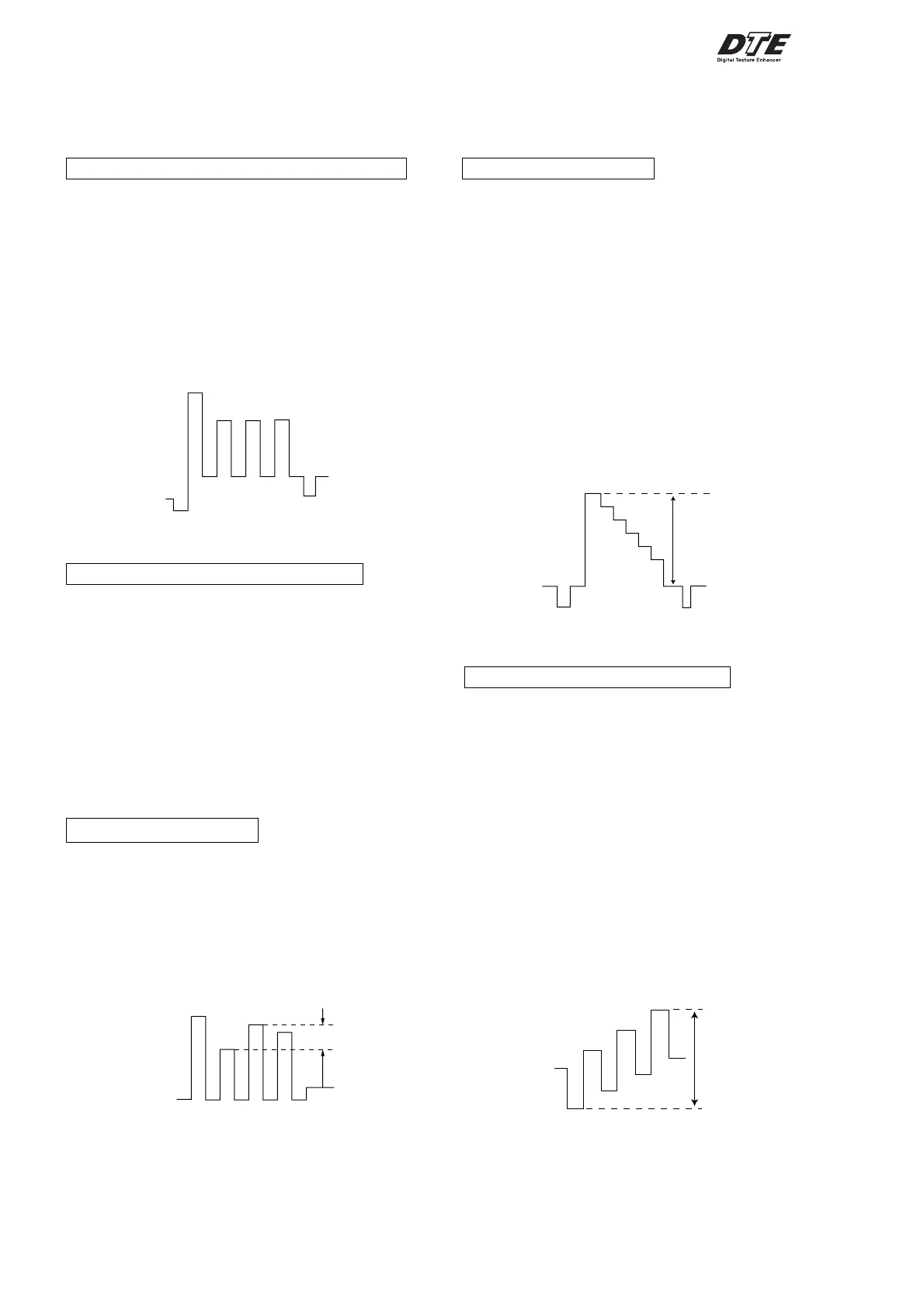
VB1
VB2
VB3
VB4
VB1 = VB2 = VB3 = VB4
The highest level of VB1,VB2,VB3,VB4 must be aligned at
the same line. Ideal difference level between VB2 and VB3
should be within ± 110mV.
VB1
VB2 VB3
VB4
VB2 = VB3 = VB4
VB2 = VB3 = VB4 (Difference is within 70mV)
± 110mV
4-4. ADJUSTMENT FOR DIGITAL TEXTURE
ENHANCER (DTE) MODEL
(Except KV-AR34M60)
Y LEVEL ADJUSTMENT
1. Select Video.
2. Input PAL Color Bar to TV set (white reference 100%).
3. Set the following condition:
DTE : ON
Picture Mode : Dynamic
4. Connect an oscilloscope to pin 1 (CV/Y in) of CN106, A
Board.
5. Set to Service Mode and YCT 08 ‘YOL’ with 1 and 4 of the
commander then adjust to VY within spec with 3 and 6.
6. Then press
[MUTING] → - to write the data.
7. Select RF.
8. Repeat item 2 to 4.
9. Set to Service Mode and YCT 04 ‘SCT’ with 1 and 4 of the
commander then adjust to VY within spec with 3 to 6.
10. Copy SCT data to NTSC (RF).
SUB COLOR (YCT) ADJUSTMENT
1. Select Video.
2. Input NTSC Color Bar.
3. Set the following condition:
DTE : ON
Picture Mode : Dynamic
NTSC 75% Color Bar
4. Connect an oscilloscope to pin 2 (B-Y in) of CN303, A Board.
5. Set to Service Mode and YCT 0A ‘COL’ with 1 and 4 of the
commander then adjust to VB within spec with 3 and 6.
6. Then press
[MUTING] → - to write the data.
7. Select RF.
8. Repeat item no 2 to 4.
9. Set to Service Mode and YCT 03 ‘COL’ with 1 and 4 of the
commander then adjust the waveform within spec with 3 and
6.
10. Then press
[MUTING] → - to write the data.
11. Input PAL Color Bar (75%) and repeat item no 8 to 10.
SCT Setting (Video Mode) : 07h (NTSC & PAL)
SPEC: VY : 1.2 Vpp ± 0.05m Vpp
SPEC :
VIDEO : VB = 0.931 Vpp ± 50 mVpp
RF : VB = 0.931 Vpp ± 50 mVpp
VB











 To Next Page