26
Menu Adjustment
4
If you are not satisfied with the picture
and sound quality, you may be able to
improve them by using the “FINE” tuning
feature.
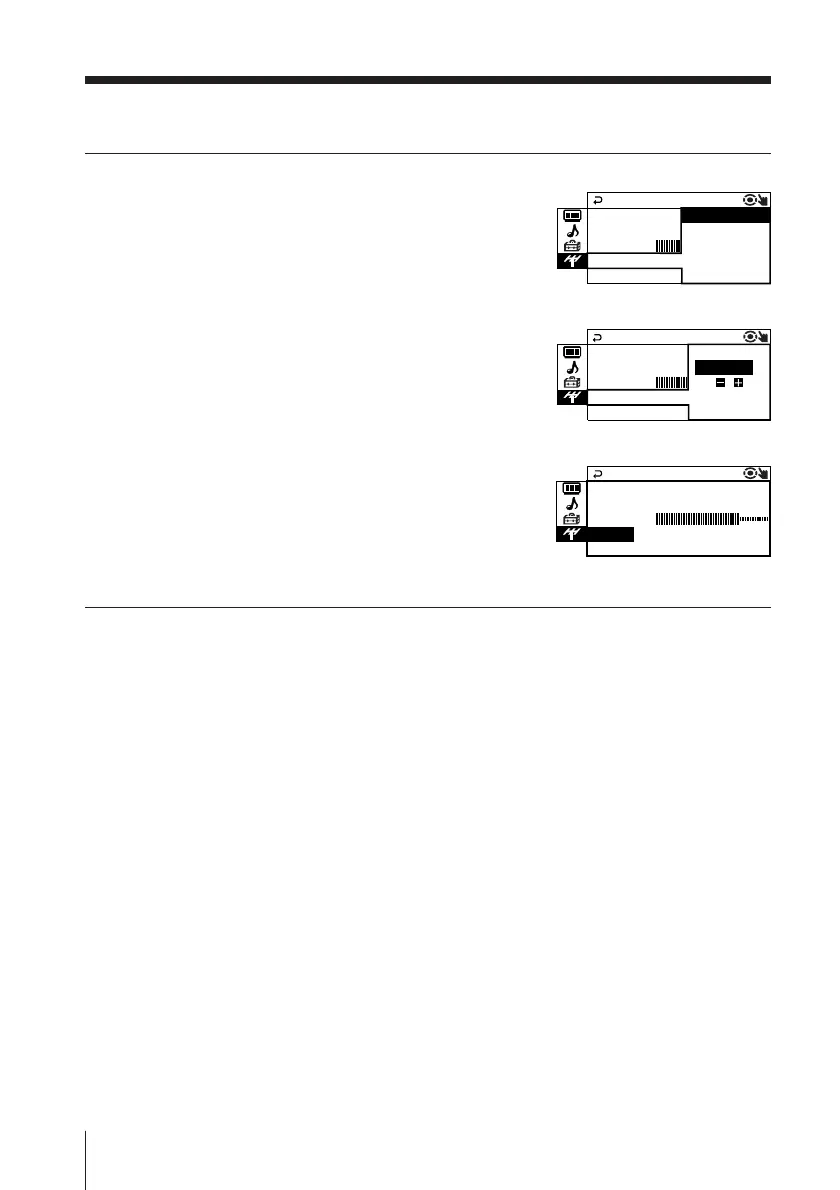
(1) Press V or v to select “FINE”, then press
ENTER.
(2) Press V or v to select “MANUAL”, then
press ENTER.
(3) Press V, v, B or b until the picture and
sound quality are optimal, then press
ENTER.
The + or – icon on the menu flashes
while tuning.
Note
• If you connect a VCR to 8 (antenna input), preset the signal output from the VCR to the
program number 0 on the TV.
MANUA L PROGRAM
PR
:
10
TV SYS
:
I MANUAL
VHF LOW
FINE
:
AUTO
MANUA L PROGRAM
PR
:
10 AUTO
TV SYS
:
I L
VHF LOW
FINE
:
MANUA
MANUA L PROGRAM
PR
:
10
TV SYS
:
I
L
FINE
:
MA
A
NU
VHF LOW
continued




 To Next Page