10
Sony KV-AR34M36 Group R8 (GB)_4-090-194-11 (1)
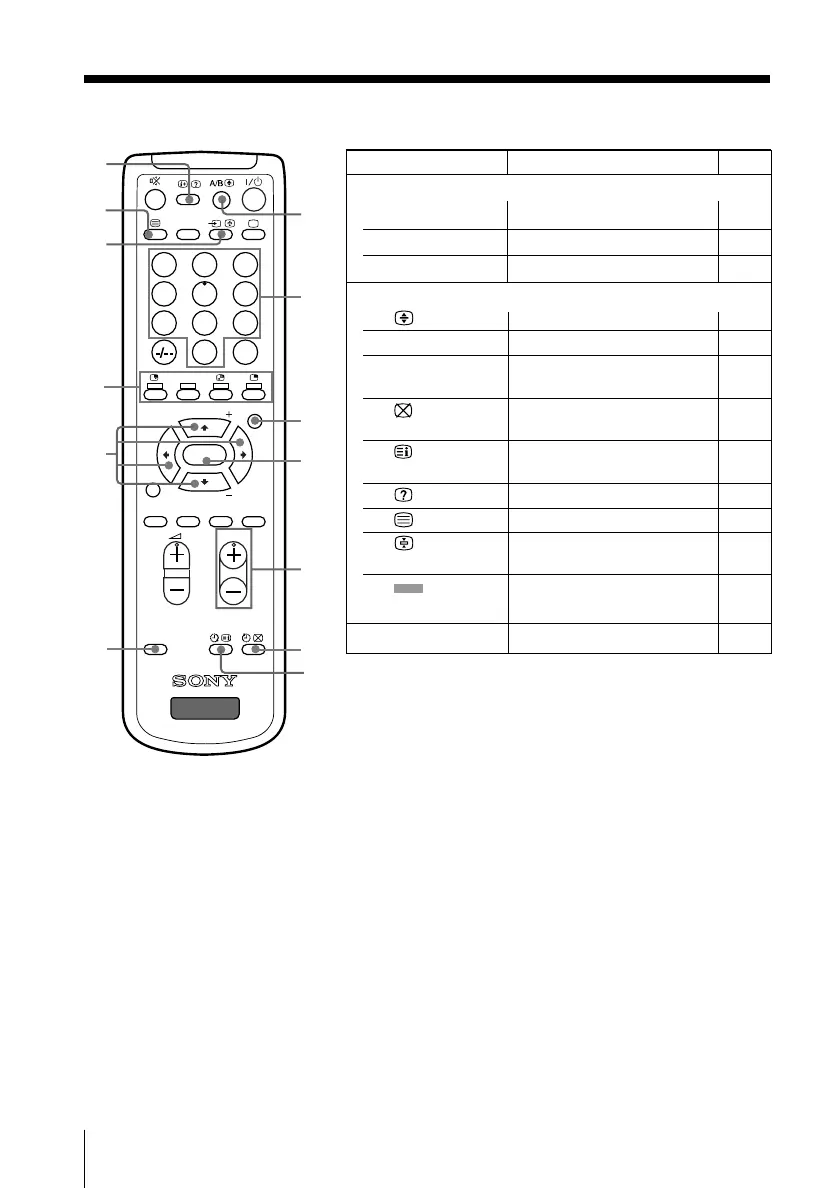
Overview of Controls
231
564
897
0
JUMP
PROGR
MENU
PIC
MODE
SOUND
MODE
WIDE
MODE
SURROUND
RESET
SOUND
TV
PIP PROGR
PIP PROGR
ENTER
DVD
DTE
wh
wk
wj
wg
ef
ed
es
eg
eh
ej
e;
ea
wl
continued
Button Function Page
Menu operations
wj MENU
Display or cancel the menu.
20
wk ENTER Confirm selected items. 20
eh V, v, B, b Select and adjust items. 20
Teletext operations (green label)
wg Enlarge the Teletext display. 17
wh 0 – 9 Input Teletext page number. 17
wl PROGR +/– Display the next or previous 17
page.
e; Show TV screen while 17
waiting for Teletext page.
ea Display Teletext service 17
contents.
es
Reveal concealed information.
17
ed Displat Teletext broadcast. 17
ef Stop Teletext display from 17
scrolling.
eg (red, green, Access a FASTEXT menu. 17
yellow, blue)
ej RESET Set TV to factory setting. 33
01GB04INS-OCE.p65 7/25/02, 11:23 AM10











 To Next Page