26 Adjusting Your Setup (MENU)
Adjusting Your Setup (MENU)
Introducing the
menu system
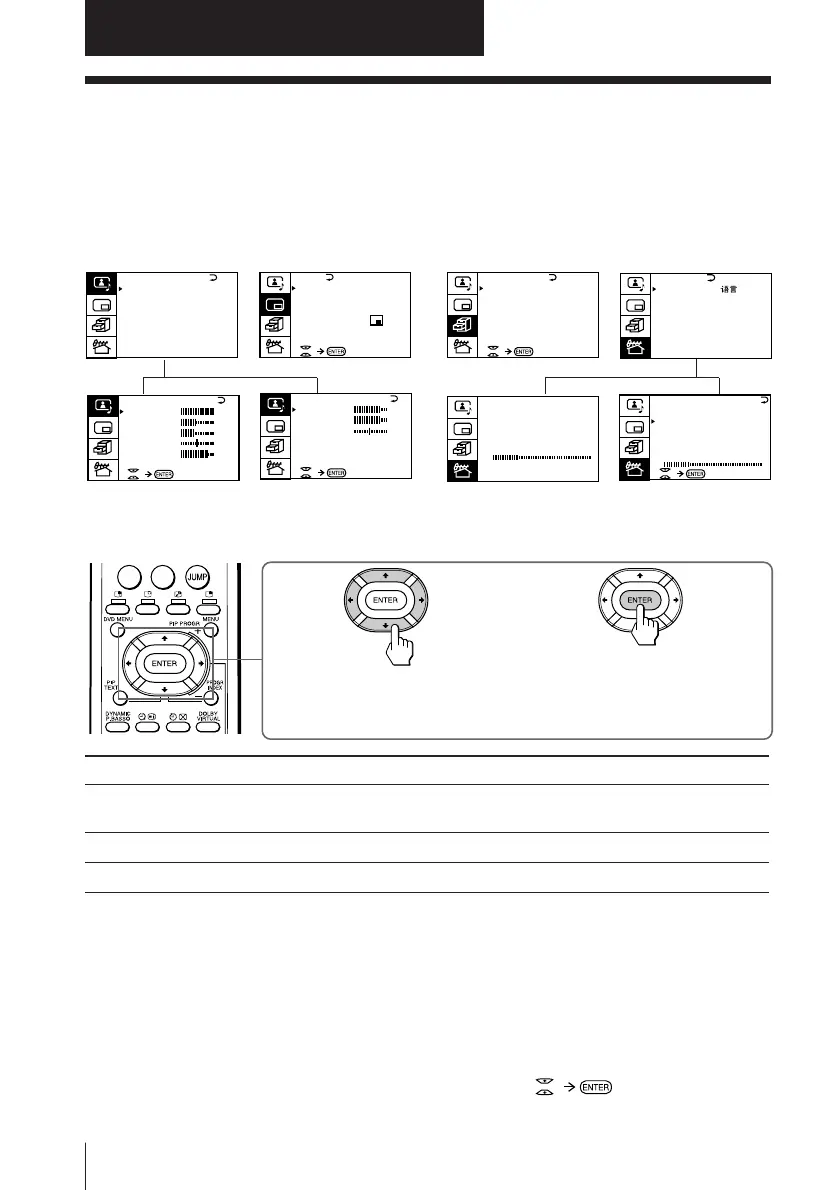
The MENU button lets you open a menu and change the settings of your TV. Here’s
an overview of the menu system.
A/V CONTROL PIP FEATURES PRESET
*KV-EF29M61/EF29M91 only
How to use the menu
1 After pressing MENU, press
V/b/v/B to move the cursor (”)
in four directions to select an item.
2 Press ENTER to
confirm the
selection.
To
go back to the previous menu
cancel the menu
change the menu language
Do this
Press V or v to move the cursor (”) to the first line (N) of
each menu, then press ENTER.*
Press MENU.
See next page.
* Except for “AUTO PROGRAM”
Notes (except for AUTO PROGRAM)
• When you select a menu, the color of the menu and the menu symbol
change and the cursor (”) appears beside the first item of the menu.
• When an item on the menu is selected after pressing ENTER, the color of
the item changes.
• If more than 60 seconds elapse between entries, the menu screen
disappears.
• Some menu displays contain the symbol at the bottom of the
screen to indicate how to use the menu.
PIP
PIP: OFF
PIP TEXT
STROBE
POS I T I ON:
PROGR I NDEX
GAME MODE
HYPER SURROUND :
OF F
MONITOR
AV OUT :
FEATURES
PRESET
SKIP:
PR02 OFF
TV SYS: B/G
COL
SYS : AUTO
ENGL I SH
AUTO PROGRAM
MANUAL PROGRAM
LANGUAGE /
:
P I CTURE
40
100
0
80
V I DEO ADJUST
COLOR
BR I GHT
HUE
SHARP
VM: HIGH
45
0
BASS
80
00
80
TREBLE
BALANCE
AUD IO ADJUST
TV SYS: B/G
AUTO PROGRAM
VHF LO
W
PR: 01
TV SYS: B/G
VHF
LO
W
PR: 01
AT T : OFF
MANUAL PROGRAM
A / V CONTROL
DYNAMIC
SOFT
STANDARD
PERSONAL
V I DEO ADJUST
AUD IO ADJUST
T I LT CORRECT : 0
*
0
-/--





 To Next Page