32 Adjusting Your Setup (MENU)
Adjusting the
FEATURES setting
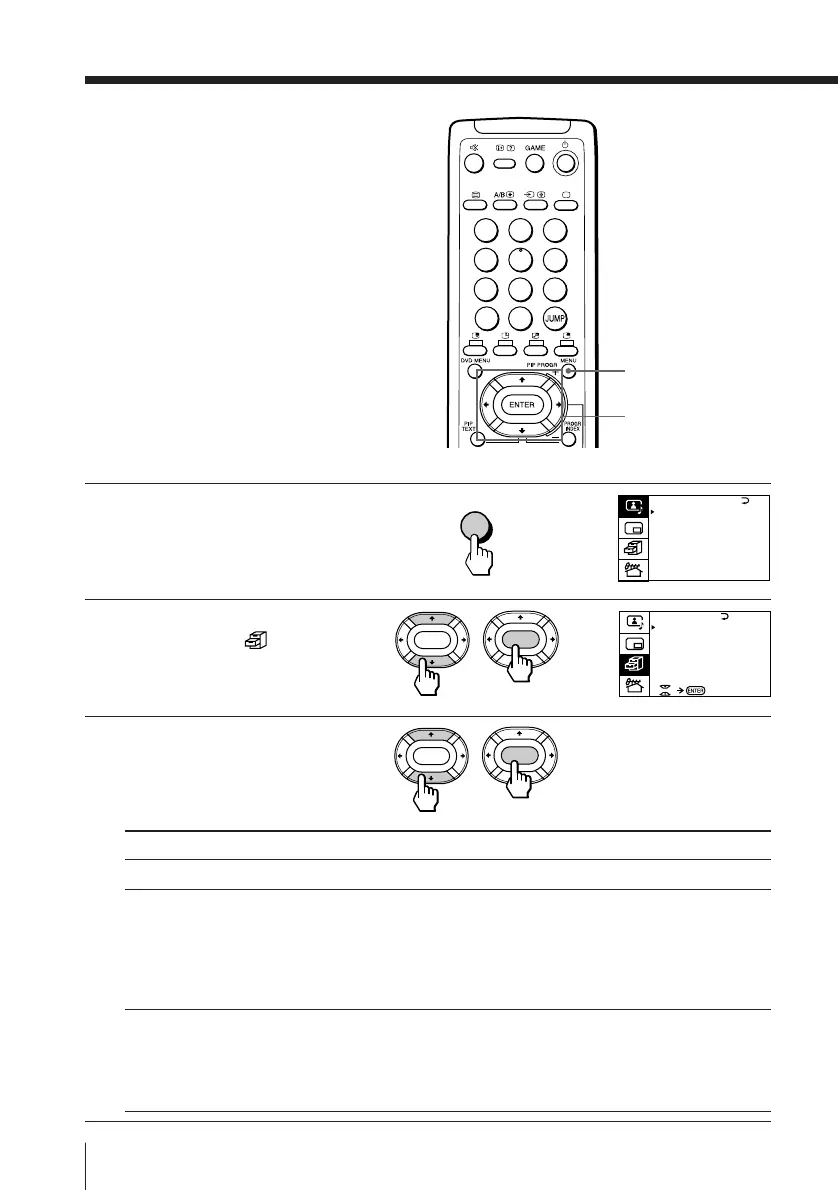
The FEATURES menu allows you to
optimize the screen for video games,
enjoy “surround” sound effects, and
select the output signal of the TV
broadcast or the connected equipment.
1
Press MENU.
2
Press V or v to move the
cursor (”) to (
), then
press ENTER.
3
Press V or v to move the
cursor (”) to the desired
option (see the table
below), then press ENTER.
MENU
b
b
Select
GAME MODE
HYPER SURROUND
AV OUT
(advanced rec-out)
MENU
V/b/v/B/ENTER
GAME MODE
HYPER SURROUND :
OF F
MONITOR
AV OUT :
FEATURES
ENTER
ENTER
ENTER
ENTER
To
view a video game screen
enjoy “surround” sound effects of a concert hall or
movie theater.
Press V/b/v/B to select “DOLBY VIRTUAL”,
“MOVIE”, “MUSIC”, “NEWS<BBE
1)
>”,
“HALL<SRS
2)
>”, or “SPACE
3)”
(see below for details on
each item).
select the signal output through the Ú (Monitor/TV
output) terminal.
Press V/b/v/B to select “TV” (to output the TV
broadcast signal) or “MONITOR” (to output the signal
of the equipment connected to the TV).
A / V CONTROL
DYNAMIC
SOFT
STANDARD
PERSONAL
V I DEO ADJUST
AUD IO ADJUST
T I LT CORRECT : 0
1
2
3
4
5
6
7
8
0
-/--
9





 To Next Page