34 Adjusting Your Setup (MENU)
Adjusting the
PRESET setting
The PRESET menu allows you to adjust
the setup of your TV. For example, you
can receive a channel with a weak signal
that fails to be tuned in by automatic
presetting. In addition, the PRESET
menu offers other setup options, such as
changing the menu language.
Presetting channels manually
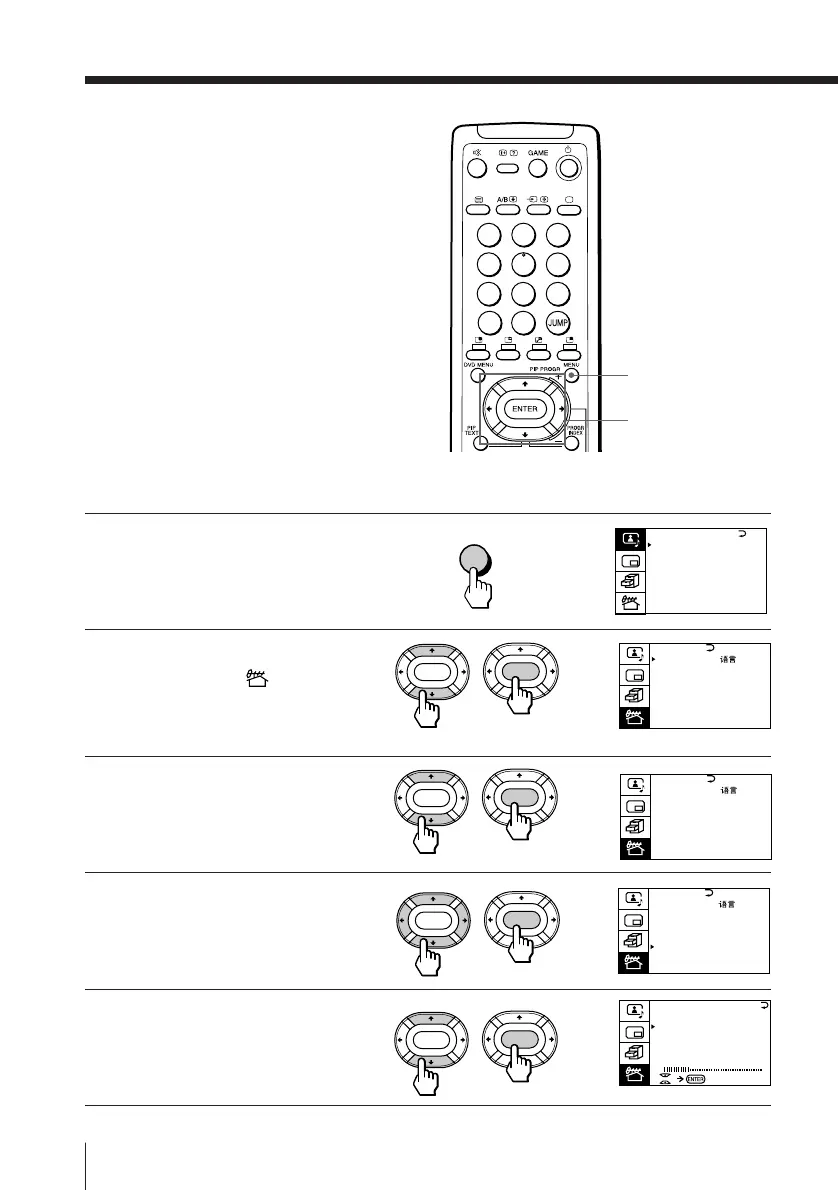
1
Press MENU.
2
Press V or v to move the
cursor (”) to ( ), then
press ENTER.
3
Press V or v to move the
cursor (”) to TV SYS, then
press ENTER.
4
Press V/b/v/B until your
local TV system appears
on the menu, then press
ENTER.
5
Press V or v to move the
cursor (”) to MANUAL
PROGRAM, then press
ENTER.
MENU
b
b
MENU
V/b/v/B/ENTER
b
b
b
ENTER
ENTER
ENTER
ENTER
ENTER
ENTER
TV SYS: B/G
VHF
LO
W
PR: 01
AT T : OFF
MANUAL PROGRAM
PRESET
SKIP:
PR02 OFF
TV SYS: D/K
COL
SYS : AUTO
ENGL I SH
AUTO PROGRAM
MANUAL PROGRAM
LANGUAGE /
:
ENTER
ENTER
PRESET
SKIP:
PR02 OFF
TV SYS: B/G
COL
SYS : AUTO
ENGL I SH
AUTO PROGRAM
MANUAL PROGRAM
LANGUAGE /
:
A / V CONTROL
DYNAMIC
SOFT
STANDARD
PERSONAL
V I DEO ADJUST
AUD IO ADJUST
T I LT CORRECT : 0
1
2
3
4
5
6
7
8
0
-/--
9
PRESET
SKIP:
PR02 OFF
TV SYS: B/G
COL
SYS : AUTO
ENGL I SH
AUTO PROGRAM
MANUAL PROGRAM
LANGUAGE /
:





 To Next Page