EasyManua.ls Logo

Sony Trinitron KV-EF29 - Changing the Menu Language

Sony Trinitron KV-EF29
42 pages
Print Icon
To Next Page IconTo Next Page
To Previous Page IconTo Previous Page
Loading...
27Adjusting Your Setup (MENU)
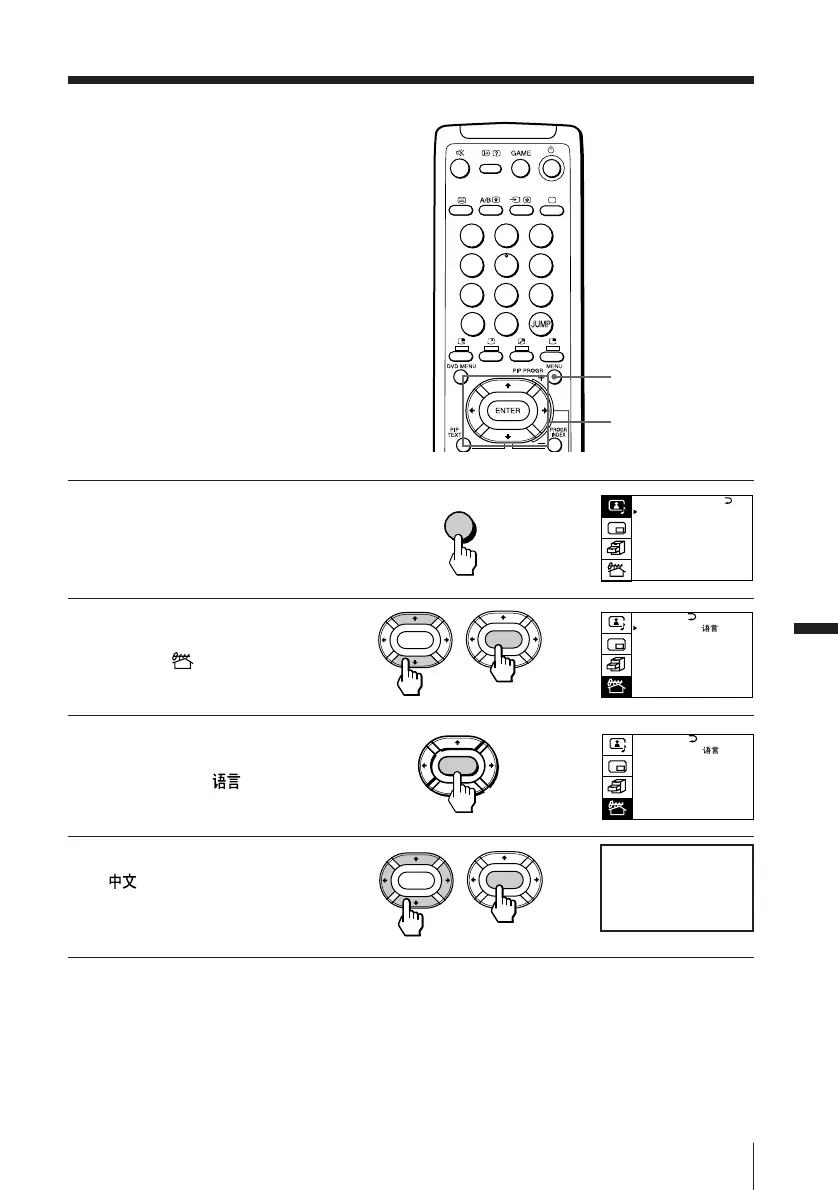
Changing the
menu language
You can change the menu language as
well as the on-screen language.
1
Press MENU.
2
Press V or v to move the
cursor () to the PRESET
menu (
), then press
ENTER.
3
Make sure the cursor ()
appears beside
LANGUAGE/
, then
press ENTER.
4
Press V/b/v/B to select
, then press ENTER.
The menu language
changes to Chinese.
To go back to the normal screen
Press MENU.
MENU
V/b/v/B/ENTER
MENU
b
b
ENTER
b
b
PRESET
SKIP:
PR02 OFF
TV SYS: B/G
COL
SYS : AUTO
ENGL I SH
AUTO PROGRAM
MANUAL PROGRAM
LANGUAGE /
:
ENTER
ENTER
Adjusting Your Setup (MENU)
PRESET
SKIP:
PR02 OFF
TV SYS: B/G
COL
SYS : AUTO
ENGL I SH
AUTO PROGRAM
MANUAL PROGRAM
LANGUAGE /
:
ENTER
ENTER
A / V CONTROL
DYNAMIC
SOFT
STANDARD
PERSONAL
V I DEO ADJUST
AUD IO ADJUST
T I LT CORRECT : 0
1
2
3
4
5
6
7
8
0
-/--
9
Chinese

Related product manuals