'VM-6041OM I
SECTION 5
CIRCUIT ADJUSTMENTS
5-1. 0 BOARD ADJUSTMENTS
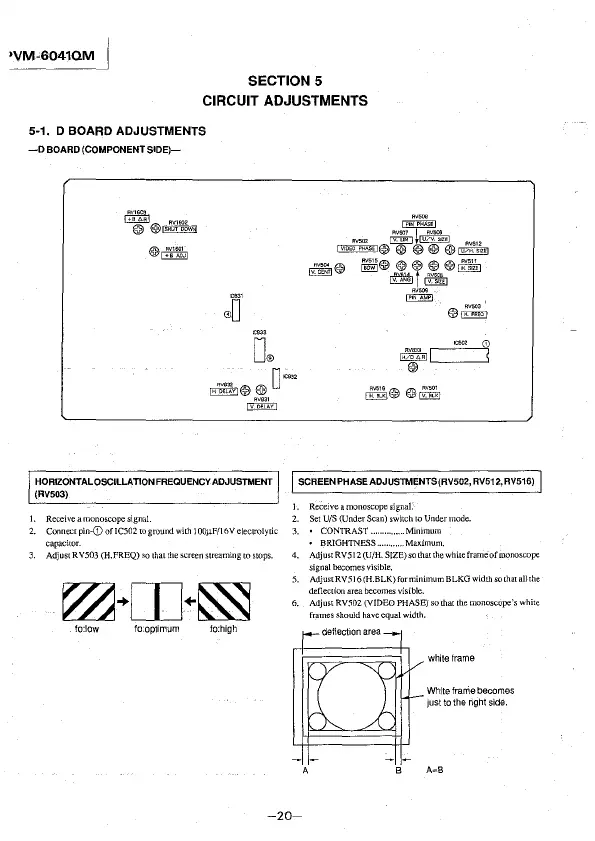
-0 BOARD (COMPONENT SIDE)-
~
RV1602
@) @>,s,o, o~,,
HORIZONTAL OSCILLATION FREQUENCY ADJUSTMENT
(RV503)
1. Receiveamonoscopesigna!.
2. Connect pin-G) of IC502 to ground with JO0µF/16 V electrolytic
capacitor.
3. Adjust RV503 (H.FREQ) so that the screen streaming to stops.
fo:low fo:optimum fo:high
R~;INPHA:~
lv1oc~~~s,1@T~T@~
~© ~@®®!®~
~l~
~
@~
RV833 G)
IEZeMlc:=::J
@)
SCREEN PHASE ADJUSTMENTS(RV502, RV512, RV516)
J. Receive a monoscope
signaL
2. Set UIS (Under Scan) switch to Under mode.
3. • CONTRAST .............. Minimum
• BRIGHTNESS ........... Mmdmum.
4. Adjust RVS 12 (U/H. SIZE) so that the white frame ofmonoscope
signal becomes visible.
5. AdjustRV516(H.BLK)forminimumBLKG width so that all the
deflection area becomes visible.
6. Adjust
RV502 (VIDEO PHASE) so that the monoscope's white
frames should have equal width.
white frame
White frarrie becomes
just to the right side.
-20-








 To Next Page