1-3. POWER SOURCES
House Current
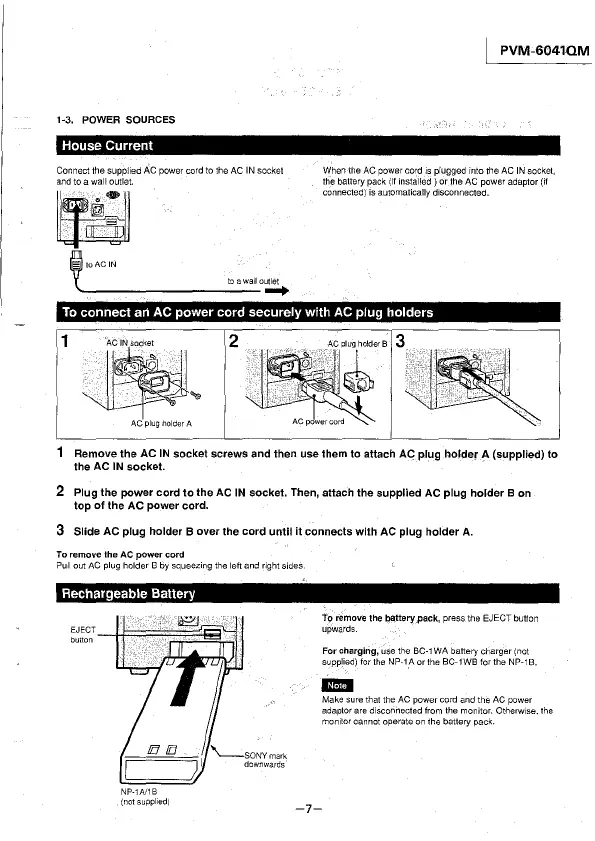
Connect the supplied AC power cord to the AC IN socket
and to a wall outlet.
~
i10ACIN
1{ to a wall outlet
--------------+
I PVM-6041QM
When the AC power cord 1s plugged into the AC IN socket,
the battery pack
(if installed) or the AC power adaptor (if
connected) is automatically disconnected.
To connect an AC power cord securely with AC plug holders
1
2
AC plug holder A
Remove the AC IN socket screws and then use them to attach AC plug holder A (supplied) to
the AC IN socket.
2 Plug the power cord to the AC IN socket. Then, attach the supplied AC plug holder B on
top of the AC power cord.
3 Slide AC plug holder B over the cord until it connects with AC plug holder A.
To remove the AC power cord
Pull out AC plug holder B by squeezing the left and right sides.
Rechargeable Battery
To remove the battery,pack, press the EJECT button
upwards.
For charging, use the BC-1 WA battery charger (not
supplied) for the NP-1_A or the BC-1WB for the NP-1B.
111!1!1
Make sure that the AC power cord and the AC power
adaptor are
disconnected from the monitor. Otherwise. the
monitor cannot operate on the battery pack.
NP-1A/1B
{not supplied)
-7-



 To Next Page