0
VM-6041QM I
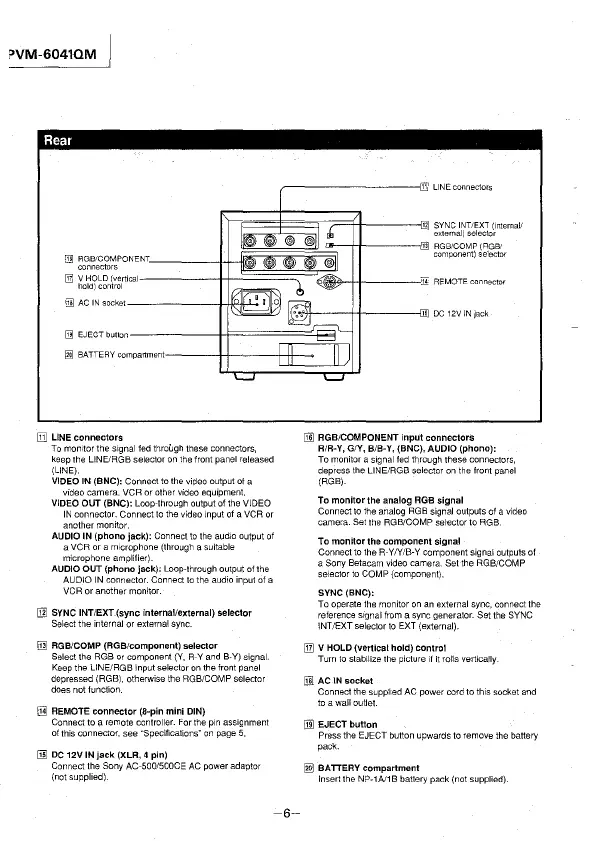
Rear
~--------;Wn: LINE connectors
l
n;;;::;;~;=:;;1--;i;=tt-----@]12
SYNC INT/EXT (111ternal/
external) selector
U]] RGB/COMPONENT
connectors
[TI] VHOLD (vertical
hold)control
(j]] AC IN socket-------1--H'*"--<
[IT] LINE connectors
To morn tor the signal fed throl.lgh these connectors,
keep the LINE/RGB selector on the front panel released
{LINE).
VIDEO IN {BNC): Connect to the viPeo output of a
video camera, VCR or other video equipment.
VIDEO OUT (BNC): Loop-through output of the VIDEO
IN
connector. Connect to the video input of a VCR or
another monitor.
AUDIO IN (phono jack): Connect to the audio output of
a VCR or a microphone (through a suitable
microphone amplifier).
AUDIO OUT (phono jack): Loop-through output of the
AUDIO IN connector. Connect to the audio input of a
VCR or another monitor.
[ill SYNC INT/EXT (sync internal/external) selector
Select the internal or external sync.
@] AGB/COMP (AGB/component) selector
Select the RGB or component {Y, R-Y and 8-Y) signal.
Keep the LINE/RGB input selector on the front panel
depressed (RGB), otherwise the RGB/COMP selector
does not function.
IT1] REMOTE connector (8-pin mini DIN)
Connect to a remote controller. For the pin assignment
of this connector, see
"Specifications" on page 5.
(!ID DC 12V IN jack (XLR, 4 pin)
Connect the Sony AC-500/S00CE AC power adaptor
(not supplied).
-6-
13 RGB/COMP (RGBI
component) selector
Ji REMOTE connector
[NJ RGB/COMPONENT input connectors
R/R-Y, G/Y, B/B-Y, (BNC), AUDIO (phono):
To monitor a signal fed through these connectors,
depress the LINE/RGB selector on the front panel
{RGB).
To monitor the analog RGB signal
Connect to the analog RGB signal outputs of a video
camera. Set the RGB/COMP selector to RGB.
To monitor the component signal
Connect to the R-Y/Y/B-Y component signal outputs of
a Sony Betacam video camera. Set the RGB/COMP
selector to COMP (component).
SYNC (BNC):
To operate the monitor on an external sync, connect the
reference signal
from a sync generator. Set the SYNC
\NT/EXT selector to EXT (external).
[IT] V HOLD (vertical hold) control
Turn to stabilize the picture 1/ it rolls vertically
[l]l AC IN socket
Connect the supplied AC power cord to this socket and
to a wall outlet.
[NJ EJECT button
Press the EJECT button upwards to remove the battery
pack.
~
BATTERY compartment
Insert the NP-1Al1 B battery pack (not supplied).








 To Next Page