I PVM-6041OM
!:~· L,OCATION ANQ FUNCTION OF PAR.TS A.I'll? CONTROLS
Front
0 0
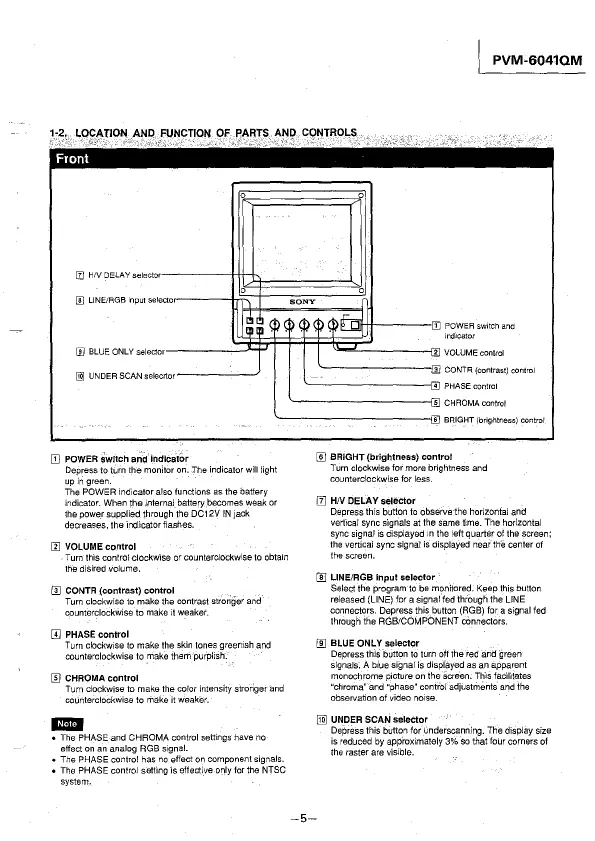
[I) HIV DELAY selecto
0 0
[ID LINE/RGB input se lector
SONY
I~, \i),_lli.P~~rn
[j]
POWER switch and
md1cator
°'
[I] BLUE ONLY select
[j]j UNDER SCAN sele crtor
[I) POWER Switch a~d indicator
Depress to turn the monitor on. The indicator will light
upin green.
The POWER indicator also functions as the battery
indicator. When the mternal battery becomes weak or
the power supplied through the DC12V IN
Jack
decreases, the ind'1catorflashes.
llJ VOLUME control
Turn this control clockw'1se or counterclockw'ise to obtain
the disired volume.
[1] CONTR (contrast) control
Turn clockwise to make the contrast stronger and
counterclockwise to make 11 weaker.
[!] PHASE control
Turn clockwise to make the skin tones greenish and
counterclockwise to make them purplish.
[ID CHROMA control
Turn clockwise to make the color intensity stroriger and
counterclockwise to
make it weaker.
-
• The PHASE and CHROMA control settings have no
effect on an analog RGB signal.
• The PHASE control has no effect on component signals.
• The PHASE control setting is effective only for the NTSC
system.
I
&
w
--w
"'
,6,
VOLUME control
CQNTR (contrast) control
PHASE control
CHROMA control
BRIGHT
(brightness) control
[ID BRIGHT (brightness) control
Turn clockwise for more brightness and
counterclockwise for less.
[I] HIV DELAY selector
Depress this button to observe the horizontal and
vertical sync signals at the same f1me. The horizontal
sync signal is displayed
m the left quarter of the screen;
the vertical sync signal is displayed near
th€! center of
the screen.
I]] LINE/RGB Input selector
Select the program to be monitored. Keep this button
released (LINE) for a signal fed through
the LINE
connectors. Depress this button (AGB) for a signal fed
through the AGB/COMPONENT connectors.
[[] BLUE ONLY selector
Depress thiS button to turn off the red and green
signals. A blue signal is displayed as an apparent
monochrome picture on the screen. This facilitates
"chroma" and "phase"
contfo! adjustm9nts and the
observation of video norse.
[ID UNDER SCAN selector
-5-
Depress this button for underscanning. The display size
is reduced by
appl'oximately 3% so that four corners of
the raster are visible.








 To Next Page