29
Transmission
channel
Transmission
frequency
Attenuation
level of the
input signal
Accumulated
battery use
time
Press
the
SET
button.
The channel/frequency indications for
U66 model are shown.
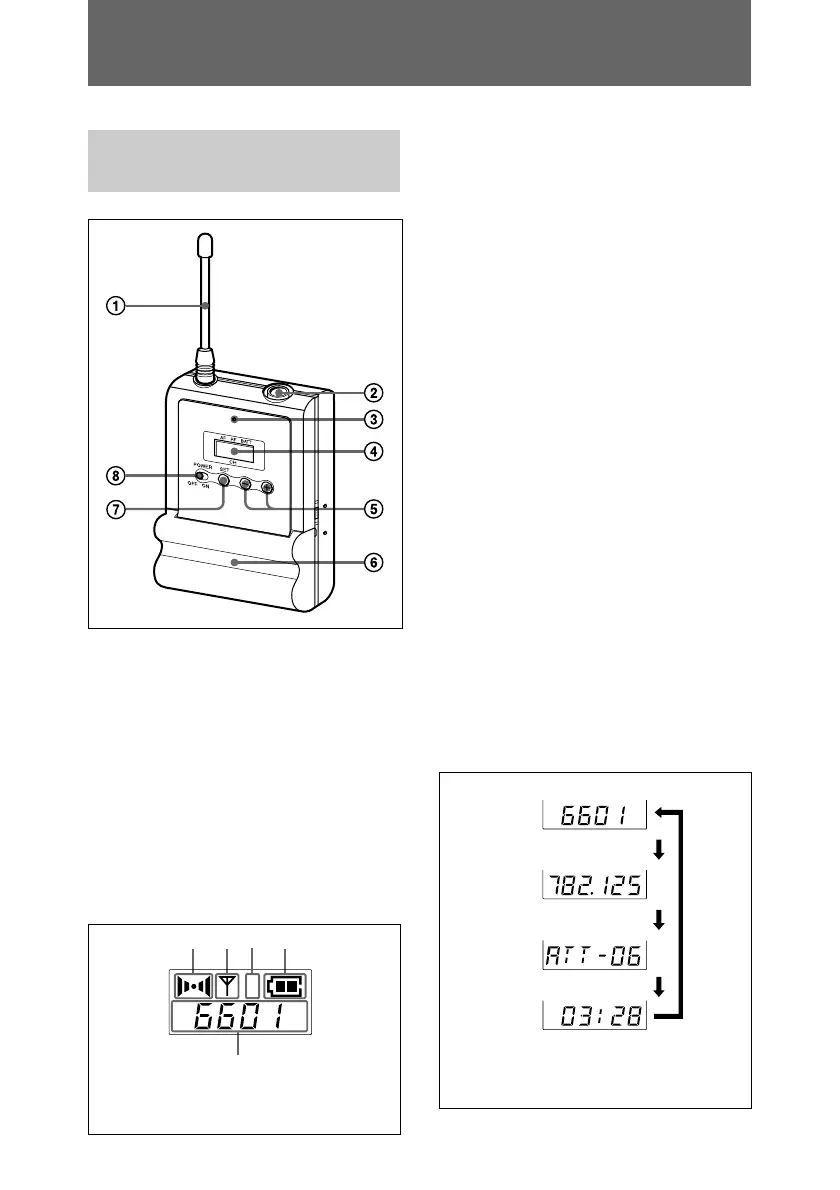
Parts Identification
Body-pack transmitter
(UTX-B1)
1 Antenna
2 Audio input connector
Connect the supplied lavalier
microphone here.
3 Power indicator
Lights up red when the transmitter is
tuned on.
4 Display section
A AF (audio frequency) indication
Appears whenever the input audio
signal is stronger than the reference
level.
B RF (radio frequency) indication
Appears during signal transmission
from the antenna.
C RF (radio frequency) level
indication
Shows the RF output level setting.
For details, see “Setting the RF output
level” on page 52.
D BATT (battery) indication
Shows the battery condition.
For details, see “Power Supply” on
page 38.
E CH (channel) indication
Shows the transmission channel. Each
time you press the SET button in
transmission mode, the channel
indication changes as follows.
For details, see “Settings” on page
47.
A
B
D
E
AF RF
CH
BATT
C
H
L
The E channel indication for
U66 model is shown.



 To Next Page