31
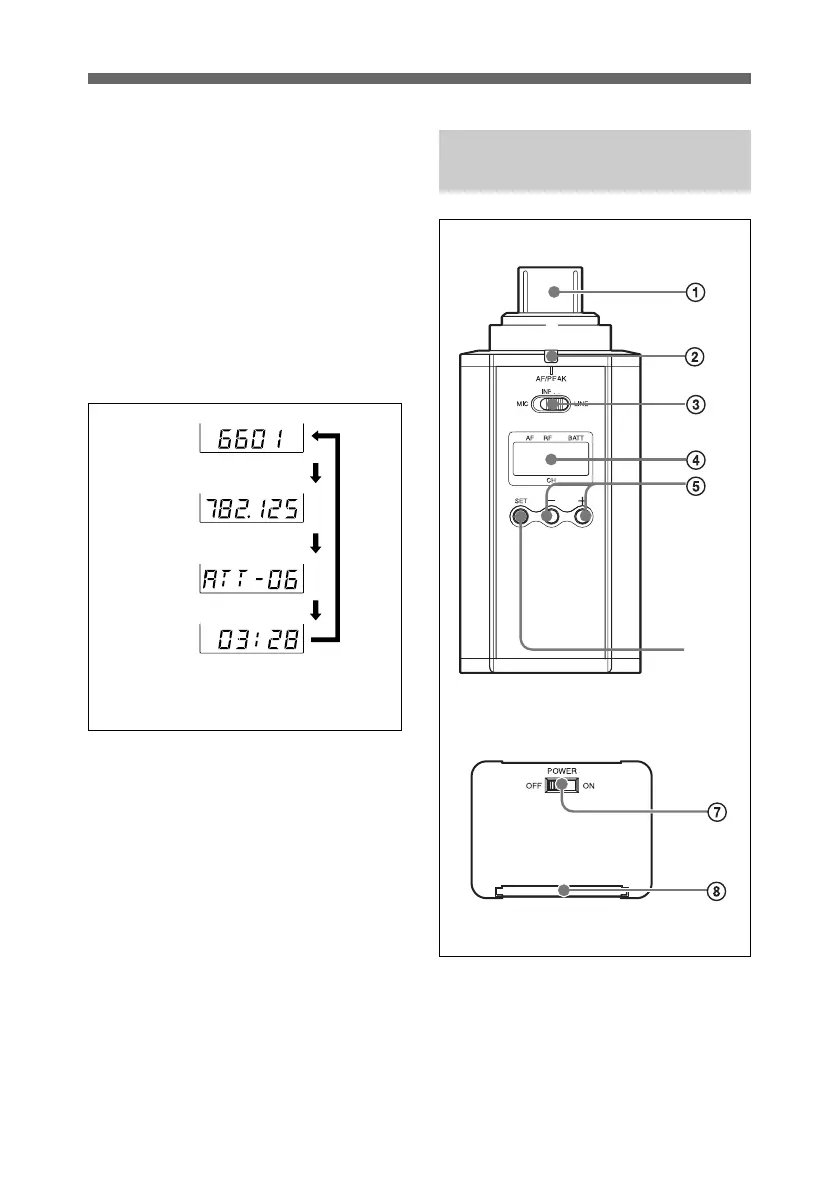
D BATT (battery) indication
Shows the battery condition.
For details, see “Power Supply” on
page 38.
E CH (channel) indication
Shows the transmission channel. Each
time you press the SET button, the
channel indication changes as follows.
For details, see “Settings” on page
47.
5 + (+ selection) / – (– selection/
reset) buttons
Press these buttons to set the
transmission channel, frequency, or
attenuation level of the input signal.
The “–” button resets the accumulated
battery use time to “00:00”.
6 SET button
Press to change display parameters.
For details, see “Settings” on page
47.
Transmission
channel
Transmission
frequency
Attenuation
level of the
input signal
Accumulated
battery use
time
Press
the
SET
button.
The channel/frequency indications for
U66 model are shown.
Plug-on transmitter
(UTX-P1)
1 Audio input connector (XLR
type)
Connect a microphone or a line output
connector of an audio mixer, etc.
6
Front side
Bottom side



 To Next Page