Introducing the Digital TV (DTV)
6
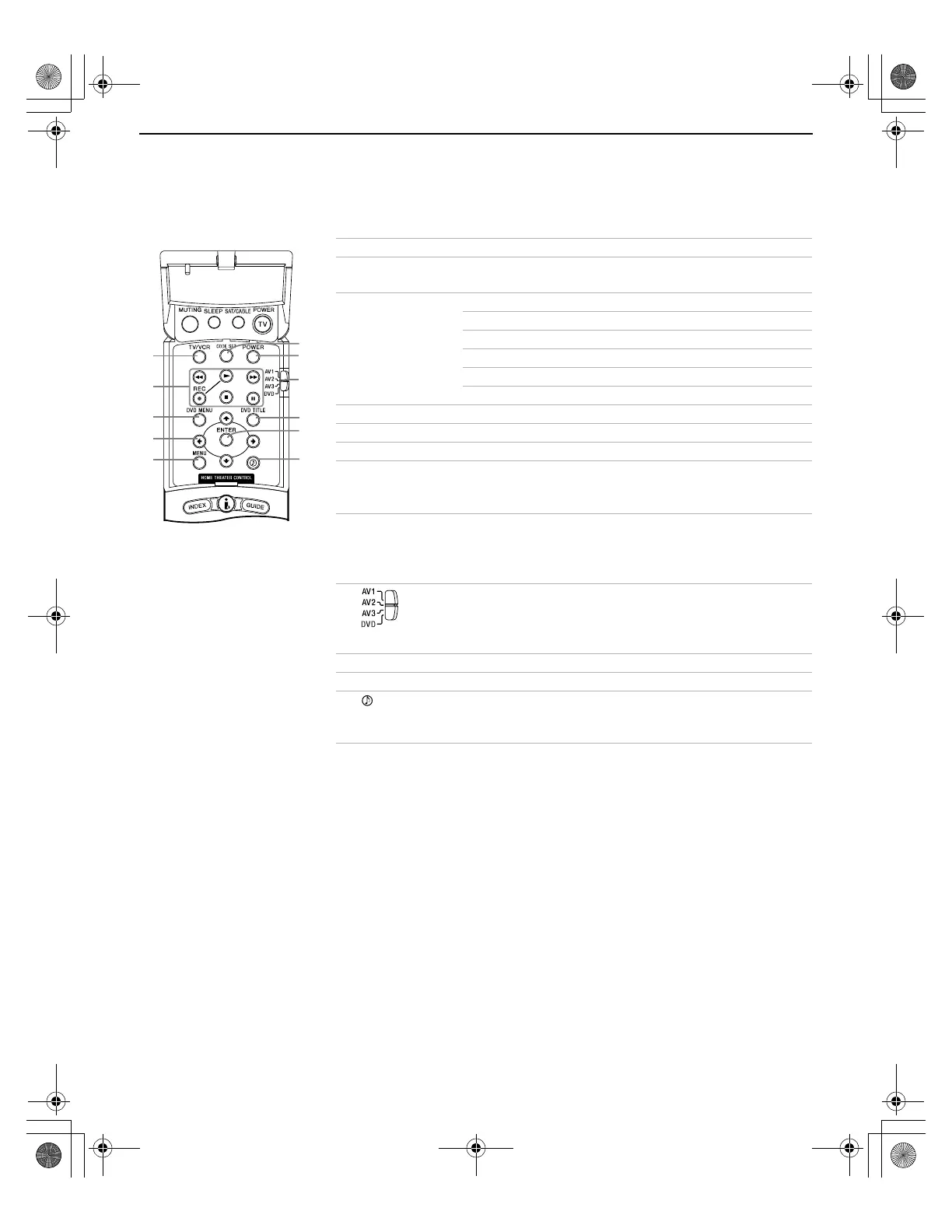
Inside Panel
You can access the following buttons by lifting up the outside panel.
Button Description
1 TV/VCR Press to change the VHF/UHF output of the VCR.
2 Transport
Buttons
m Rewind
N Play
z Record (press together with N)
x Stop
M Fast-forward
X Pause
3 DVD MENU Press to display the DVD menu.
4 B bVv Press B bVv to move the on-screen cursor.
5 MENU Press to display the DVD setup menu.
6 CODE SET Used for programming the remote control to operate
non-Sony video equipment. For details, see
“Programming the Remote Control” on page 62.
7 POWER Press to turn on and off other audio/video equipment
you have programmed into the remote control. For
instructions, see “Programming the Remote Control” on
page 62.
8 Use to switch control for connected video equipment.
You can program one video source for each switch
position. For details, see “Programming the Remote
Control” on page 62.
9 DVD TITLE Press to display the DVD title.
0 ENTER Press to select.
qa Press repeatedly to step through the Audio Effect
options: TruSurround, Simulated, and Off. Also available in
the Audio menu. For details, see page 48.
2
3
4
5
9
qa
q;
7
6
8
1
Welcome.fm5 Page 6 Friday, July 6, 2001 1:48 PM



 To Next Page