Connecting and Setting Up the DTV
19
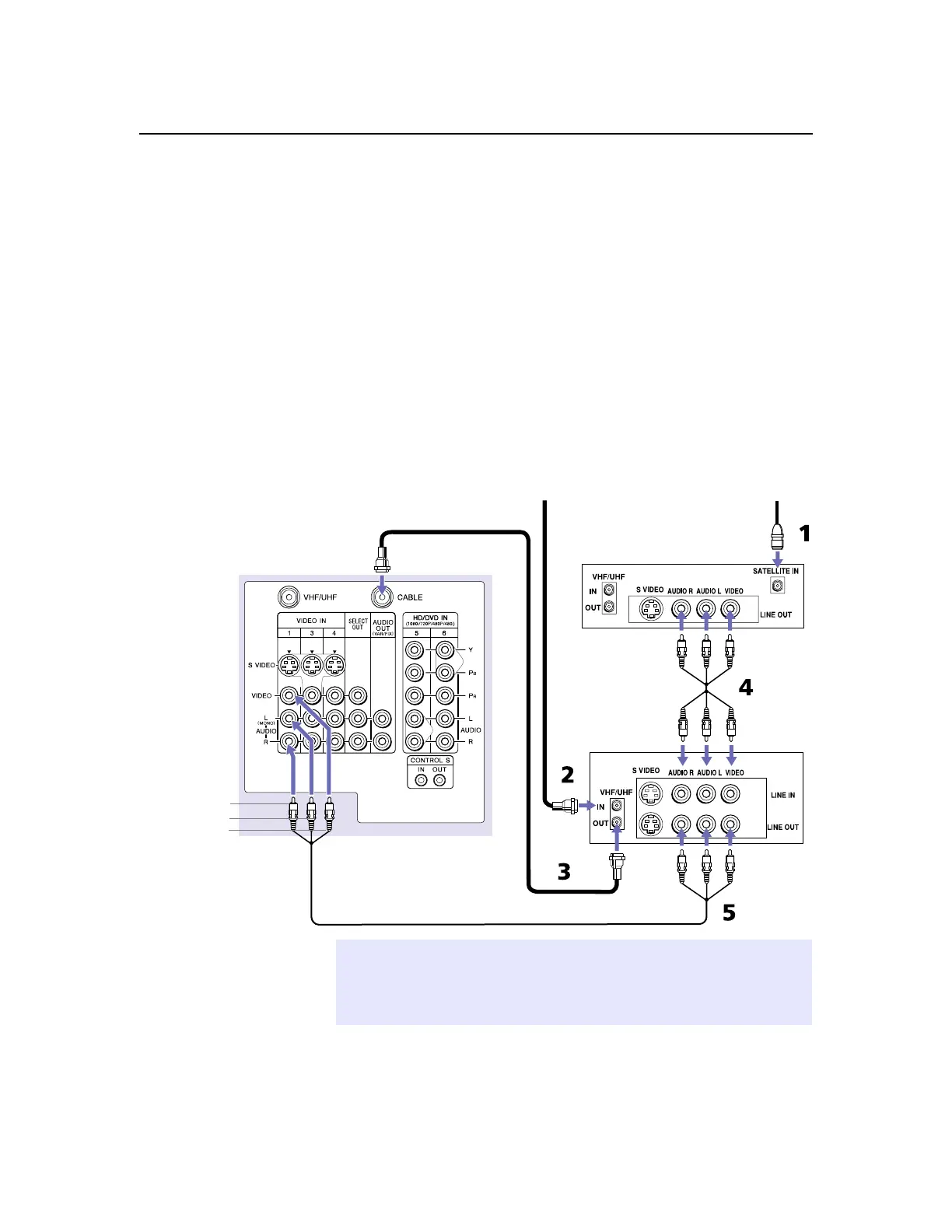
Connecting a Satellite Receiver with a VCR
1
Connect the satellite antenna cable to the satellite receiver’s
SATELLITE IN jack.
2
ConnecttheCATVcabletotheVCR’s VHF/UHF IN jack.
3
Using a coaxial cable, connect the VCR’sOUTjacktotheDTV’s
CABLE jack.
4
Using an A/V cable, connect the satellite receiver’sAudioand
VideoOUTjackstotheVCR’s Audio and Video IN jacks.
5
Using an A/V cable, connect the VCR’s Audio and Video OUT
jacks to the DTV’sAudioandVideoINjacks.
6
If necessary, change the video input on your VCR. (For details,
see your VCR’sinstructionguide.)
DTV
Satellite receiver
VCR
A/V cable
Coaxial
cable
CATV
Satellite
antenna
cable
cable
AUDIO-R (red)
AUDIO-L (white)
VIDEO (yellow)
✍
If the peripherals you are connecting have S VIDEO jacks, you can use S VIDEO
cables for improved picture quality (compared to combination audio/video
cables). Because S VIDEO cables carry only the video signal, you will also need
audio cables for sound.



 To Next Page