Connecting and Setting Up the DTV
14
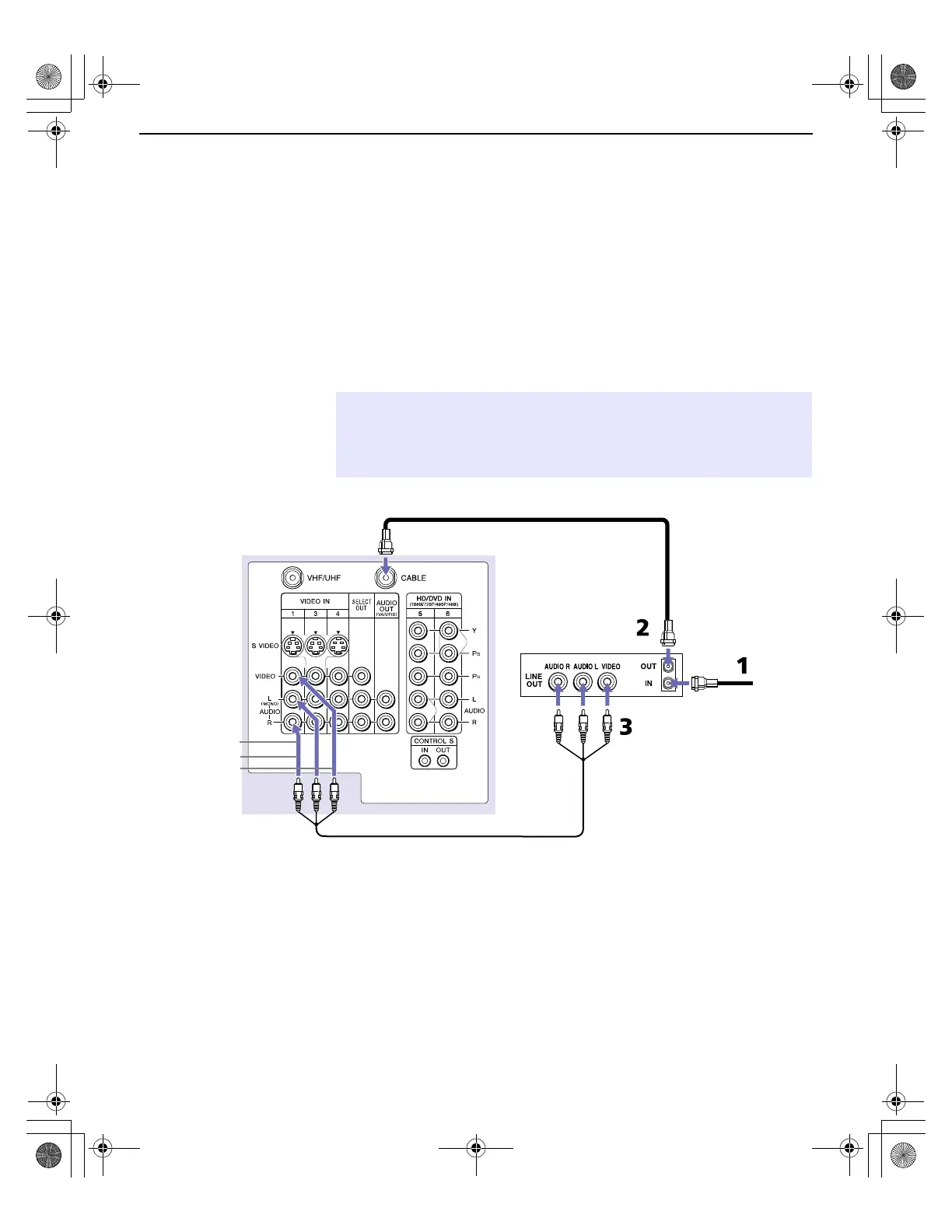
Connecting a VCR and Cable
Use this hookup if you have cable TV that does not require a cable
box.
1 Connect the cable TV cable to the VCR’s IN jack.
2 Using a coaxial cable, connect the VCR’s OUT jack to the DTV’s
CABLE jack.
3 Using an A/V cable, connect the VCR’s Audio and Video OUT
jacks to the DTV’s Audio and Video IN jacks.
✍ If the VCR you are connecting has an S VIDEO jack, you can use an S VIDEO
cable for improved picture quality (compared to a combination audio/video
cable). Because an S VIDEO cable carries only the video signal, you will also
need audio cables for sound.
VCR
DTV
Cable
Coaxial cable
A/V cable
AUDIO-L (white)
AUDIO-R (red)
VIDEO (yellow)
Install.fm5 Page 14 Friday, July 6, 2001 1:52 PM



 To Next Page