Connecting and Setting Up the DTV
10
DTV Controls and Connectors
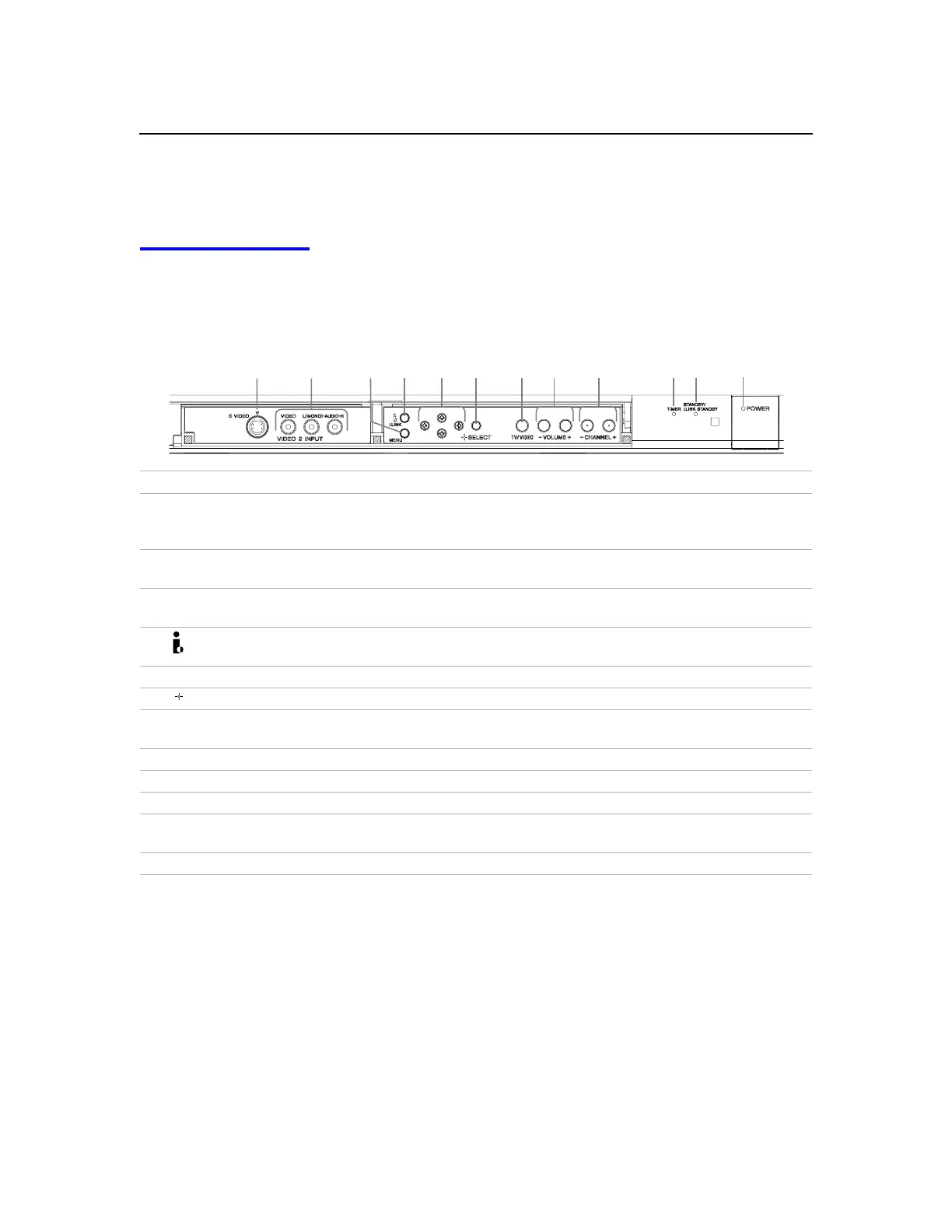
Front Panel Controls
The front panel provides convenient inputs for audio/video
components you plan to connect temporarily, such as a camcorder or
digital camera. It includes several buttons that you’ll also find on the
remote control.
Control Description
1 S VIDEO 2 INPUT
Connects to the S VIDEO OUT jack of your camcorder or other S VIDEO-
equipped video component. Provides better picture quality than the
VHF/UHF jacks or the Video IN jack.
2 VIDEO 2 INPUT
VIDEO/L(MONO)-AUDIO-R
Connect to the audio and video OUT jacks on your camcorder or other video
component.
3 MENU
Press to display the DTV on-screen menu. Press again to exit from the menus.
For details, see page 45.
4 i.LINK
Press to display the i.LINK Control Panel. For details on using the i.LINK
Control Panel, see page 42.
5 B bVv
Press
B bVv
to move the on-screen cursor and press
SELECT
to select.
6 SELECT
Press to select the on-screen highlighted item.
7 TV/VIDEO
Press repeatedly to step through the video equipment connected to your
DTV
’s
video inputs.
8 -VOLUME+ Press to adjust the volume.
9 -CHANNEL+
Press to scan through channels.
0 TIMER
When lit, indicates one of the timers is set. For details, see pag e43.
qa STANDBY/
i.LINK STANDBY
When lit in orange, indicates that i.LINK Standby is
On
. When lit in red,
indicates that i.LINK Standby is
Off
. For details, see page 59.
qs POWER
PresstoturnonandofftheDTV.
1
2
4 5 6
7
8
9
3
q;
qs
qa



 To Next Page