10
Connecting the Projector
OUTPUT
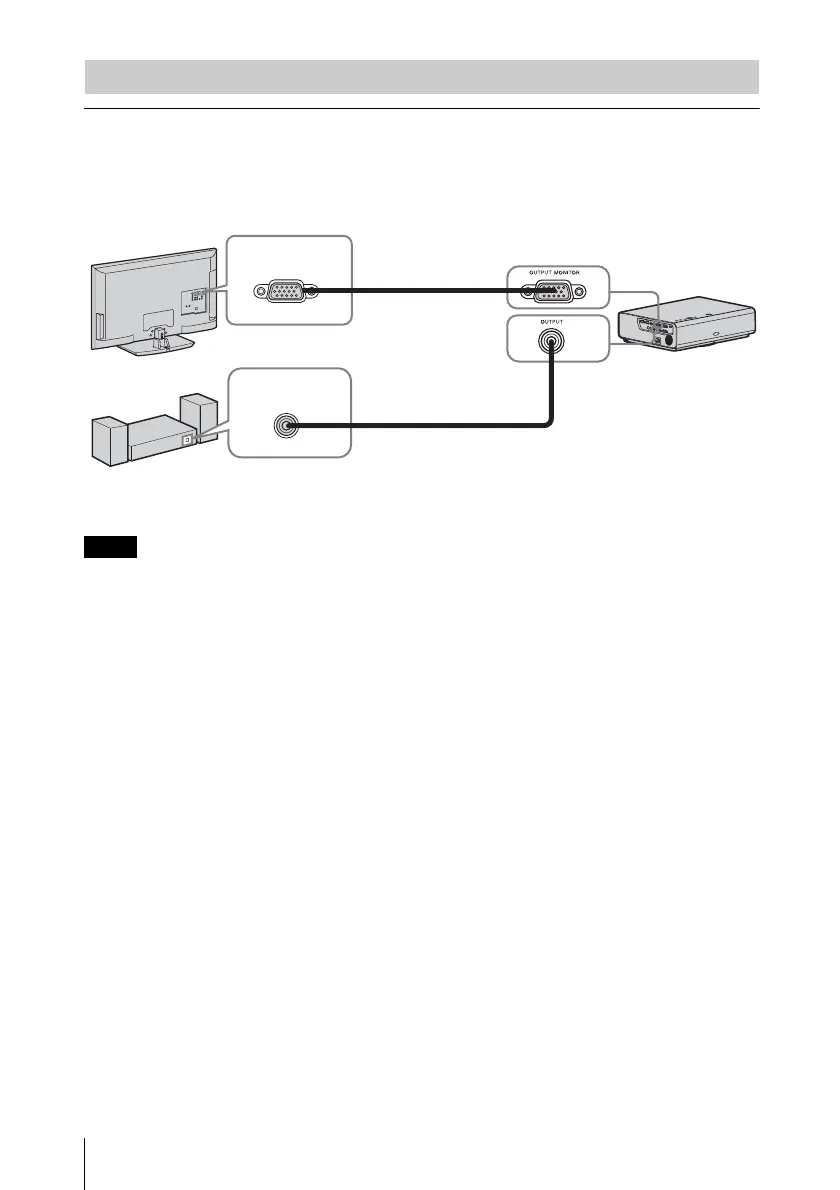
Projected images and input audio can be output to display equipment such as a monitor and
audio equipment such as speakers with a built-in amplifier. When an audio cable is connected
to the audio output connector, no sound will be heard from the built-in speaker.
Projected images and audio can be output. The image is output only as a computer signal input from
the RGB input connector (INPUT A/INPUT B) or a video signal input from the YP
BPR input
connector (INPUT A).
Connecting an External Monitor and Audio Equipment
Note
Mini D-sub 15-pin
cable (supplied)
RGB input
connector
Display equipment
Audio input
connector
Audio cable
(stereo mini plug)
(not supplied)
Audio equipment


 To Next Page