EasyManua.ls Logo

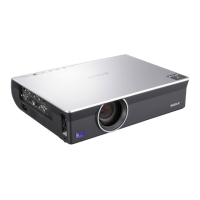
Sony VPL-CX70 - User Manual

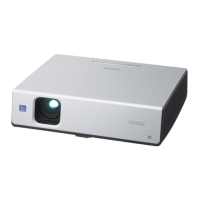
Sony VPL-CX70
180 pages
Print Icon
To Next Page IconTo Next Page
Loading...
GB
FR
ES
Data Projector VPL-CX75/VPL-CX70
© 2004 Sony Corporation
2-149-997-13 (1)
Data Projector
Operating Instructions
Mode d’emploi
Manual de instrucciones
VPL-CX75
VPL-CX70

Table of Contents

Other manuals for Sony VPL-CX70

Questions and Answers

  • S
    Susan LeeAug 29, 2025
    How to fix Sony VPL-CX70 Projector when the power is not turned on?
    • K
      kimberly39Aug 29, 2025
      If the Sony Projector's power is not turning on, wait about 60 seconds before trying to turn it on again if it was recently turned off. Also, ensure that the lamp cover and the air filter cover are securely closed and attached, respectively.
  • F
    francojosephSep 4, 2025
    How to fix a flickering picture on my Sony Projector?
    • M
      Martin CobbSep 4, 2025
      If the picture on your Sony Projector flickers, adjust “Dot Phase” in the INPUT SETTING menu.
  • B
    Bradley TorresAug 28, 2025
    What does “Please replace the LAMP” mean on Sony VPL-CX70?
    • A
      Adam HallAug 28, 2025
      This message indicates that it is time to replace the lamp. Replace the lamp.
  • M
    mpriceSep 22, 2025
    Why does the on-screen display not appear on my Sony VPL-CX70?
    • S
      Samantha RiveraSep 22, 2025
      If the on-screen display does not appear on your Sony Projector, check if “Status” on the MENU SETTING menu has been set to “Off.” If so, set “Status” to “On.”
  • J
    Jason WhiteSep 23, 2025
    Why can't the computer be controlled with the Remote Commander on my Sony Projector?
    • S
      Sarah Smith MDSep 23, 2025
      If the computer cannot be controlled with the Remote Commander on your Sony Projector, ensure the USB cable is connected between the projector and the computer. If you are using the Air Shot (VPL-CX76 only), the computer cannot be controlled with the Remote Commander; use the presentation tool instead.
  • T
    Terry WilsonSep 7, 2025
    What to do if the control panel keys do not function on my Sony Projector?
    • M
      Martin LeonardSep 8, 2025
      If the control panel keys on your Sony Projector do not function, unlock the control panel keys.
  • S
    steven48Sep 12, 2025
    Why is the picture from INPUT A connector colored strange on Sony Projector?
    • D
      Dustin MillerSep 12, 2025
      If the picture from INPUT A connector is colored strangely, the setting of “Input-A Signal Sel.” in the SET SETTING menu is incorrect. Select “Computer,” “Video GBR” or “Component” correctly according to the input signal.
  • D
    Diane CollinsSep 18, 2025
    Why does my Sony VPL-CX70 Projector say 'Please check Input-A Signal Sel.' even with the correct signal?
    • A
      Andrew SuttonSep 18, 2025
      If the Sony Projector displays “Please check Input-A Signal Sel.” even when inputting the correct signal from INPUT A, the setting of “Input-A Signal Sel.” on the SET SETTING menu is incorrect. Select “Computer,” “Video GBR” or “Component” correctly according to the input signal.
  • M
    mccarthycarlosAug 26, 2025
    How to fix no picture on Sony VPL-CX70 Projector?
    • J
      Jamie RobersonAug 26, 2025
      If your Sony Projector shows no picture, check the cable connections, ensuring they are correctly connected. If connections are correct, and you still have no picture, make sure the input selection is correct by using the INPUT key. Also, ensure that the picture is not muted by pressing the PIC MUTING key. If you have a VPL-CX76 model, check if the B key is activated and deactivate it using the Presentation Tool.
  • B
    Bryan LarsonAug 25, 2025
    Why won't my Sony VPL-CX70 power on?
    • R
      Robert VegaAug 26, 2025
      If your Sony Projector won't power on, it may be because the power was recently turned off and on too quickly. Wait about 60 seconds before trying to turn it on again. Also, ensure that the lamp cover and the air filter cover are securely closed and attached.

Summary

Precautions

Installation and Usage Notes

Connecting the Projector

Computer Connection Guide

Guides for connecting the projector to a computer via USB and video cables.

Projecting the Picture

Initial Power On and Setup

Steps for powering on, initial setup, and input source management.

Picture Adjustments and Positioning

Correcting focus, size, tilt, keystone, and side shot distortions.

Menu Operations and Settings

The PICTURE SETTING Menu

Adjusting picture mode, volume, contrast, brightness, and color.

The INPUT SETTING Menu

Configuring input signals, aspect ratio, and signal adjustment.

Installation and Maintenance

Lamp and Air Filter Maintenance

Procedures for replacing the lamp and cleaning the air filter.

Troubleshooting Guide

Power and Picture Issues

Solutions for power, display, and image quality problems.

Product Specifications

Sony VPL-CX70 Specifications

VPL-CX75

Optical IconOptical
projection system3 LCD panels, 1 lens projection system
panel0.79-inch XGA LCD panel with Micro Lens Array
projection lens1.2 times F1.6 to 1.78, f23.5 to 28.2 mm
lamp165 W/135 W UHP
screen coverage40 to 300 inches (measured diagonally)
keystone correction rangeMax. ±30° vertical, ±20° horizontal
light output2500 ANSI lm (lamp mode high)
General IconGeneral
speakerMono 1 W (max.) x 1
power requirementsAC 100 to 240 V, 50/60 Hz
power consumptionMax 240 W
standby power consumption9 W (standard), 0.5 W (low)
operating temperature0 to 35 ºC (32 to 95 ºF)
operating humidity35% to 85% (no condensation)
dimensions298 x 69 x 244 mm
massApprox. 2.9 kg
heat dissipation819 BTU
Input/Output IconInput/Output
video inputS Video Y/C Mini DIN 4-pin, Composite RCA pin jack
audioStereo mini jack
input ARGB/Component Analog RGB/Component (HD D-sub 15 pin female x 1)
USBUpstream (B type, female x 1)
wireless LANWireless LAN card slot x 1
memory stickMemory Stick media slot x 1

VPL-CX70

Optical IconOptical
projection system3 LCD panels, 1 lens projection system
panel0.79-inch XGA LCD panel
projection lens1.2 times F1.6 to 1.78, f23.5 to 28.2 mm
lamp165 W/135 W UHP
screen coverage40 to 300 inches (measured diagonally)
keystone correction rangeMax. ±30° vertical, ±20° horizontal
light output2000 ANSI lm (lamp mode high)
General IconGeneral
speakerMono 1 W (max.) x 1
power requirementsAC 100 to 240 V, 50/60 Hz
power consumptionMax 240 W
standby power consumption9 W (standard), 0.5 W (low)
operating temperature0 to 35 ºC (32 to 95 ºF)
operating humidity35% to 85% (no condensation)
dimensions298 x 69 x 244 mm
massApprox. 2.9 kg
heat dissipation819 BTU
Input/Output IconInput/Output
video inputS Video Y/C Mini DIN 4-pin, Composite RCA pin jack
audioStereo mini jack
input ARGB/Component Analog RGB/Component (HD D-sub 15 pin female x 1)
USBUpstream (B type, female x 1)

Related product manuals