11
Location and Function of Controls
Overview
f Air filter covers
To maintain optimal performance, clean
the air filter whenever you replace the
lam
p.
For details, see “Cleaning the Air
Filter” on page 42.
g Rear remote control detector
h Connector/Connector Panel
For details, see “Connector Panel” on
page 12.
i Security lock
Connects to an optional security cable
(from Kensington).
Web page address:
http://www.kensington.com/
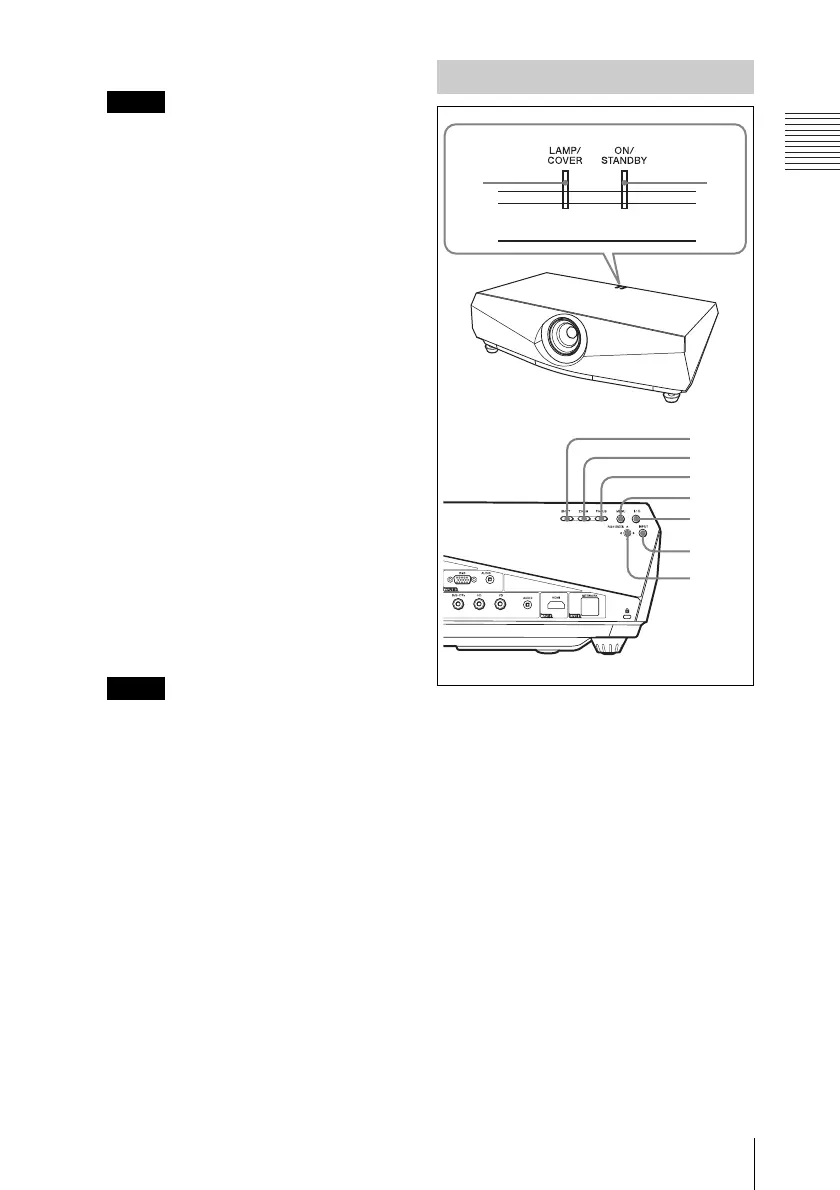
j Control panel
For details, see “Control Panel” on
page 11.
k Speakers
l Ventilation holes (exhaust)
m Ventilation holes (intake)
• Do not place anything near the
ventilation holes as this may cause
internal heat build-up.
• Do not place your hand near the
ventilation holes as this may cause
injury.
a LAMP/COVER indicators
Flashes in orange under the following
conditions:
• A reception rate of 2 flashes when the
lamp cover or air filter cover is not
secured firmly.
• A reception rate of 3 flashes when the
lamp has reached the end of its life or
reaches a high temperature.
For details, see page 45.
b ON/STANDBY indicator
Lights up or flashes under the following
conditions:
– Lights in red when the AC power cord
is plugged into a wall outlet. Once the
projector is in standby mode, you can
turn it on with the ?/1 key.
Note
Notes
Control Panel
1
6
5
4
3
7
8
9
2



 To Next Page