19
Projecting
Projecting the Picture
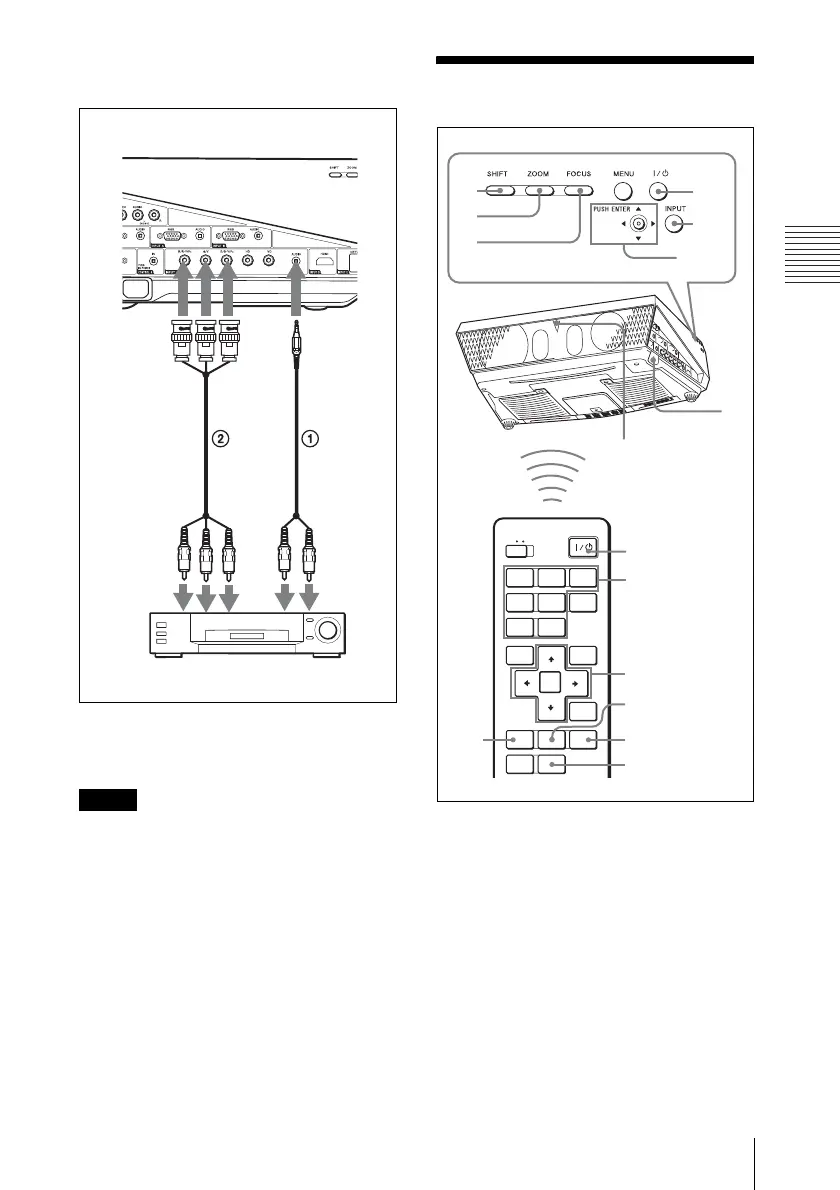
To connect to a video GBR/
Component output connector
A Stereo audio connecting cable (not supplied)
(Use a no-resistance cable.)
B BNC cable (not supplied)
Set the aspect ratio using “Aspect” on the
Screen menu according to the input signal.
Projecting
1 Plug the AC power cord into a wall
outlet, then connect all equipment.
The ON/STANDBY indicator lights in
red and the projector goes into standby
mode.
2 Press the ?/1 key.
The ON/STANDBY indicator flashes in
green, and then lights in green.
3 Turn on the equipment connected to
the projector.
Note
Side
to
audio
output
(R)
VCR
to video
GBR/
component
output
to
audio
output
(L)
COMMAND
INPUT
A
INPUT
B
INPUT
C
INPUT
D
VIDEO
ENTER
MENU APA
RESET
SHIFTZOOMFOCUS
ASPECT
KEY
STONE
S VIDEO
INPUT
E
AIR
SHOT
OFF ON
7
8
2
1
2
4
6,7,8
8
78
6
4
6,7,8
8
Rear remote control
detector



 To Next Page