Connecting to an HDMI Compatible Device
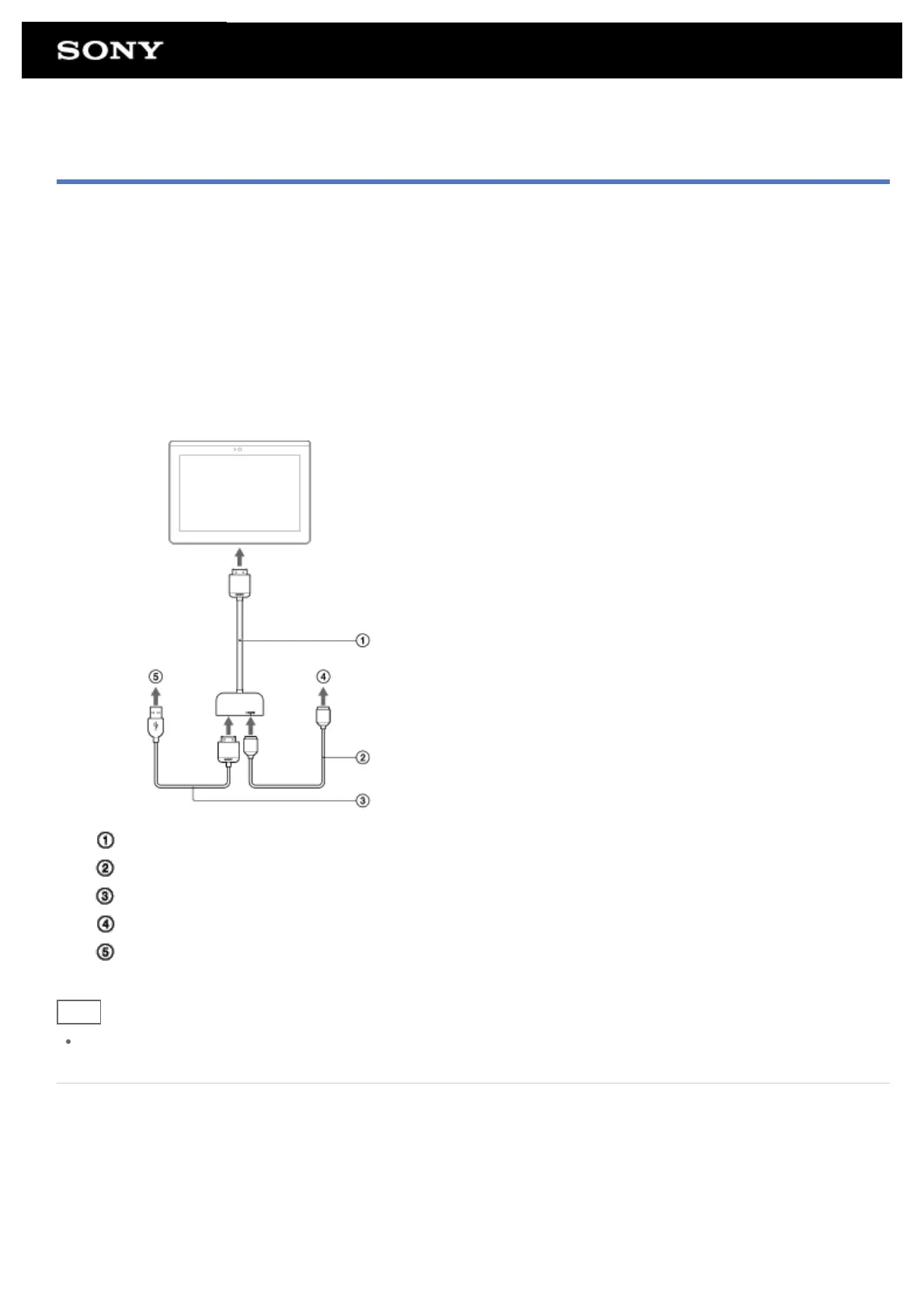
Your tablet can output data to HDMI compatible devices such as a TV or projector. An HDMI adapter cable (sold
separately) is necessary for this connection.
1. Turn over your tablet, and then remove the Multi Port cover.
2. Connect the HDMI adapter cable (SGPHC1, sold separately) to the Multi Port.
3. Connect a commercially available HDMI cable to the HDMI adapter cable, and then connect to a TV or
projector.
4. Connect the supplied USB cable for Multi Port (SGPUC2) to the HDMI adapter cable, and then connect to
the AC adapter.
HDMI Adapter Cable (SGPHC1, sold separately)
Commercially available HDMI cable
Supplied USB cable for Multi Port (SGPUC2)
To TV or projector
To AC adapter
Hint
For details on the HDMI adapter cable, see the operating instructions supplied with the HDMI adapter cable.
Related Topic
Supported Formats
Connecting to a Computer
Connecting a USB Compatible Device











 To Next Page