10
6. Home button
Press it to turn to the main menu quickly.
7. SETUP button
Press it to turn to setting menu quickly. Long press the button to enter into EQ setting.
8. SEL button
SEL: Press it to enter SOUND SETTING menu to adjust the sound settings; EQ => BASS =>
TREBLE = > BALANCE => FADER => EQ. Adjust the level by click touch screen to increase or
decrease.
9. IR Sensor
IR Remote control signal receiving window. Max distance is 6-8 meters, 45 angels.
10. TFT display
11. AV-in Jack
Put the AV plug into the AV-IN jack which was marked on front panel.
12. USB slot
13. DISC slot
14. Anti-Theft LED flash
15. RESET button
Press it with a thin, sharp object. The device will then be reset to factory default settings.
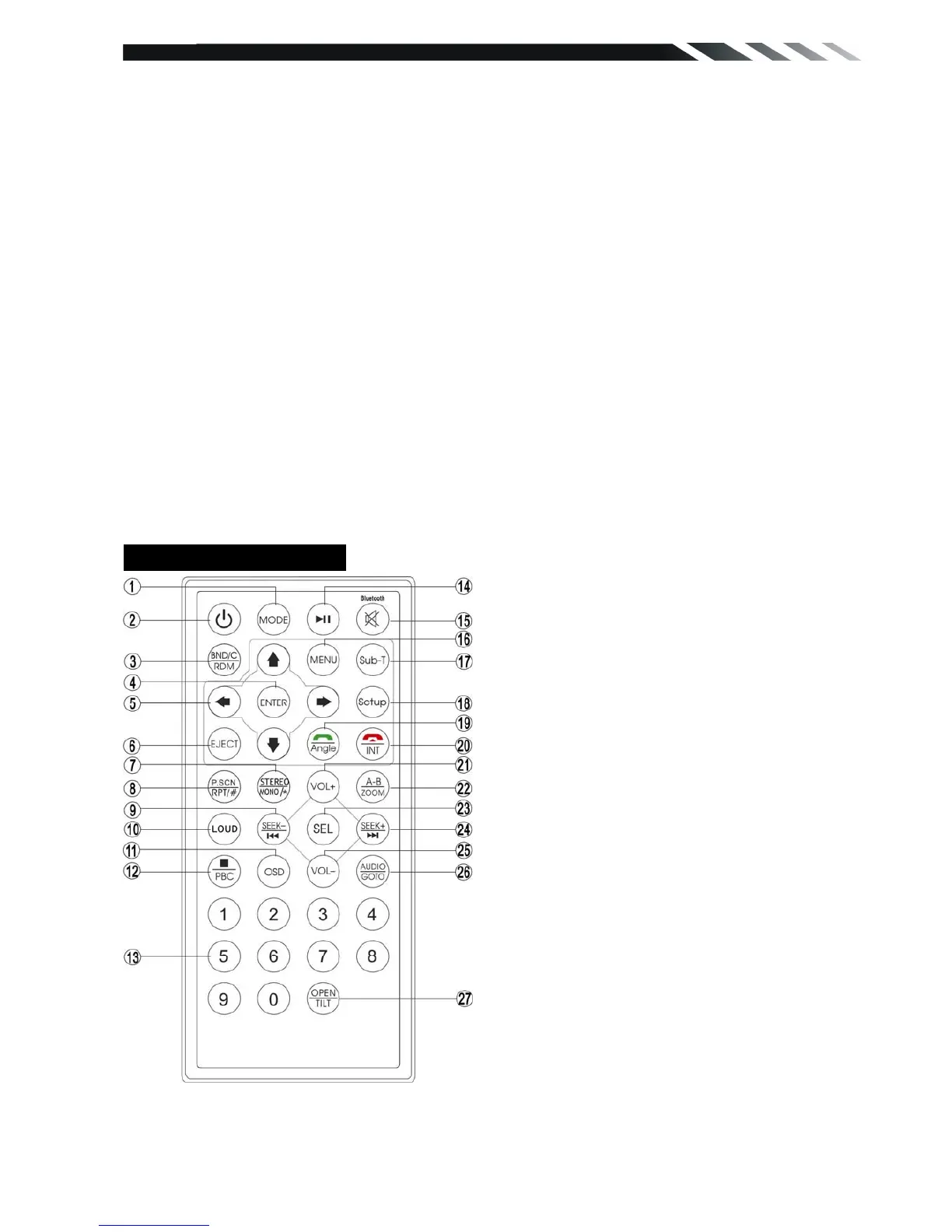
REMOTE CONTROL
1. MODE button
Press it to select the mode: Radio, DISC (if there is a disc in unit), USB (if there is a USB
device in the unit), CARD (if there is a SD/MMC card in the unit), Bluetooth (only for VR-732BT)
and AV IN.
1: MODE
2: POWER
3: BAND/RANDOM/CLEAR
4: ENTER
5: UP/DOWN/LEFT/RIGHT
6: EJECT
7: STEREO/MONO/*
8: P.SCN/RPT/#
9: BACKWARD/SEEK-
FAST BACKWARD
10: LOUD
11: OSD
12: PBC/STOP
13: DIGIT NUMBERS
14: PLAY/PAUSE
15:
MUTE/BLUETOOTH
16: MENU
17: SUBTITLE
18: SETUP
19: ANGLE/ACCEPT (optional)
20: INT/REJECT (optional)
21: VOLUME PLUS
22: A-B/ZOOM
23: SEL
24: FORWARD/SEEK+
FAST FORWARD
25: VOLUME MINUS
26: AUDIO/GOTO
27: OPEN(option without function)/TILT













 To Next Page