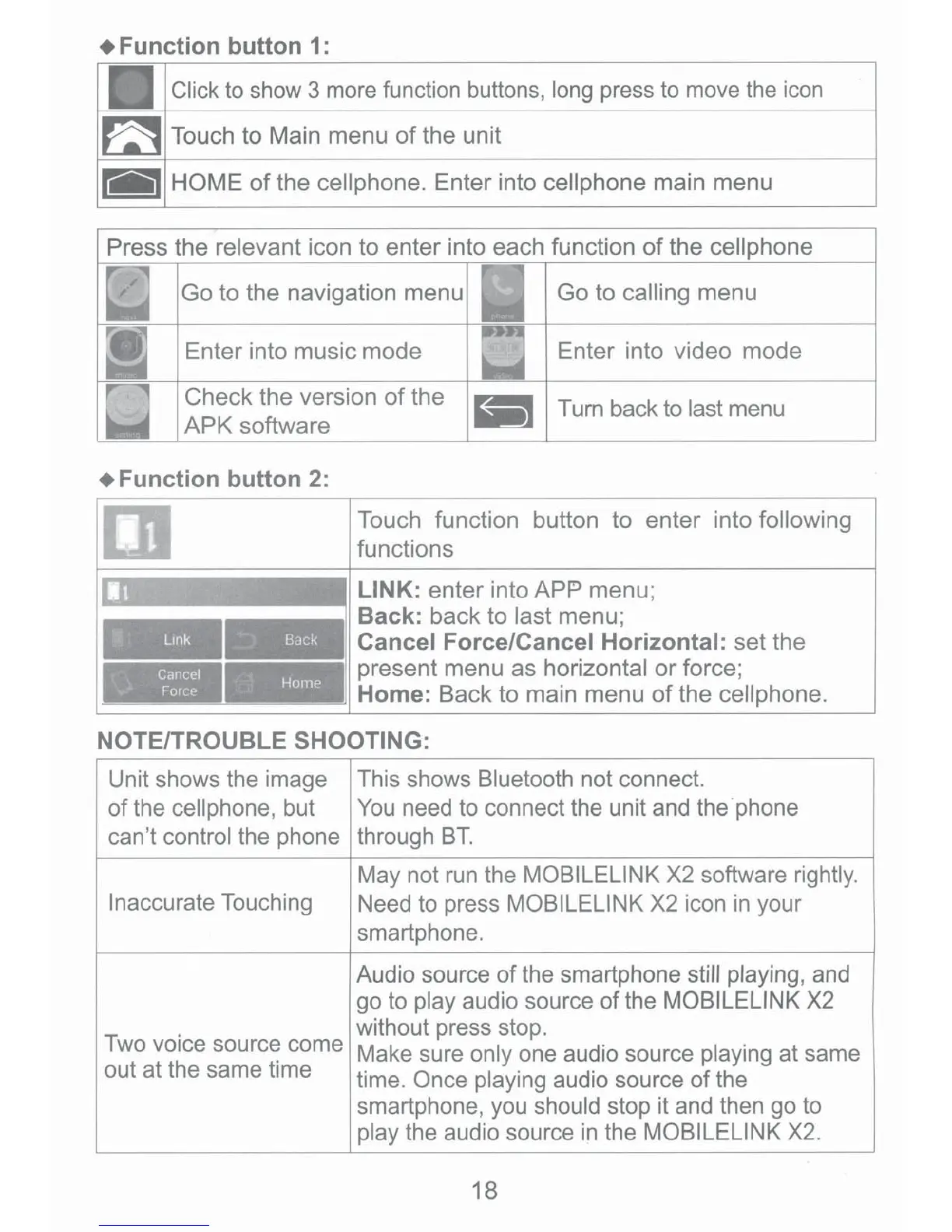
+Function
button
1:
Click to show 3 more function buttons, long press to move the
icon
Press the relevant icon to enter into each function
of
the cell phone
Go
to the navigation menu
Go
to calling menu
Enter into music
mode
Enter into video mode
Check the version
of
the
APK
software
~iii~
Turn back to last menu
+Function
button
2:
Lmk
_
Cancel
Home
·.·
Force
--
-
----
---
Touch function button to enter into following
functions
LINK: enter into
APP
menu;
Back: back to last menu;
: Cancel Force/Cancel Horizontal: set the
present menu
as
horizontal
or
force;
Home: Back to main menu
of
the cell phone.
NOTE/TROUBLE SHOOTING:
Unit shows the image This shows Bluetooth not connect.
of the cellphone, but
You
need to connect the unit and the.phone
can't control the phone through
BT.
May not
run
the MOBILELINK X2 software rightly.
Inaccurate Touching Need to press MOBILELINK X2 icon
in
your
smartphone.
Audio source of the smartphone still playing, and
go to play audio source of the MOBILELINK X2
. without press stop.
Two
vo1ce
sourc~
come Make sure only one audio source playing at same
out at the same time time. Once playing audio source
of
the
smartphone, you should stop it and then go to
play the audio source
in
the MOBILELINK
X2.
18






 To Next Page