18
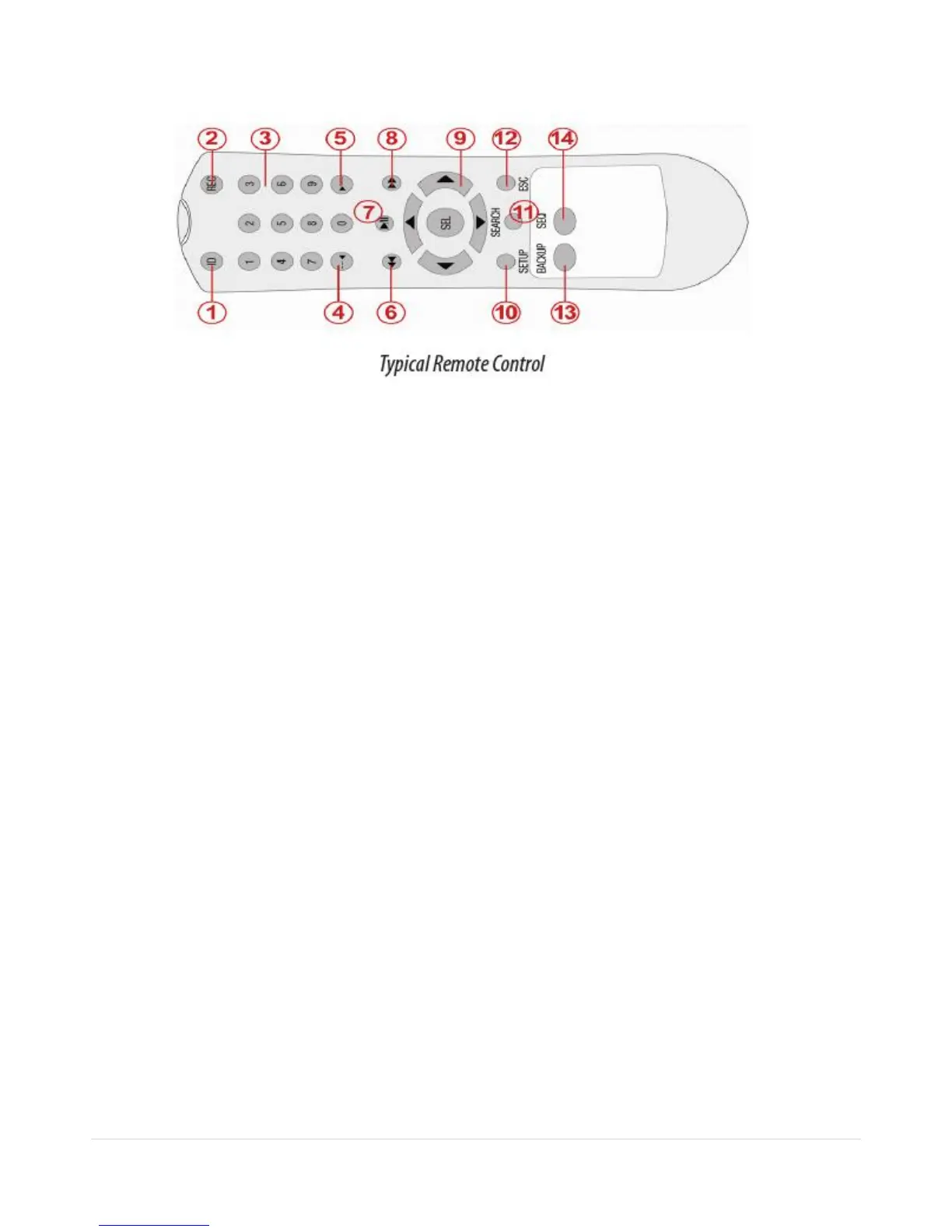
3-3. Remote Control
① ID: To set the remote control ID.
② REC: To start and stop manual recording
③ 0~9: To select channel (1,2,3,..) or to enter a DVR ID number or use as number key.
④ F/REW:
During playback – To move the playback position 60seconds back.
During Pause – To move the playback postion 1 frame back.
⑤ F/ADV:
During playback – To move the playback position 60seconds forward .
During Pause – To move the playback position moves 1 frame forward
⑥ REW: To rewind the recording.
⑦ PLAY/PAUSE: To play or to pause the recording in playback mode
⑧ FF: To fast forward the recording.
⑨ Direction buttons: To move menu items or select a channel.
⑩ SETUP: To open the SETUP menu.
⑪ SEARCH: To go to SEARCH menu.
⑫ ESC:
During setup – To retun to the preivous menu screen.
During Playback – To exit playback mode
System lock – To lock a system when pressing ESC button for 5 seconds.
System unlock – To unlock a system when pressing ESC button for 5 seconds.
⑬ BACKUP: To start a backup operations in live or playback mode
⑭ SEQ: To start auto sequencing the screen in full screen mode. (Toggle)


 To Next Page