26
HDD Bad Sectors Over – Enable Email Notification when the HDD has bad
Sectors.
HDD Almost Full Over – Enable Email Notification when the HDD is almost full
HDD Full – Enable Email Notification when the HDD is full
HDD Failure – Enable Email, Beep and Alarm output Notification when the
HDD fails.
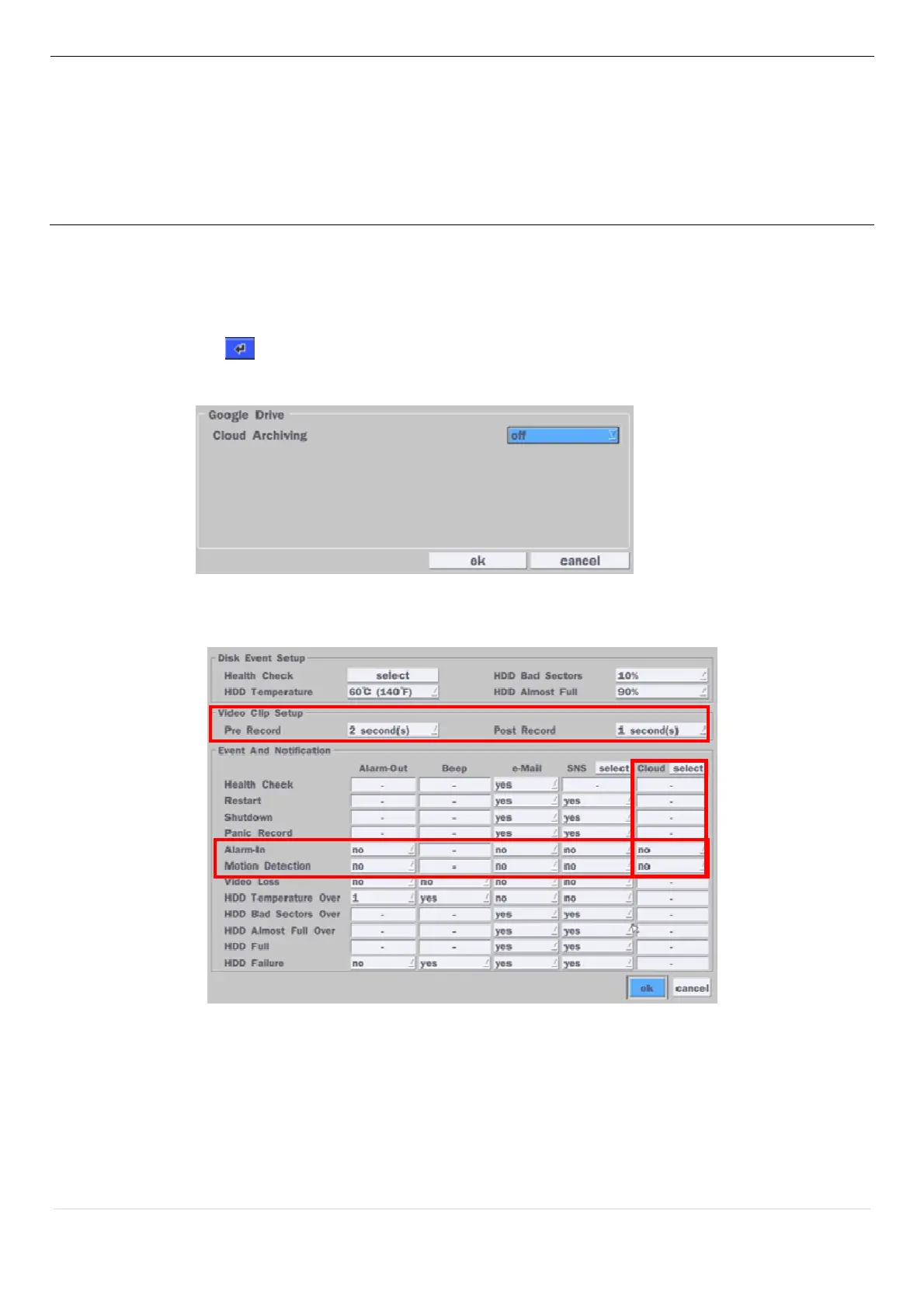
4-2-1. How to use ‘Cloud’
- Notice : User have to have a ‘Google Drive’ Account
- Save video clip on the Google Drive and playback though Mobile device.
1) How to set (Setup – System – System Event Notification – Cloud)
1-1) Click icon
1-2) Enter Google Drive Account
1-3) Video clip will be save at Google Drive when ‘Alarm-In’ and ‘Motion’ triggered.
1-4) Set Video clip duration
2) How to playback
2-1) Playback through PC
: Log in Google Drive and select a file and playback
2-2) Playback through Mobile device
: Use ‘SpecoPlayer’
Notice – Support iOS from ‘1.5.8_150316’, Android from ‘3.2.2.7_150316’



 To Next Page