33
4-6. Setup – NETWORK Mode
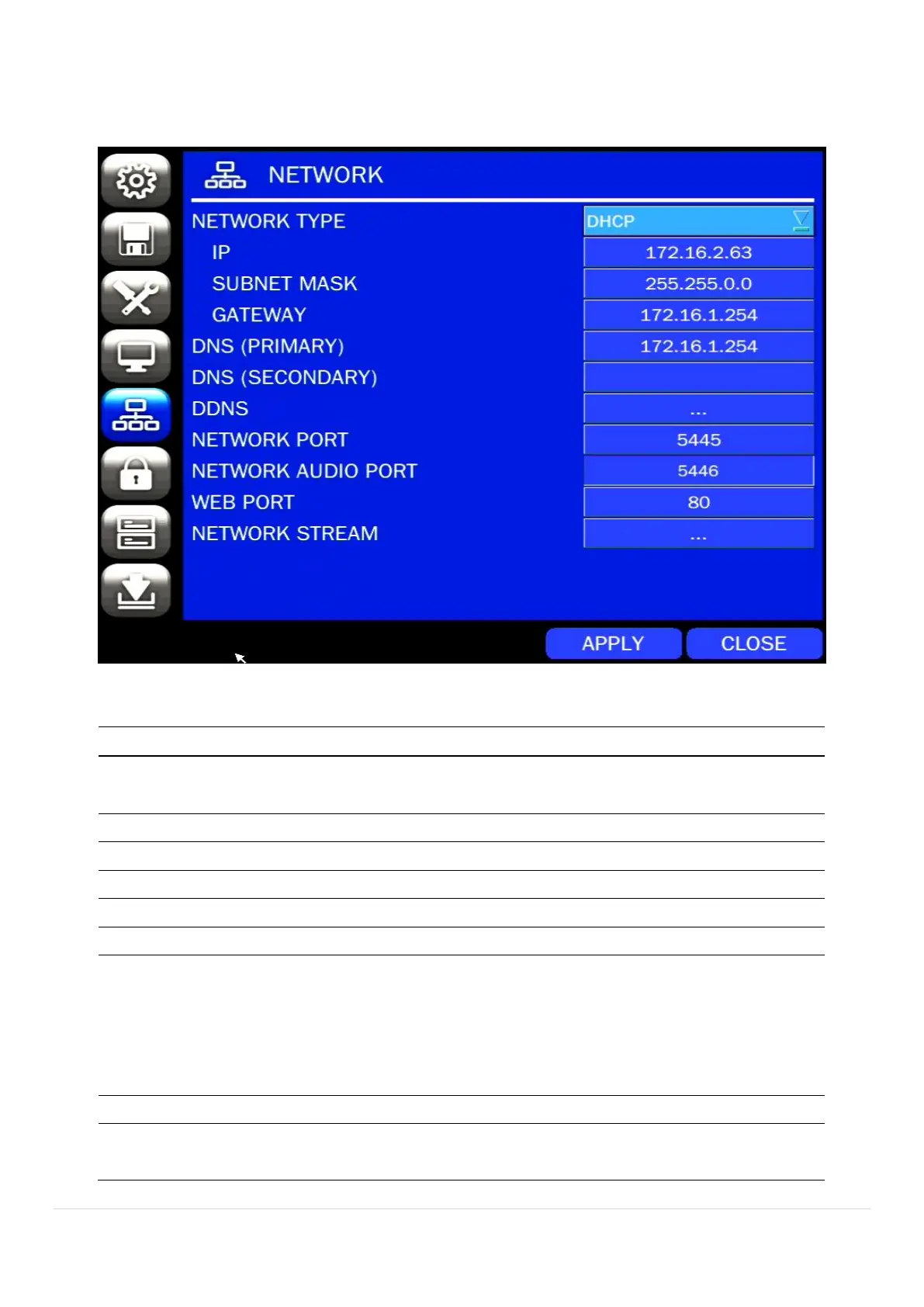
Select the NETWORK tab. Then, the network menu is displayed as pictured below. Navigate through the
menu items using the mouse or the control button on the remote control and change the value of the menu.
Figure 4.6.1. NETWORK Setup Screen
Table 4.6.1. Menu Items in NETWORK Setup Screen
DHCP: DVR will automatically retrieve an IP address.
STATIC: Network information must be manually configured.
Enter IP address that is assigned for the DVR
Enter Subnet Mask that is assigned for the DVR
Enter Gateway that is assigned for the DVR.
Enter Primary DNS address that is assigned for the DVR
Enter Secondary DNS address that is assigned for the DVR
Dynamic Domain Name System (DDNS) allows a DNS name to be
constantly synchronized with a dynamic IP address. In other words, it
allows using a dynamic IP address to be associated with a static
domain name so others can connect to it by the static name.
Enable/disable using domain name address through DDNS server.
Display the network audio port (NETWORK PORT + 1).



 To Next Page