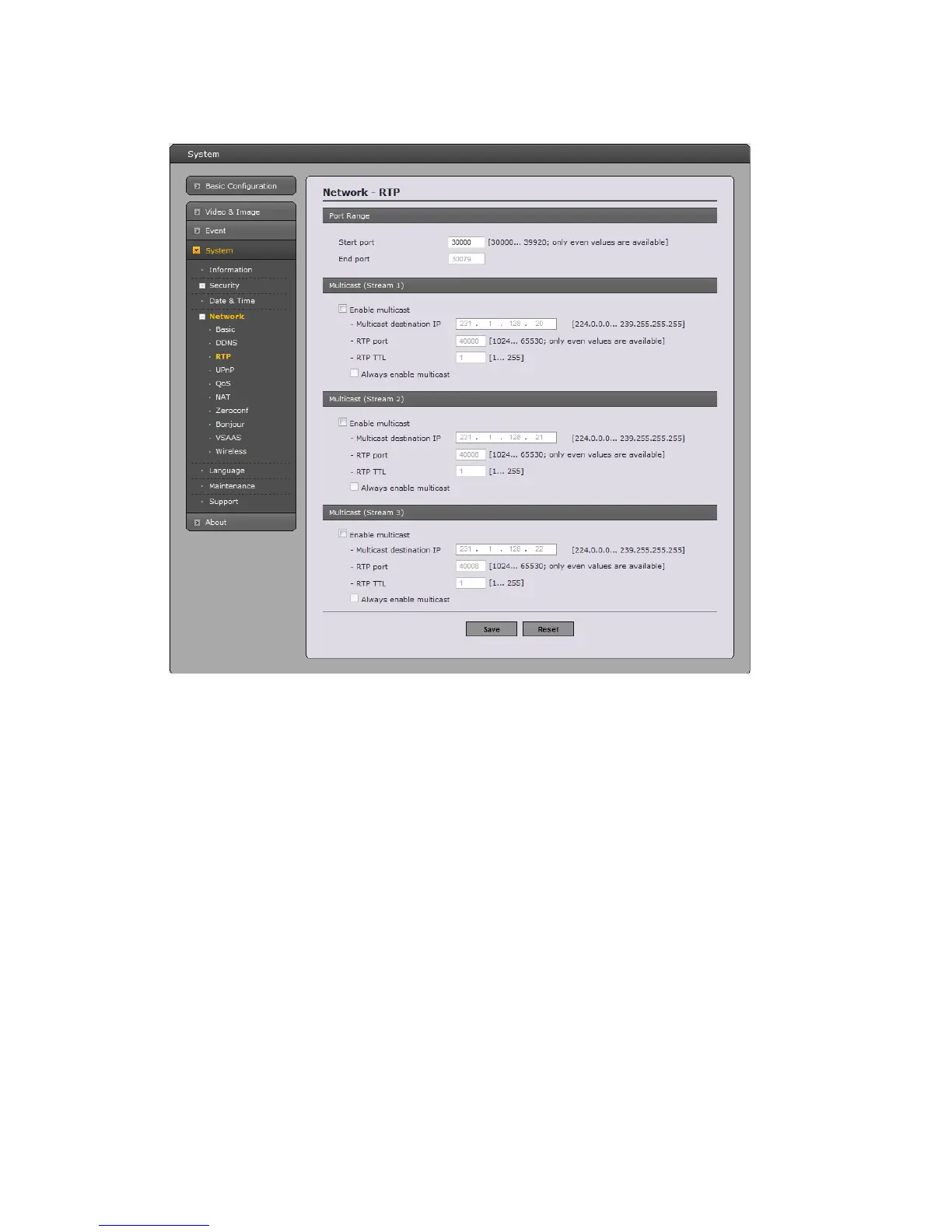
RTP
Hav
e a setting for sending and receiving a video on a real-time basis. These settings are the IP
address, port number, and Time-To-Live value to use for the media stream(s) in multicast H.264
format. Only certain IP addresses and port numbers should be used for multicast streams. For more
information, please see the online help.
• Port Range
- Start port: Enter a value between 30000 and 39920
- End port: Enter a value between 30000 and 39920
• Multicast
This function is for sending Video to Multicast group.
- Enable Multicast: Check the checkbox to enable multicast operation.
- Multicast destination IP: Enter an IP between 224.0.0.0 and 239.255.255.255. Although
it is empty, an IP will be entered automatically.
- RTP port: Enter a value between 1024 and 65530.
- RTP TTL: Enter a value between 1 and 255. If a network status is smooth, enter a lower
value. On the other hand, if a network status is poor, enter a higher value. When there are
many Network Cameras or users, a higher value may cause a heavy load to the network.
For a detailed setting, please consult with a network manager.
53


 To Next Page