1.
Tools required for this procedure include a #1 Phillips head screwdriver, a 1/8-inch nut
driver or open-end wrench, and a 5/16” driver, wrench, or socket.
2.
Internal GPS receiver boards only: Using the 5/16-inch driver or wrench, remove
the nut and lock washer securing the GNSS RF cable to the board. Slide the cable out of
the D-hole in the half-height bracket.
3.
Use the Phillips-head screwdriver to remove the Phillips-head screw securing the bracket
to the Tsync-PCIe board.
4.
Using the 1/8-inch nut driver, remove the two jack screws from the 25-pin connector. The
half-height bracket can now be removed from the TSync-PCIe board.
5.
Install the full-height bracket. Replace the jack screws on the 25-pin connector.
NOTE – It may be desirable to install the Phillips-head screw finger-tight, then the
jack screws, before completely tightening the Phillips-head screw. Also, be careful
to seat the jack screws fully in the holes in the full-height bracket, or the breakout
cable will not attach properly to the 25-pin connector when the cable is connected
to the board for operation.
6.
Reverse steps 1 through 3 in order to complete installation of the full-height bracket.
Reconnect the Phillips-head screw to secure the bracket on the board and, for boards
with internal GPS receivers, reco nnect the SMA RF connector cable (being sure to align
it properly in the D-hole).
The board operates automatically as soon as the host computer system performs the power-on
reset. To change the operating parameters or read data, consult the available Application Pro
grammer’s Guide for this product.
5.3 Status LEDs
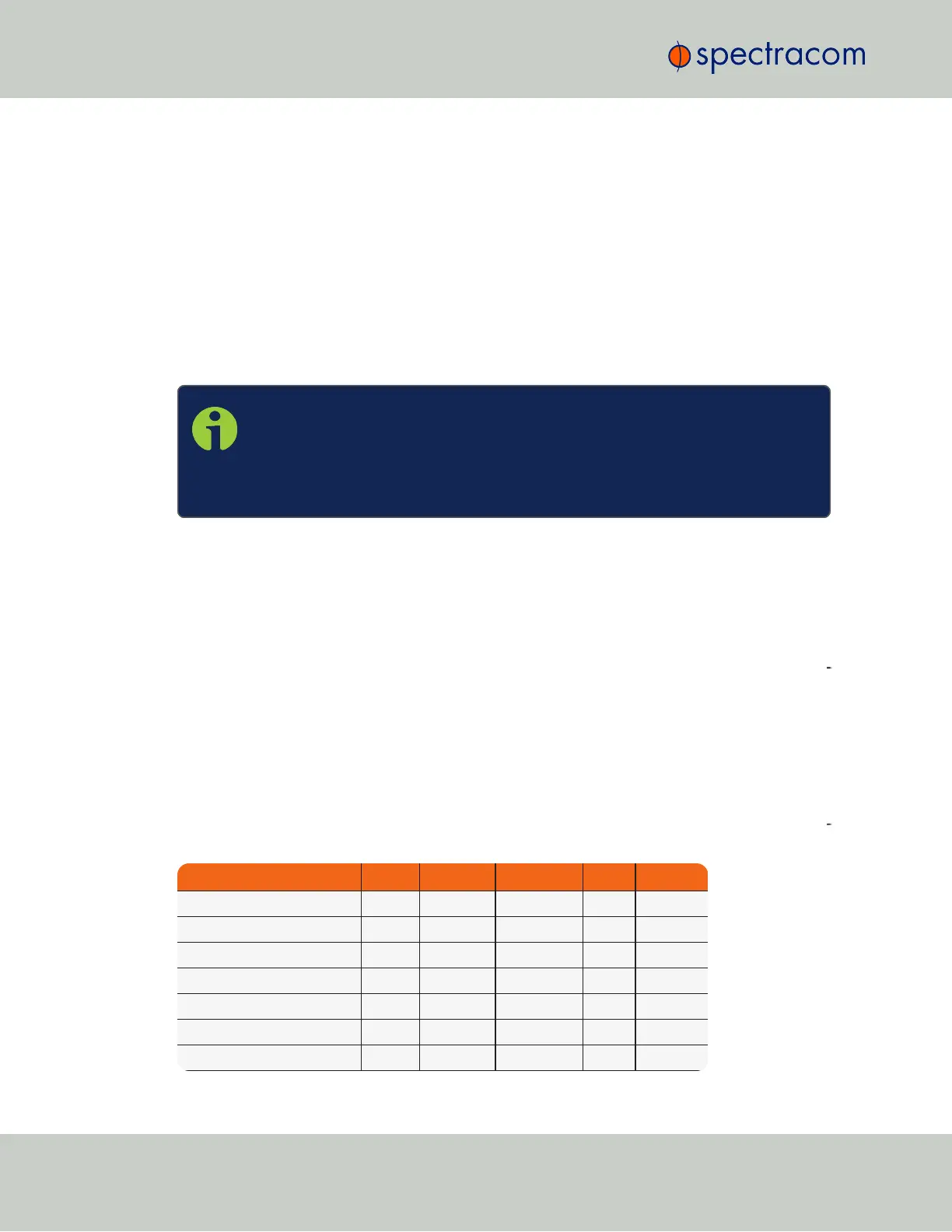
During start up and operation, the board LEDs flash in sequence to indicate different oper
ational states.The patterns are as follows:
State Sync Alarm Holdover 1PPS Manual
Power-On On Off Off N/A N/A
Self-Test On On On N/A N/A
Waiting for Host Blink Blink Off N/A N/A
Download from Host Strobe Strobe Strobe N/A N/A
Initialize Off Off Off – Off
Never Synchronized Off Off Off – N/A
Synchronized On Off Off – N/A
24
CHAPTER 5 • Instruction Manual XYZ Rev. R
5.3 Status LEDs



 To Next Page