Spectralink PIVOT Smartphone Quick Barcode Connector Administration Guide
721-0045-000_A.docx
February 2017 18
Setting Hotspots, Barcode, and Endpoint Type Options
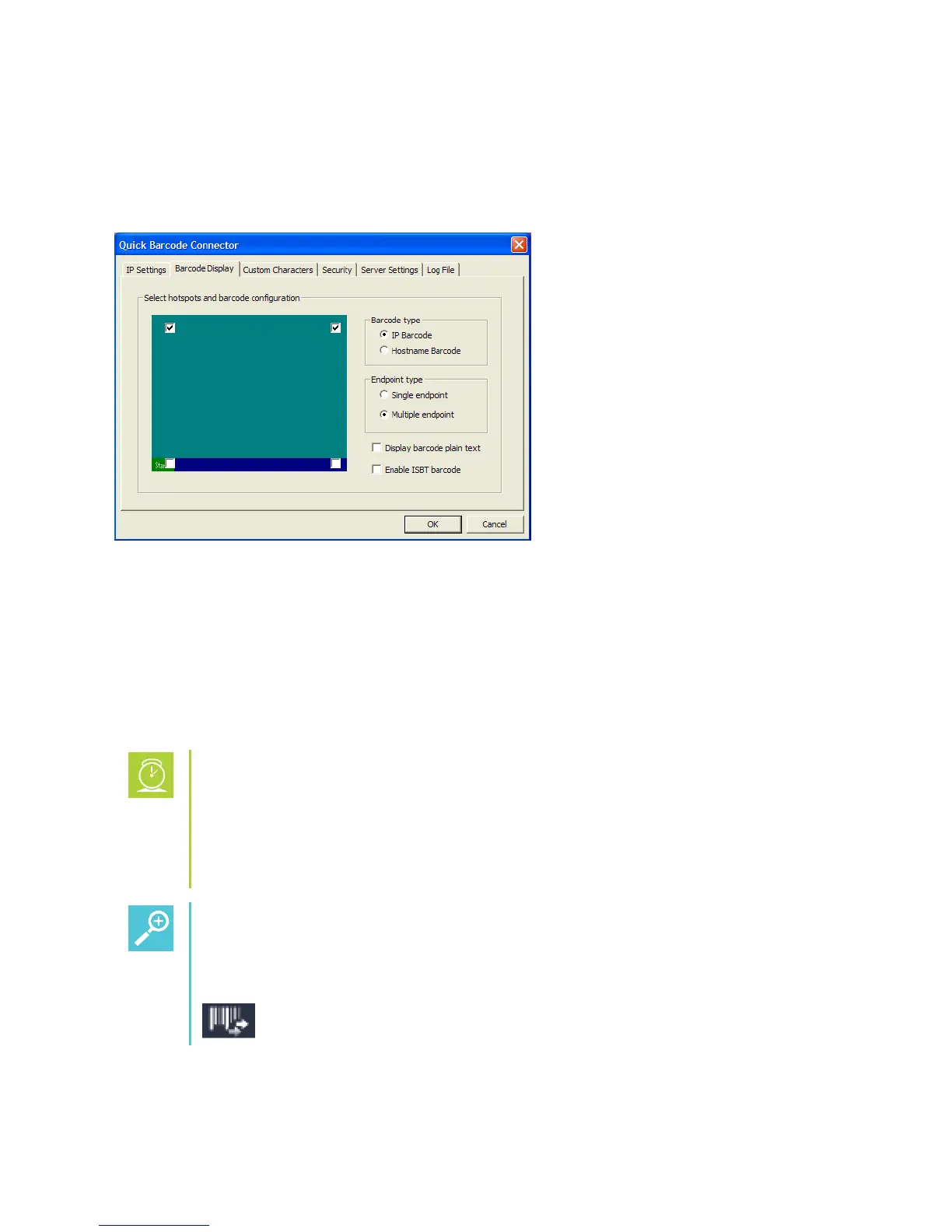
The Barcode Display tab (shown next) enables you to choose your barcode hotspots and
configuration options for multiple endpoint mode. If you select the single endpoint type, the other
options are dimmed.
In the Endpoint type area, select either single endpoint or multiple endpoint:
Select the single endpoint type if the smartphone will connect to one computer only. When
using single endpoint mode, you cannot connect your smartphone to any computer other
than the one configured in the smartphone.
Select the multiple endpoint type to enable your smartphone to transmit barcode
information to any one of multiple computers that have been configured for Spectralink
QBC operation.
Timesaver: Benefits of Multiple Endpoint Mode
Using multiple endpoint mode, you can connect and/or disconnect your
smartphone to any configured computer as needed, providing you the freedom of
unrestricted mobility. A smartphone can only be connected to one computer at any
one time.
Tip: How Do I Recognize Multiple Endpoint Mode?
While your phone is set to multiple endpoint and connected to a computer, the
following icon is displayed on the smartphone’s screen:


 To Next Page