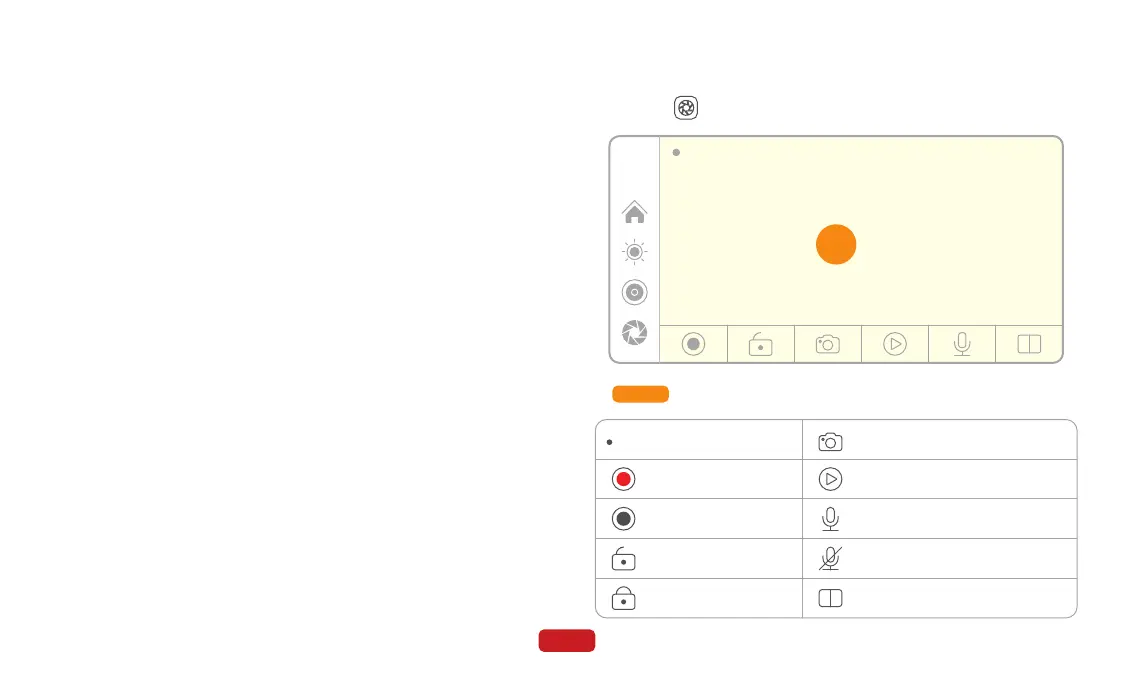
Zone A
Click on on the main screen to enter the DVR mode.
4.4 DVR
18
※ Note:
● Please make sure your phone is running on Android 11 or
above and supports 5GHz Wi-Fi and Google Play services.
● The initial connection for wireless Android Auto may take
longer, so please be patient.
● Display and settings may vary across different Android
models, so please refer to your actual situation.
● If you want to switch to Apple CarPlay, you need to disable
Bluetooth and Wi-Fi on your phone and disconnect from
Android Auto mode.
⑥ Wait for a moment, and you will enter Android Auto mode.
12:00
01:30
A
Video recording duration
Start Recording
Stop Recording
Unlock the current recording
Lock the current recording
Take a photo of the current frame
Enter playback mode
Record with audio
Record without audio
Switch between front and rear camera view
01:30



 To Next Page