① Prepare a computer and a card reader.
② Insert the TF card into the computer using the card reader.
4.9.2 Burn TF Card Upgrade
※ Note:
● Do not remove the TF card during the upgrade.
● After restarting, quickly go to "Settings" - "Format". Other-
wise, the upgrade process may repeat.
25
⑨ After restarting, quickly go to "Settings" - "Format". Otherwise,
the upgrade process may repeat.
⑩ Go to "Settings" - "Firmware Info" to check if the firmware
version has been updated.
● Preparation
① Open the computer and visit the Spedal official website's down-
load page at https://spedal.cc/html/support/download/navi-
cam.html. Download the latest firmware according to the model.
● TF card burning
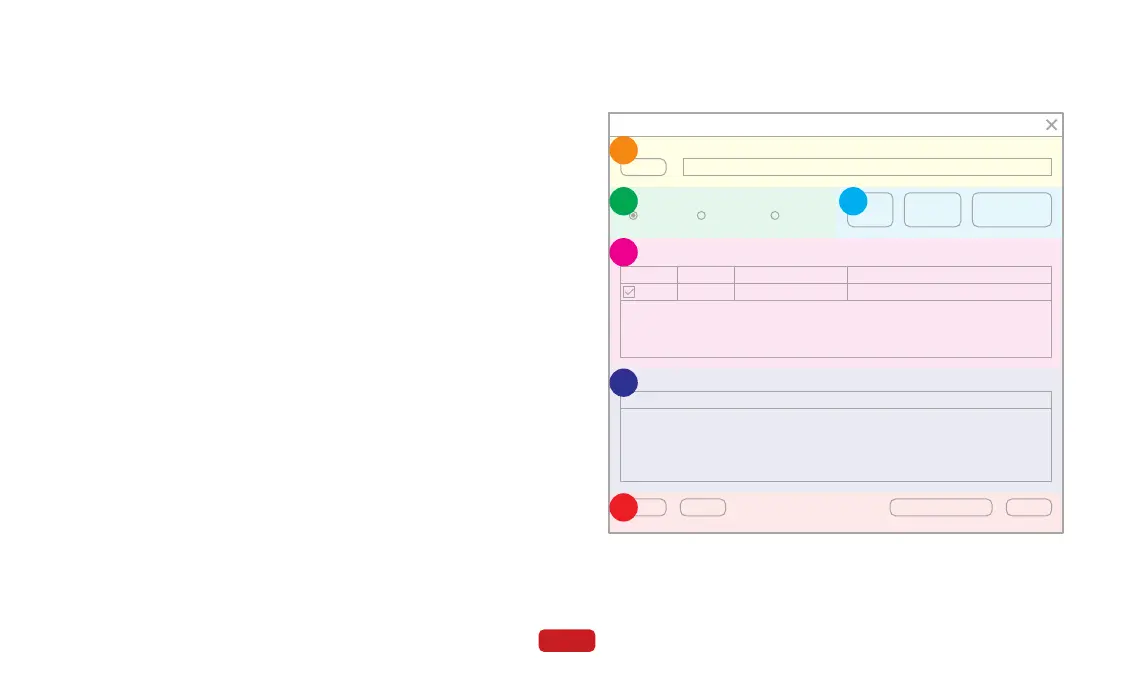
② Download the TF card burning tool, PhoenixCard, and run the
"PhoenixCard.exe" program.
PhoenixCard
Image
Clean Help Update Version Close
Burn Restore Refresh Drive
E:\firmware\*******.img
Work Type
Product Start up Key Card
Dev List(Please plug in the card you want to make)
Select
1
Drive
L
Capacity
15278M
Status
Output message
Message
A
B
C
D
E
F



 To Next Page