20
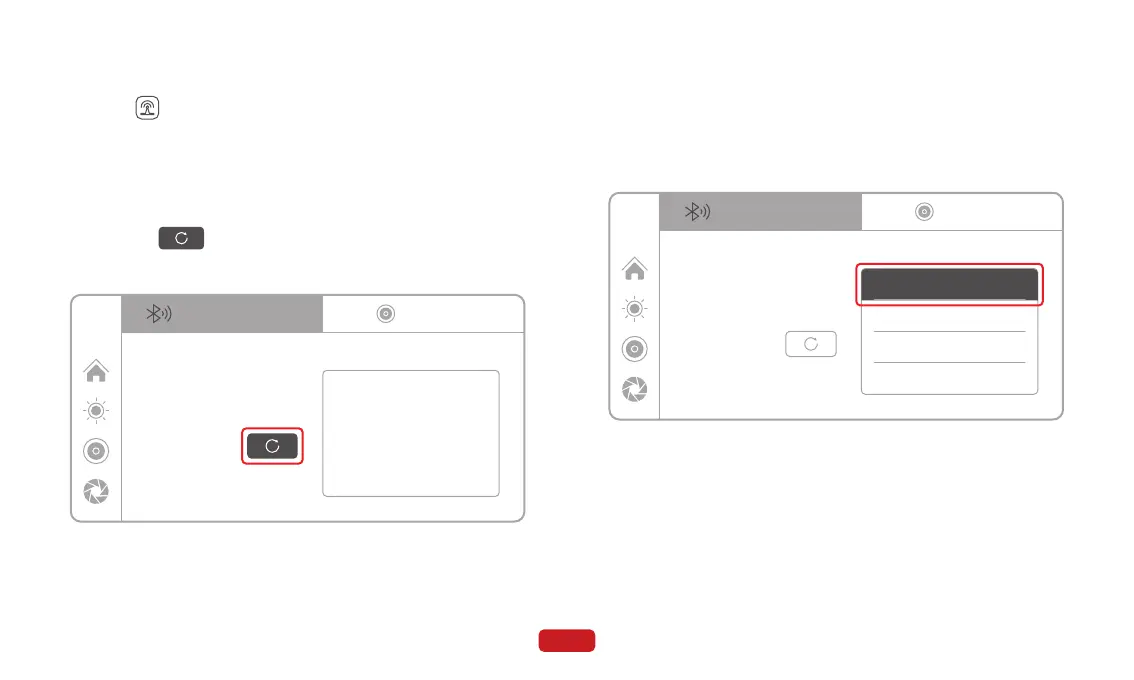
Click on on the main screen to enter the audio output mode.
4.6 Audio Output
4.6.1 Bluetooth Connection
① Turn on your Bluetooth headset and set it to discoverable mode.
② Click on and wait for the search results for Bluetooth
headsets.
③ In the "Bluetooth Headset" list, click on the name of the Bluetooth
device you want to connect to.
④ In the pop-up prompt, click on "Connect" and wait for the pairing
process between the main unit and the Bluetooth headset to
complete.
⑤ The Bluetooth headset name will display "Connected" indicating
a successful connection. Now you can play audio through the
Bluetooth headset.
12:00
BT transmitter
No devices found
Device Name:
Scan:
BTX-0B2
Bluetooth headset
AUX
12:00
BT transmitter
Device Name:
Scan:
BTX-0B2
Bluetooth headset
AUX
Sony WH-1000
Connected
Galaxy S23
JBL GO
A8:1E:DD:89:70:4F
Disconnect
Disconnect
Disconnect



 To Next Page