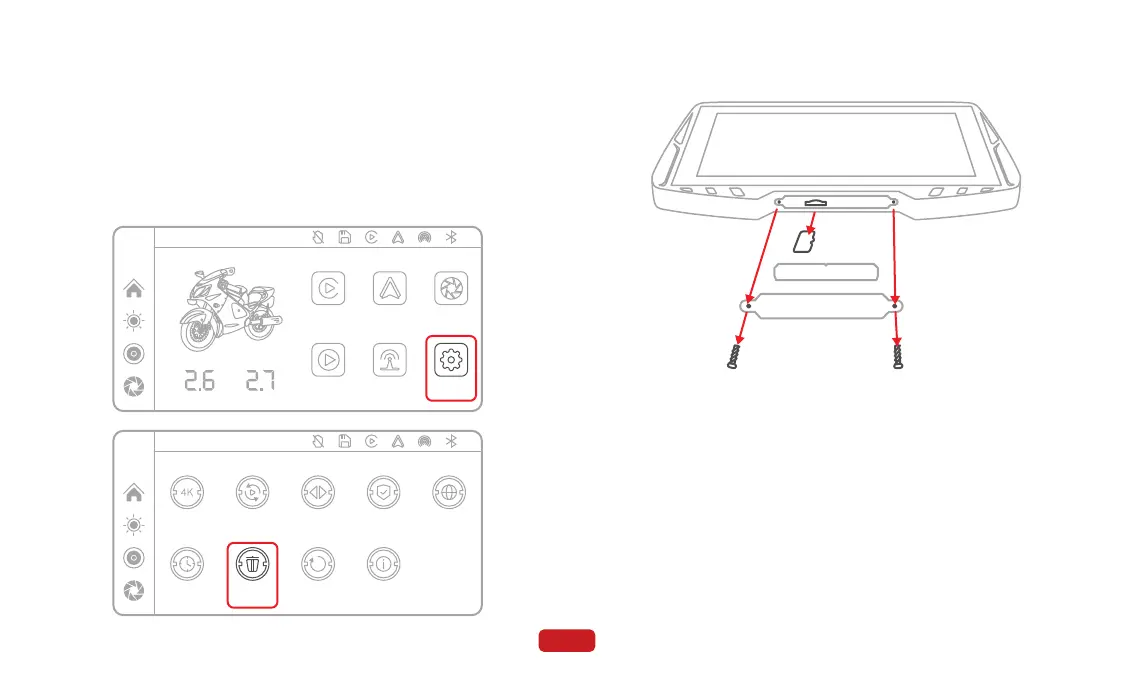
③ Power off the device and remove the TF card.
④ Open the computer and visit the Spedal official website's down-
load page at https://spedal.cc/html/support/download/navi-
cam.html. Download the latest firmware according to the model.
⑤ Copy the downloaded firmware onto the TF card.
⑥ Insert the TF card into the device and power it on.
⑦ After powering on, a dialog box "Does OTA upgrade?" will pop up.
Click "Confirm" and wait for a moment as the device starts the
upgrade process.
⑧ Once the upgrade is complete, the device will automatically
restart.
① Prepare a Windows-based computer and a card reader.
② After powering on the device, go to "Settings" - "Format" to
perform a formatting.
24
4.9 Firmware Upgrade
12:00
Audio Out
Apple CarPlay Android Auto DVR
Playback Setting
F
Bar
B
Bar
12:00
Firmware version
Image mirror Screen saverRecord resolution Split time
Language
Factory resetFormatDate & time
4.9.1 OTA Upgrade



 To Next Page