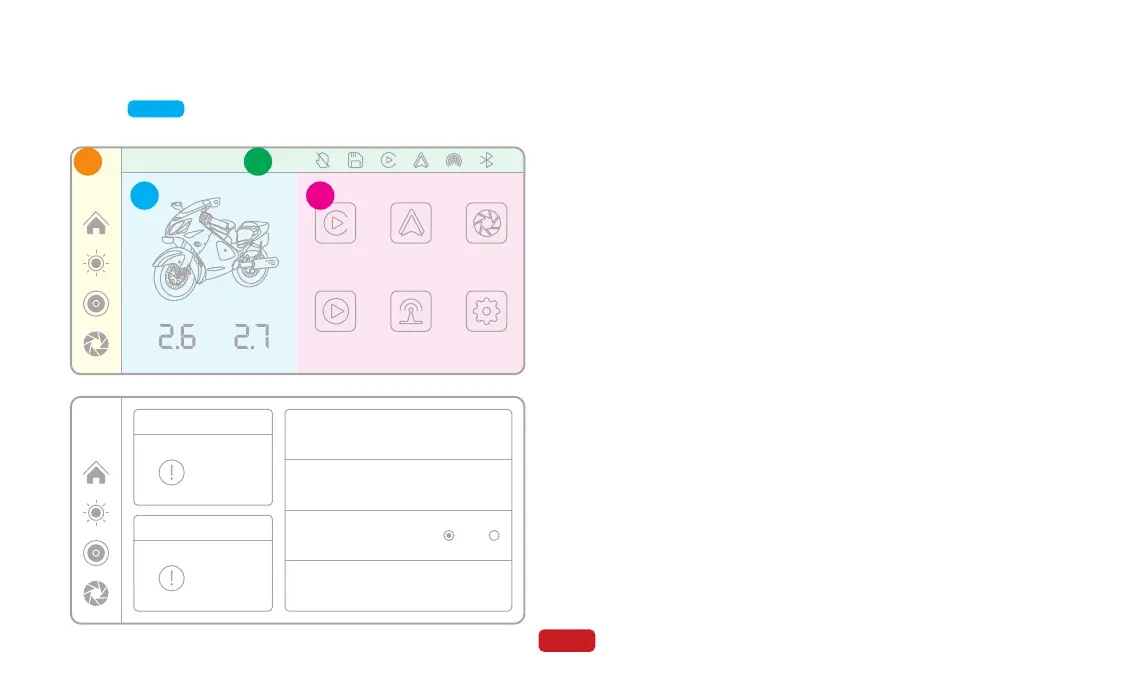
Display the front tire pressure value.
● TPMS 1
Display the rear tire pressure value.
● TPMS 2
Set the low-pressure alarm value, which will trigger a warning when
the pressure falls below the set value. The range can be set from 0.6 to
3.0. The default value is 1.6.
● Low pressure alarm value
Set the high-pressure alarm value, which will trigger a warning when
the pressure exceeds the set value. The range can be set from 1.2 to
5.0. The default value is 3.2.
● High pressure alarm value
Set the unit of tire pressure. You can choose between Bar or Psi. The
default unit is Bar.
● Tyre pressure unit
Bind tire pressure sensors. You can bind the sensors to the front tires,
bind them to the rear tires, or unbind all bindings.
● Binding sensor
12:00
Audio Out
Apple CarPlay Android Auto DVR
Playback Setting
F
Bar
B
Bar
A B
C D
23
Click on Zone C on the main screen to enter the Tire Pressure Moni-
toring Settings mode.
4.8 Tire Pressure Monitoring Settings
12:00
Low pressure alarm value
High pressure alarm value
Tyre pressure unit
Binding sensor
1.6 >
3.2 >
Bar Psi
>
TPMS 1
Unbound
TPMS 2
Unbound



 To Next Page