EasyManua.ls Logo

SphygmoCor XCEL - Calibration Software Installation; Computer Requirements; Installation Guide

SphygmoCor XCEL
50 pages
Print Icon
To Next Page IconTo Next Page
To Previous Page IconTo Previous Page
Loading...
Page 22
Installation of the SphygmoCor XCEL Calibration Software
Minimum computer requirements to install the XCEL Calibration Software
Type
IBM Compatible PC
Processor
Intel or compatible
Nominal Speed
2GHz minimum
Memory
1GB RAM minimum
Hard Disk
2GB for Installation
Accessories
DVD drive
Printer Drivers
Standard
Communications
USB port
Operating Systems
Windows 7 Professional (32 and 64 bits)
Windows 8 Professional (32 and 64 bits)
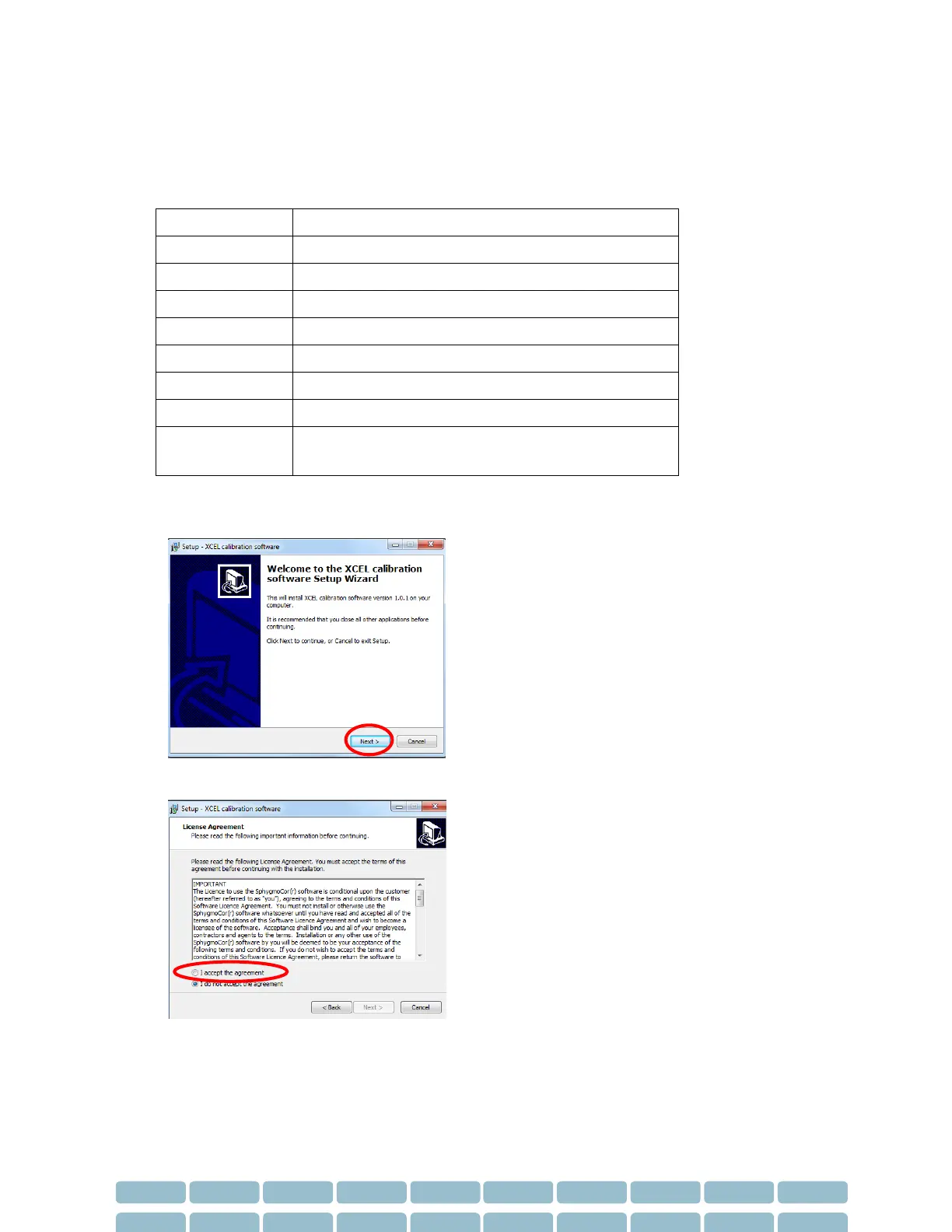
1- Insert the installation disk into the CD / DVD Drive and run setup.exe
2- Click Next
3- Select “I accept the agreement” if you agree with the terms and conditions.