Page 45
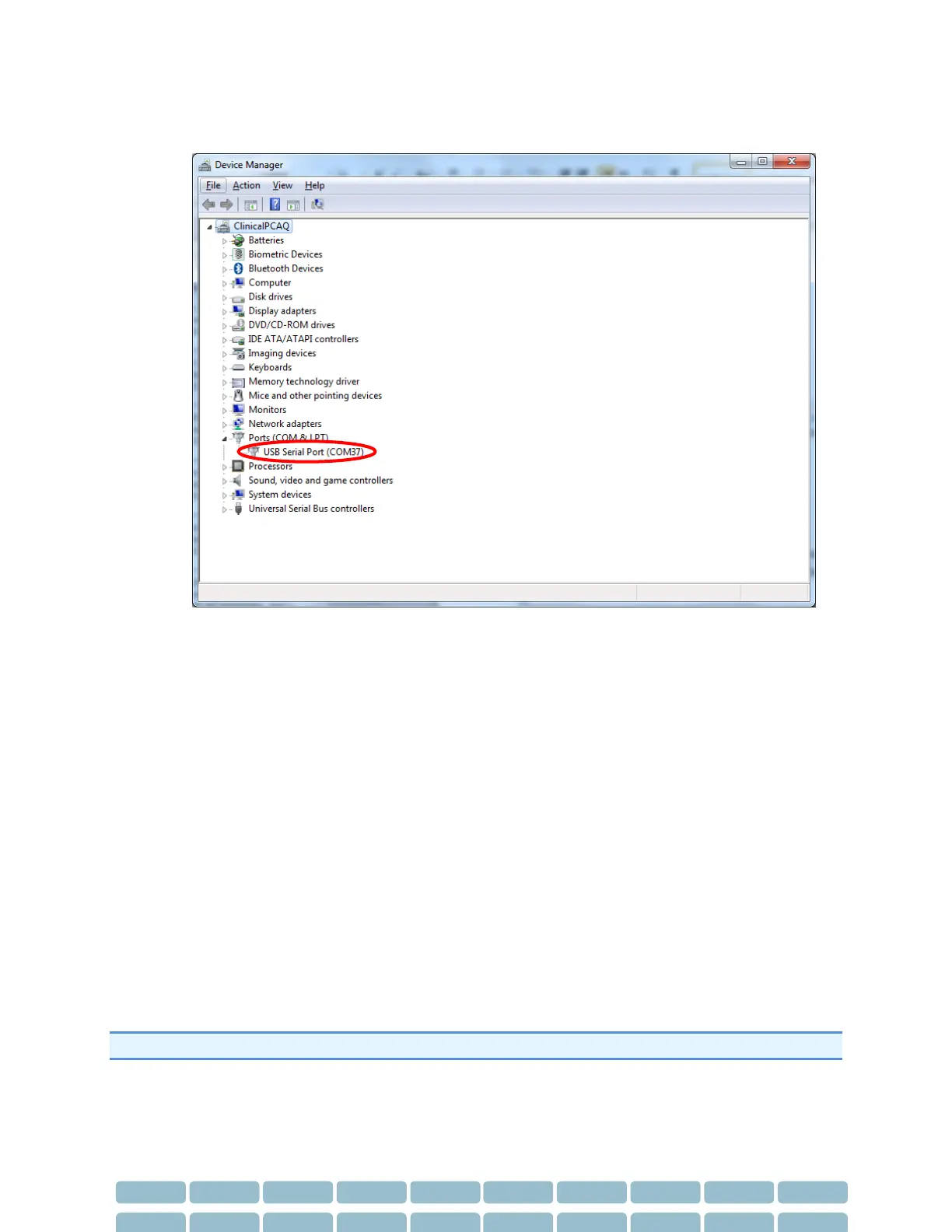
4- Expand the PORTS (COM & LPT) section.
5- The SphygmoCor XCEL will appear as ‘USB Serial Port’ and the COM Port number will be
displayed next to ‘USB Serial Port (COM##)’.
6- In the Calibration Kit software you will need to select the Com Port number (COM##) from the
drop down list.
Restarting the Calibration Procedure
If calibration is not completed successfully, before restarting the calibration procedure, ensure the
following:
1. That the Aneroid Sphygmomanometer or manometer that will be used to calibrate the
SphygmoCor XCEL has been recently calibrated.
2. That the SphygmoCor XCEL Calibration software has been closed.
3. That the SphygmoCor XCEL device has been turned OFF/ON, and the USB cable has been
connected to your computer.
4. That the tonometer or Calibration Kit dongle has been connected to the SphygmoCor XCEL
device.
5. That the calibration kit pneumatic components have been connected to the cuff hose and the
Sphygmomanometer or manometer.
6. That the cuff hose has been disconnected from the SphygmoCor XCEL device.
Note: If the restart calibration is not successful, please contact AtCor Medical for technical support.


 To Next Page