USING THE RADIO FREQUENCY IDENTIFICATION DEVICES (RFID)
Press the Reset Buon (3) located inside the
case. Two “beeps” will sound (if the sound
is turned on) and panel will flash blue twice.
You will have 5 seconds to begin
programming a RFID device or you will have
to start over.
If you do not program the RFID device (card,
fob or scker), the RFID, Red light will flash
and beep 3 mes.
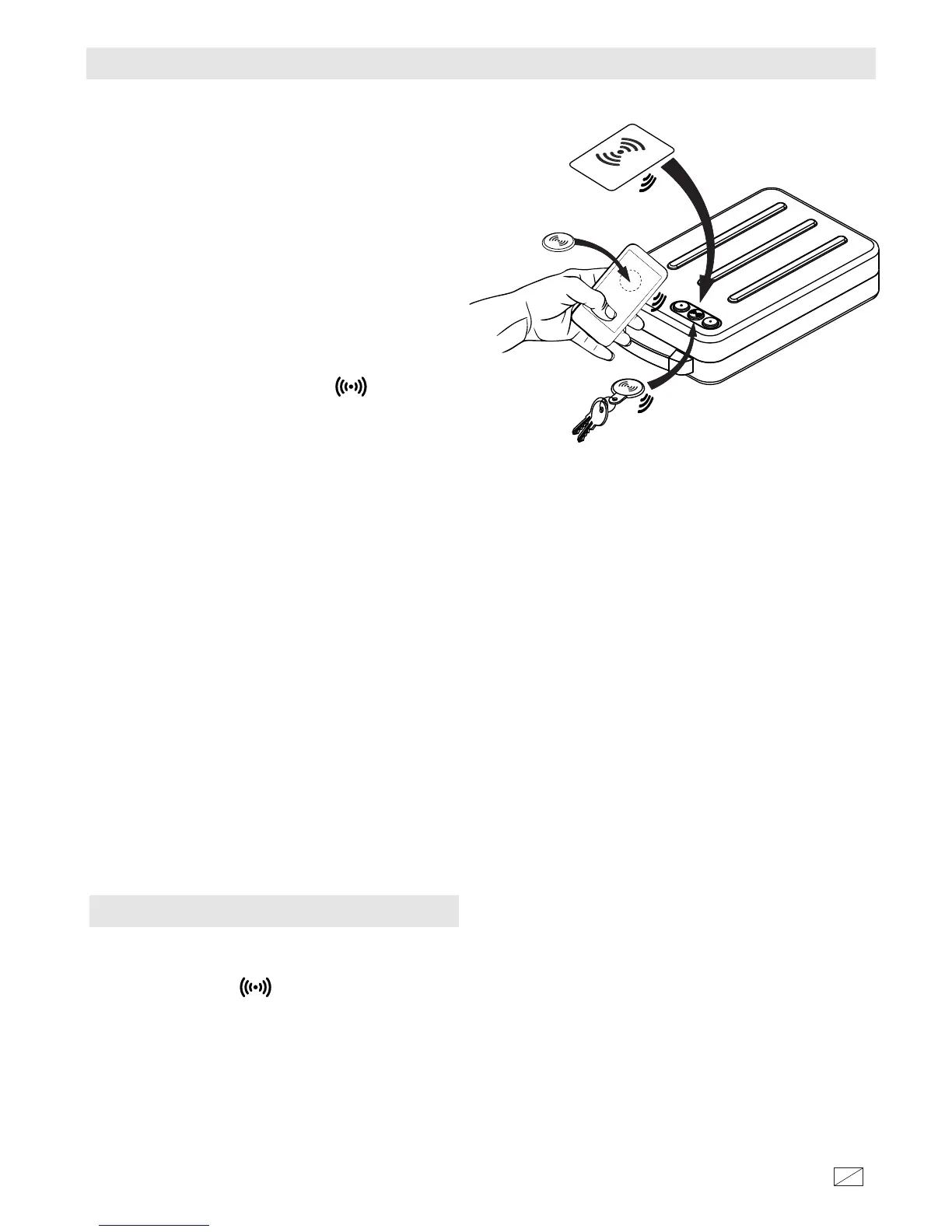
Center and place your access card, key fob,
or scker on the RFID buon as shown
in FIGURE 1.
Two “beeps” will sound (if the sound is
turned on) and panel will flash green twice if
the device is recorded.
Press the reset buon to confirm recorded
devices. Four “beeps” will sound (if the
sound is turned on) and panel will flash blue
four mes if device is recorded. Repeat
above steps to record addional RFID
devices.
NOTE: Recording RFID devices does not
replace or remove other prerecorded
devices, or combinaons.
Only 5 RFID devices can be recorded.
If an aempt is made to record a 6th device
the case will beep 3 mes and the red light
will flash 3 mes.
OPENING THE CASE USING RFID
If an invalid RFID device is scanned 3 mes
the case will beep 5 mes (if the sound is
turned on) and the red light will flash 5
mes resulng in the case being
automacally locked out for 60 seconds
before you can scan your device again.
The case will beep one me (if the sound is
turned on) and the green light will flash
once when the lockout period is over.
If an invalid RFID device is scanned 1
addional me, the case will beep 5 mes
(if the sound is turned on) and the red light
will flash 5 mes resulng in the case being
automacally locked out for 5 minutes
before the the scan can be tried again. The
case will beep one me (if the sound is
turned on) and the green light will flash
once when the lockout period is over.
The case may sll be opened using the
supplied Key to override failed RFID scans.
To close the case, push the lid closed
unl locked.
FIGURE 1




 To Next Page