EasyManua.ls Logo

Stanley PB2500 - User Manual

Stanley PB2500
36 pages
Print Icon
To Next Page IconTo Next Page
Loading...
Smart Touch Screen
Instruction Manual
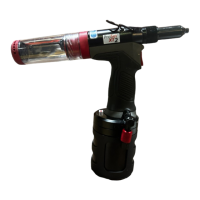
PB2500 Smart Blind rivet tool
Battery Power Tool

Other manuals for Stanley PB2500

Questions and Answers

  • S
    Shirley GambleAug 20, 2025
    What to do if my Stanley Rivet Tool does not operate when the switch is pressed?
    • C
      Christine FlemingAug 20, 2025
      If your Stanley Rivet Tool doesn't operate when the switch is pressed, there could be several reasons: * The battery might be defective (replace the battery). * The battery might not be fully charged (charge the battery). * The battery might not be fully seated (remove and re-insert the battery, then reset the tool). * The battery pack may have reached its operating temperature limit (remove the battery and allow it to cool, then remount it and reset the tool). * The screen may not be showing the counter display (switch to the counter display). * An error message might be showing (reset the error). * The screen might be frozen (remove the battery, wait 5 seconds, and reinsert it). * There might be an issue with the Trigger Module (replace it).
  • Z
    Zachary AdamsAug 22, 2025
    Why does the rivet stem not break when using my Stanley PB2500?
    • J
      Joshua JonesAug 22, 2025
      If the rivet stem doesn't break when using your Stanley Rivet Tools, it could be due to the following reasons: * The battery voltage might be low, so charge the battery. * The setting load of the rivet might be beyond the tool's capacity. In this case, reset the tool to home, remove the rivet, and use an appropriate tool to set the rivet. * The nose equipment might be incorrect for the rivet. Refer to the Accessories Manual to select and install the correct nose equipment. * The nose equipment and stem collector might be full of stems. Empty the stem collector and check the nose equipment for damage before reusing.
  • M
    Marie SimmonsAug 25, 2025
    How to fix a Stanley Rivet Tool that will not grip the stem of the rivet?
    • B
      brandon03Aug 25, 2025
      If your Stanley Rivet Tool won't grip the stem of the rivet, consider the following: * There might be a buildup of debris inside the nose equipment. You should service and clean the Nose Assembly. * The jaws might be worn or broken. Fit new jaws. * The jaw guide might be loose. Tighten the jaw guide against the pulling head. * The spring might be weak or broken. Fit a new spring. * The nose piece might be incorrect for the rivet. Refer to the Accessories Manual and install the correct nose piece. * The nose equipment might be incorrect for the rivet. Refer to the Accessories Manual and install the correct nose equipment.
  • I
    ijuarezAug 26, 2025
    What to do if Stanley Rivet Tool stops before rivet is fully set?
    • K
      Kelly RossAug 26, 2025
      If your Stanley Rivet Tool stops before the rivet is fully set, the following could be the reasons: * The battery pack may have reached its operating temperature limit. Remove the battery and allow it to cool, then mount the battery and reset the tool to home. * The nosepiece selection may be improper. Reset the tool to home, remove the rivet, and fit the proper nose piece. * The setting load of the rivet might be beyond the tool's capacity. Reset the tool to home, remove the rivet, and use an appropriate tool to set the rivet.
  • V
    vnavarroAug 28, 2025
    Why does my Stanley PB2500 need more than one trigger pull to place a rivet?
    • J
      James HarrisAug 28, 2025
      If more than one trigger operation is needed to place a rivet with your Stanley Rivet Tools, it could be due to: * A buildup of debris inside the nose equipment. Service and clean the Nose Assembly. * Worn or broken jaws. Fit new jaws. * Using an improper rivet for the application grip thickness. Review the application details and verify the fastener requirement. * The jaw guide or pulling head adapter not being seated correctly. Correctly assemble the affected parts.
  • A
    afoxAug 30, 2025
    What to do if Jaws will not release broken stem of rivet in Stanley Rivet Tools?
    • C
      Catherine Garcia DDSAug 30, 2025
      If the jaws of your Stanley Rivet Tools will not release the broken stem of the rivet, it might be due to: * A buildup of debris inside the nose equipment. You should service and clean the Nose Assembly. * A weak or broken spring. Fit a new spring. * The Jaw Guide, Nose Piece, or Nose Housing not seated correctly. Correctly assemble the affected parts.
  • A
    Anne WilliamsSep 1, 2025
    Why Stanley Rivet Tool does not return to initial position when switch is released?
    • L
      Leslie MckenzieSep 1, 2025
      If your Stanley Rivet Tool does not return to its initial position when the switch is released, it may be due to: * An electrical malfunction. Remove the battery, wait 5 seconds, and reinsert it. Then, reset the tool to home. * A stuck spindle clutch. Clean the spindle clutch and spindle to ensure smooth operation.
  • M
    Micheal MyersSep 2, 2025
    How to fix Stanley Rivet Tools when I cannot insert a rivet?
    • L
      lkellySep 3, 2025
      If you cannot insert a rivet into your Stanley Rivet Tools, it might be because of: * An incorrect nose piece for the rivet. Refer to the Accessories Manual and select and install the correct nose piece. * Broken rivet stems jammed in the nose equipment. Service and clean the Nose Assembly. * Broken rivet stems jammed in the pulling head assembly. Empty the stem collector and clear the Pulling Head Assembly. * Debris in the nose piece. Service and clean the Nose Assembly.
  • J
    jeremy30Sep 5, 2025
    Why won't my Stanley Power Tool turn on?
    • S
      Sheila SimpsonSep 5, 2025
      If your Stanley Power Tool does not turn on, there are several potential causes. First, ensure the battery is fully seated by removing and re-inserting it, then reset the tool. If that doesn't work, the battery may not be fully charged, so charge it. The battery could also be defective, requiring a replacement. Finally, the battery pack may have reached its operating temperature limit; remove it and allow it to cool before re-inserting and resetting the tool.
  • A
    Andrew FloydSep 7, 2025
    How to fix Stanley Power Tool when screen freezes in Stanley Engineered Fastening Logo?
    • G
      Gregory AlvarezSep 7, 2025
      If the screen of your Stanley Power Tool freezes on the Stanley Engineered Fastening Logo, it could be due to several reasons. A data reading failure may be the cause; to resolve this, remove and re-insert the battery, then press the trigger to turn on the tool. If the smart screen is defective, contact a local service center. A defective trigger module may also be the cause, requiring replacement of the motor and module assembly. Lastly, broken setting data can cause this issue, which can be resolved by restoring the tool to factory settings.

Summary

Safety Definitions

General Safety

Read all safety warnings and instructions. Failure to follow may result in electric shock, fire, or serious injury.

Battery Charger Safety

Important Safety Instructions for Battery Chargers

Contains important safety and operating instructions for compatible battery chargers.

Battery Pack Safety

Important Safety Instructions for Battery Packs

Read all instructions before using the battery pack and charger.

Lithium-ion Battery Safety

Specific Safety Instructions for Lithium-ion

Do not incinerate or expose lithium-ion battery packs to fire or extreme heat.

Residual Risks

Identifies residual risks such as hearing impairment and burn hazards.

Labels and Icons

Explains markings on the tool, charger, and battery pack.

Product Overview

Outline

Describes the PB2500 Smart Battery Power Rivet Tool and its features.

Precautions for Use

Lists important precautions and limitations for operating the tool.

Tool Components

Parts Names

Identifies the various parts and screens of the tool.

Tool Operation and Setup

Power On

Instructions on how to turn on the tool.

Selecting a Counter

Guide to selecting and using different counter types.

Counter Configuration

ON;OFF Counters

Instructions for turning specific counters on or off.

Setting Counter Values

Procedure for setting specific counter values with password protection.

ON;OFF Smart Function

Enables/disables assessment functions and process curve collection.

Setting Assessment Criteria (Average Mode)

Configures assessment criteria for rivets using average mode.

Setting Assessment Criteria (Free Setting Mode)

Configures assessment criteria for rivets using free setting mode.

ON;OFF Auto Return Mode

Enables/disables the tool's auto return function.

Setting Date and Time

Instructions for setting the tool's date and time.

System Settings

Changing Password

Procedure to change the tool's access password.

Gyro Function

Indicates the availability status of the gyro function.

Wi-Fi Function

Indicates the availability status of the Wi-Fi function.

Bluetooth (BLE) Function

Indicates the availability status of the Bluetooth function.

Tool Information and Settings

Serial Number and Software Versions

Displays tool's serial number and software version details.

ON;OFF LED Light

Instructions for turning the LED indicator light on or off.

Data Analysis and Review

Checking Rivet Curve and Assessment Result

View the last riveting process curve and assessment results.

OK;NOK Assessment and Counter Operation

Explains how OK/NOK results are displayed and counter behavior.

Data Management

Reset Counter Values

How to reset counter values before reaching the set limit.

Extracting the Data

Procedure to extract stored data via USB connection.

Deleting the Data

Instructions for deleting stored data from the tool's memory.

Tool Status and Alerts

Battery Level and Alarm

Information on viewing battery level and charge alarms.

Tool Maintenance

Restoring to Factory Settings

Steps to restore the tool to its default factory settings.

Troubleshooting

Troubleshooting Guide

Common symptoms, causes, and remedies for tool issues.

Stanley PB2500 Specifications

General IconGeneral
BrandStanley
ModelPB2500
CategoryRivet Tools
LanguageEnglish

Related product manuals